1. In the Main menu, select Humidification Settings.
2. Select Humidifier Setting and set the level of humidification. 1 is the lowest level 5 is
the highest level.
3. Select Humidifier and set it to On.
4. The humidifier is now activated and will start to operate when the treatment starts.
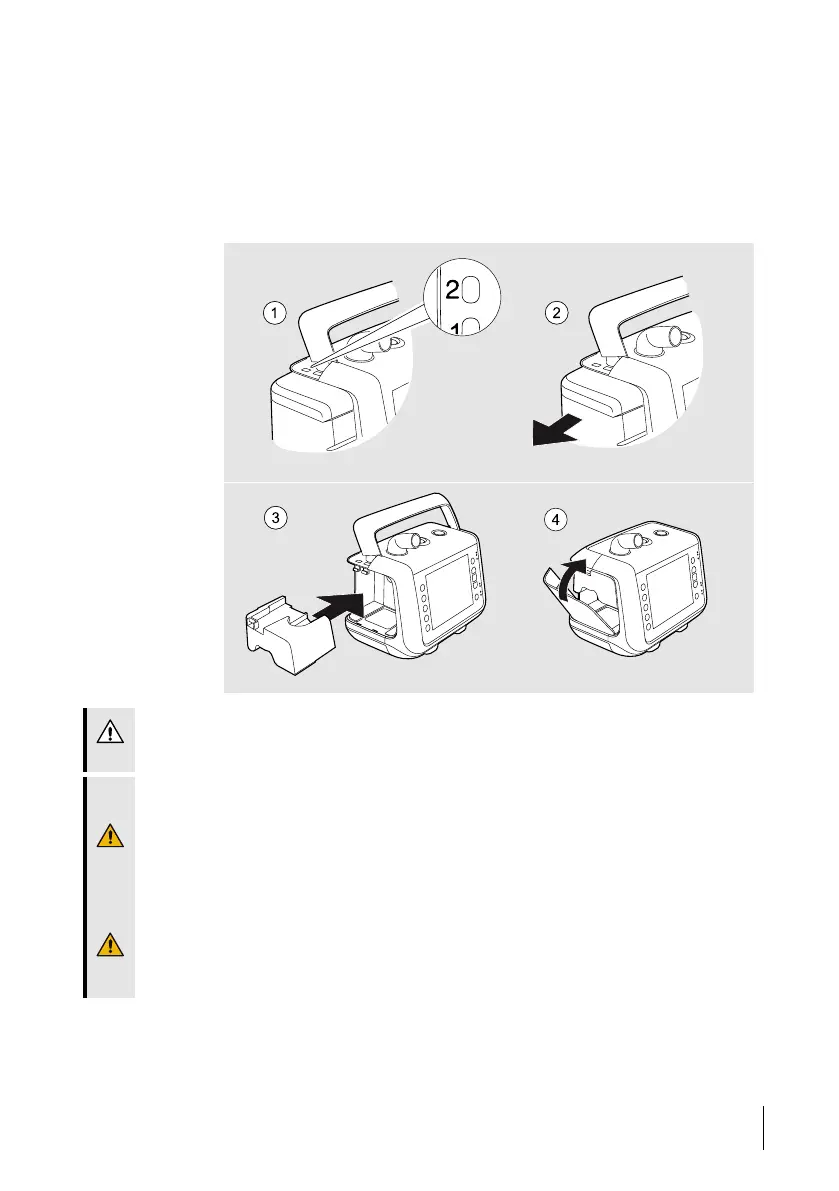
5.12.9.4 Detaching the Water Chamber
CAUTION!
Always insert the air bypass unit after disconnecting the water chamber.
WARNING!
Always stop treatment before detaching or attaching the water chamber.
Make sure the Nippy 4 with the attached water chamber is placed lower than the patient
and on a flat surface. This is to prevent personal injury from accidental spillage or from
excess water or condensation flowing down the patient tube and into the patient’s
interface.
Never add or pour out water from the water chamber when it is attached to the
ventilator.
If there is water outside of the water chamber after filling, dry it using a lint-free cloth
before reconnecting it to the ventilator.
How to Use the Nippy 4
75
Doc. 006553 M-6 User Manual



 To Next Page