EasyManua.ls Logo

Brother BAS-600 - Page 76

Brother BAS-600
118 pages
Print Icon
To Next Page IconTo Next Page
To Previous Page IconTo Previous Page
Loading...
(4)
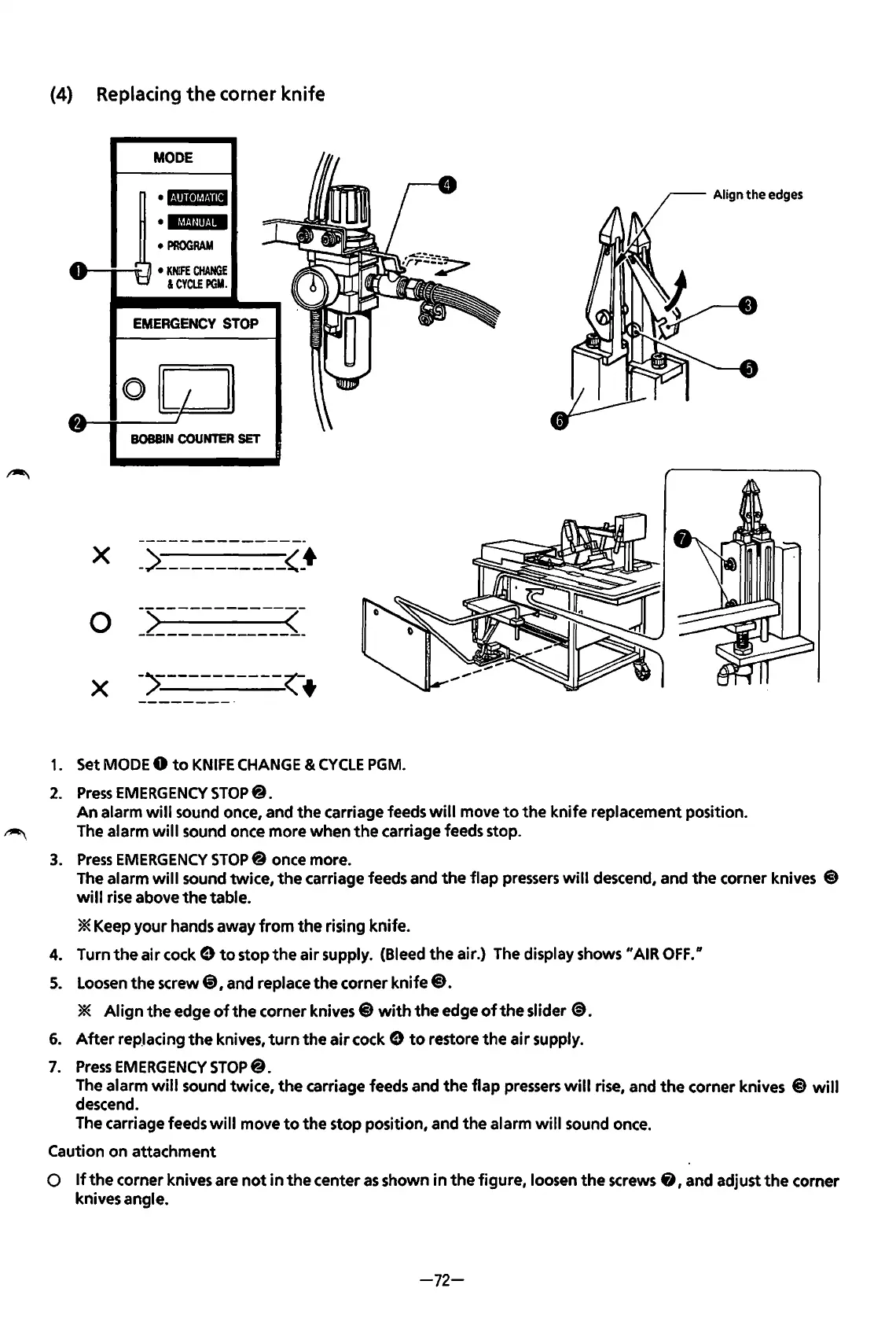
Replacing the corner knife
MODE
·•·mi•IMilli
l"'(.nilt.jM
PROGRAM
KNIFE
CHANGE
&CYCLEPGM.
EMERGENCY
STOP
BOBBIN
COUNTER
SET
X
_)l
__________
(,
1.
Set MODE 0
to
KNIFE
CHANGE
&
CYCLE
PGM.
2.
Press
EMERGENCY
STOP@.
Align
the
edges
An
alarm
will
sound once, and
the
carriage feeds
will
move
to
the
knife
replacement position.
~
The alarm
will
sound once more
when
the
carriage feeds stop.
3.
Press
EMERGENCY
STOP@
once more.
The alarm
will
sound twice,
the
carriage feeds and
the
flap
pressers
will
descend, and
the
corner knives
@)
will
rise above
the
table.
*Keep
your
hands away
from
the
rising knife.
4. Turn
the
air
cock e
to
stop
the
air supply. {Bleed
the
air.) The display shows
II
AIR
OFF.
II
5.
Loosen
the
screw
CD,
and replace
the
corner
knife
@).
*
Align
the
edge
of
the
corner knives@)
with
the
edge
of
the
slider (f).
6.
After
rep.lacing
the
knives,
turn
the
air
cock 9
to
restore
the
air
supply.
7.
Press
EMERGENCY
STOP@.
The alarm
will
sound
twice,
the
carriage feeds and
the
flap
pressers
will
rise, and
the
corner knives @
will
descend.
The carriage feeds
will
move
to
the
stop position, and
the
alarm
will
sound once.
Caution
on
attachment
0
If
the
corner knives are
not
in
the
center
as
shown
in
the
figure, loosen
the
screws & , and adjust
the
corner
knives angle.
-72-
From the library of: Superior Sewing Machine & Supply LLC

Table of Contents

Related product manuals