6-31 Confidential
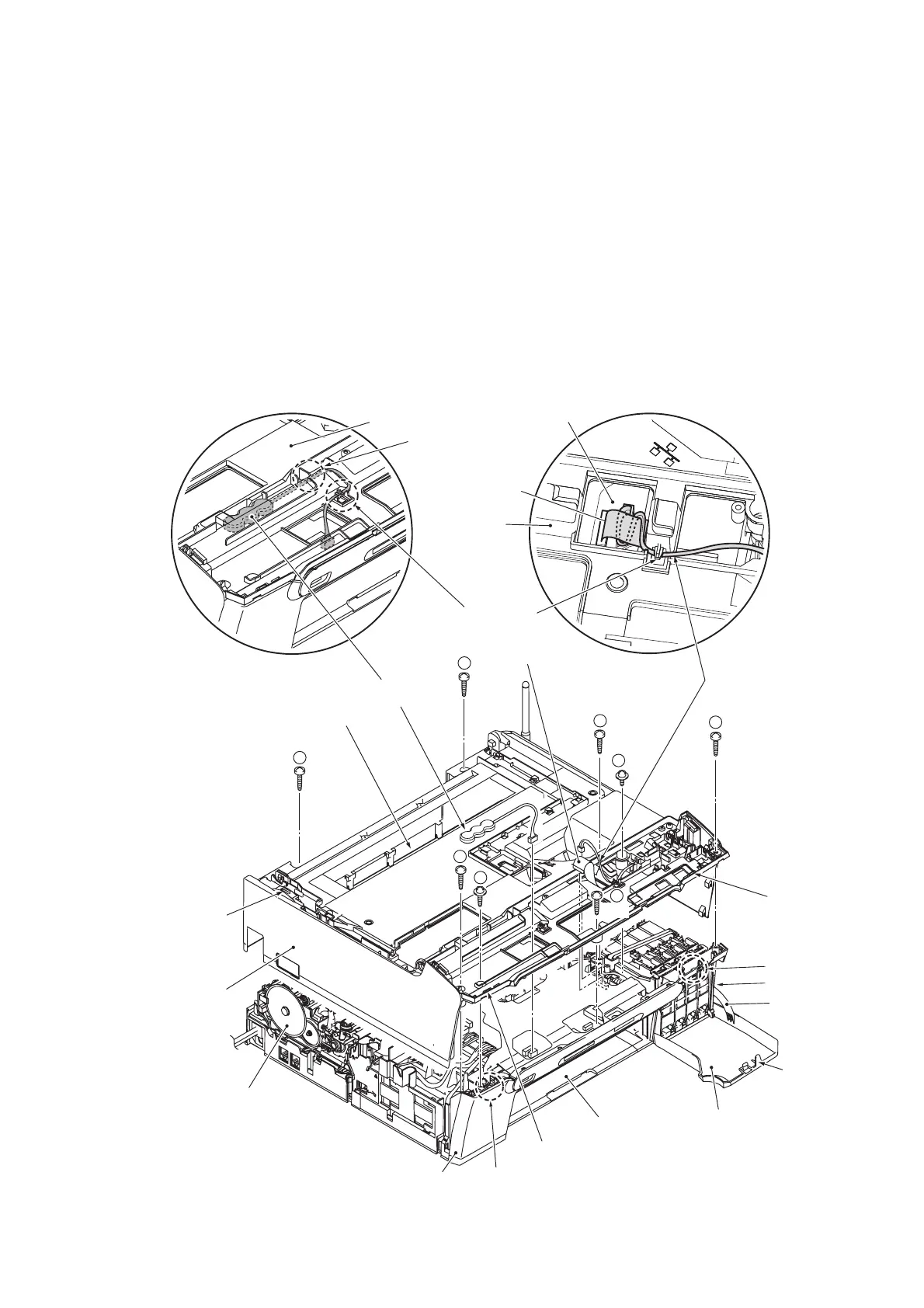
6.1.8 Backup Battery (for models with backup battery) and Upper Cover
NOTE: Make sure that the jam clear cover has been removed.
(1) Disconnect the battery harness from the main PCB and remove the backup battery from the
upper cover.
(2) Disconnect the cordless flat cable* and speaker harness from the main PCB.
(3) Open the ink cartridge cover.
(4) Remove the seven screws (six "a" and one "b" screws) (for models with cordless handset, eight
screws including one "c" screw) from the upper cover.
(5) Insert the tip of a small flat screwdriver into the two openings provided in the front end of the
upper cover, release the upper cover from the bosses on the lower cover, and lift it up.
NOTE: Do not put your hands in the opening above the platen (shown below). Doing so may
damage or stain the CR encoder strip inside.
* For models with cordless handset
(6_30_J)
1
2
8
3
6
5
4
Peep hole
Upper cover
Front cover
Boss
Lower cover
Opening
Ink cartridge cover
Boss
Opening
Actuator
lever
Rib
Cover arm
PF encoder disk
Upper cover
Cordless flat cable*
Cable guide
Cordless flat cable*
Backup battery
Cable guide
Upper cover
Speaker harness
Main PCB
7
"b"
"a"
"a"
"a"
"a"
"a"
"c"*
"a"
Opening above the platen
"a": Taptite, bind B M4x12
"b": Taptite, cup B M3x10
"c"*: Taptite, cup S M3x6
Tighten seven (eight*)
screws in the order of
to ( to *).



 To Next Page