7-6 Confidential
7.2 IF YOU REPLACE THE HEAD/CARRIAGE UNIT
OR ENGINE UNIT
[ 1 ] Update the head property information stored in the EEPROM on the main PCB
(1) Make sure that the machine's power cord is unplugged from an electrical outlet.
If the machine is connected to a PC, unplug the USB cable.
(2) Switch on the PC.
(3) Plug the machine's power cord into an electrical outlet.
(4) Press the Menu and Black Start (Mono Start) keys. Next press the
key four times to make
the machine enter the maintenance mode.
TIP: FAX models equipped with a numerical keypad can enter the maintenance mode in the
same way as conventional models; that is, by pressing the Menu, *, 2, 8, 6 and 4 keys in this
sequence.
The machine beeps for approx. one second and displays "
" on the
LCD, indicating that it is placed in the initial stage of the maintenance mode, a mode in which
the machine is ready to accept entry from the keys.
(5) Connect the machine to the PC using a USB cable.
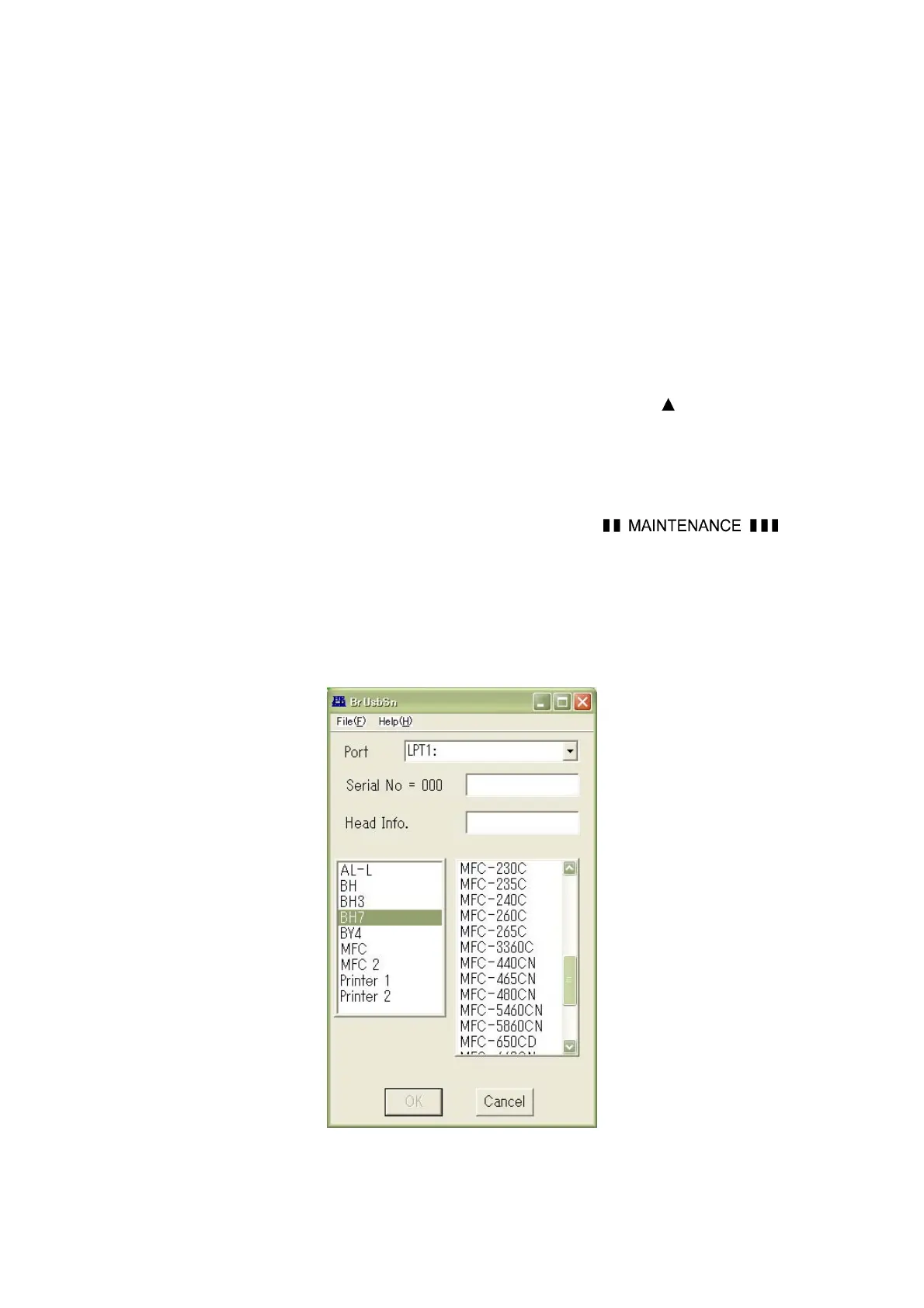
(6) On the PC, run the ID/head property setup utility (brusbsn.exe) in the folder created. The
following window appears.
(7) On the model menu, click BH7.



 To Next Page