78 I-Modell - 11/12 - Ausgabe 09/11 - 2096165 - BUE-0056-05EN
Living
6
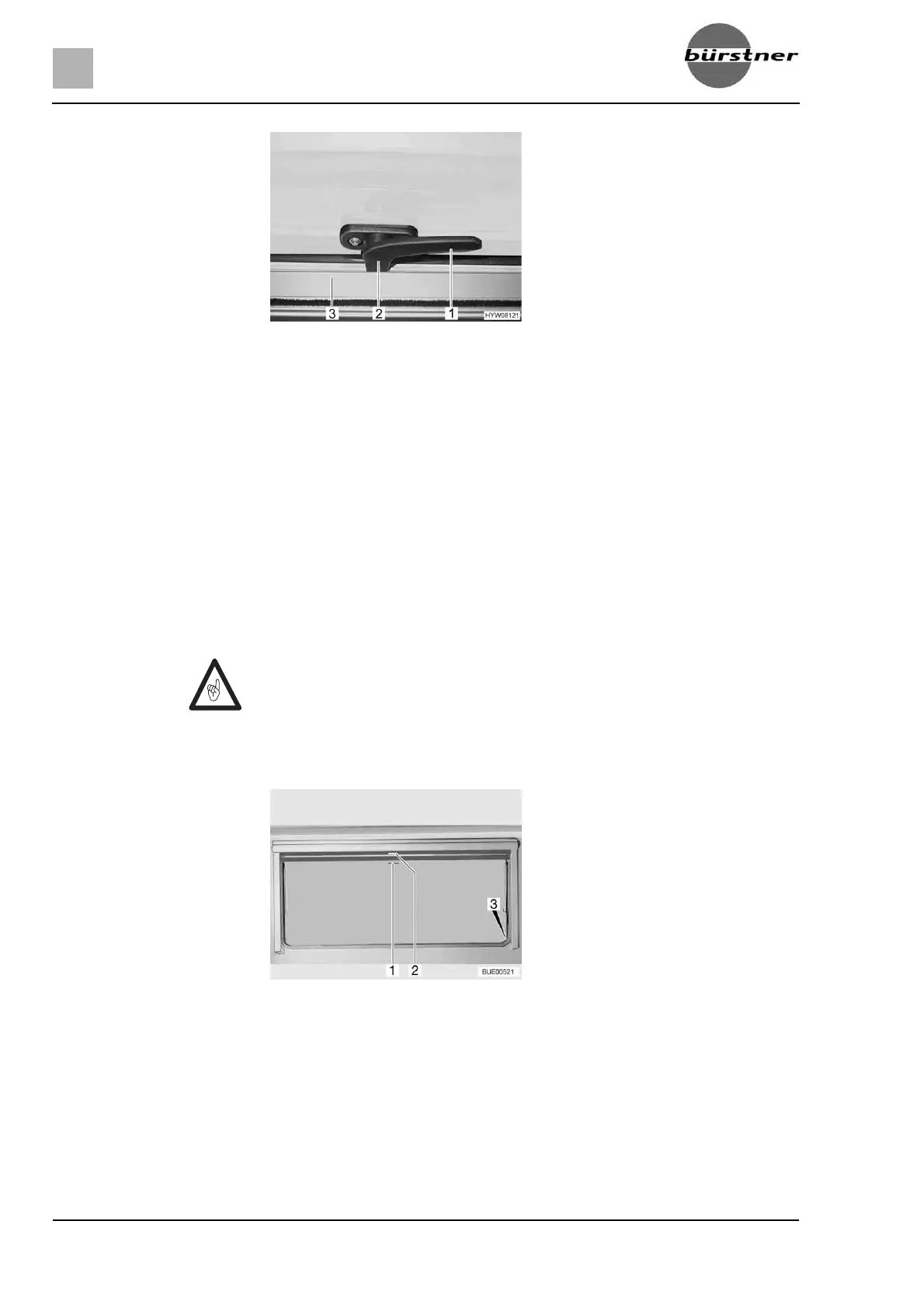
Opening: Turn the catch lever (Fig. 82,1) a quarter turn towards the centre of the
window.
Open the hinged window to the desired latched position. The automatic
hinge automatically locks in place.
The hinged window remains locked in the required position.
Closing:
Open the hinged window as wide as is necessary to release the lock.
Close the hinged window.
Turn the catch lever (Fig. 82,1) a quarter turn towards the window frame.
The locking catch (Fig. 82,2) is located on the inside of the window catch
(Fig. 82,3).
6.9.5 Blind and insect screen
The windows are fitted with a blind and an insect screen. The blind and insect
screen are adjusted separately.
Blind The blind is located in the upper blind box.
Closing:
Pull blind at the handle (Fig. 83,2) downwards. If the blind is to be com-
pletely closed, it is suspended into the locking devices (Fig. 83,3) situated
on both sides of the window frame.
Fig. 82 Catch lever in "closed" position
Z Open blinds before commencing the journey. When the blinds are closed,
vibrations can damage the spring shaft.
Fig. 83 Hinged window



 To Next Page