Configuring 60 GHz cnWave™ 180
Note
This feature is supported in the L2 bridge mode.
In addition, you can also configure Circuit ID and Remote ID fields. Use the following wildcards to
configure Circuit ID and Remote ID fields:
l $nodeMac$ - MAC address of the node in ASCII format without colons. This is a default option.
l $nodeName$ - Topology name of the node.
l $siteName$ - Name of the site.
l $networkName$ - Network name as shown in cnMaestro.
Multiple wildcards can be combined with a : delimiter. Total length of the option (after replacing
wildcards with corresponding values) is truncated to 120 characters. You can also configure a custom
string, which must not start with a $ character. For example, a customer's phone number.
Note
You cannot use the customized string and predefined wildcards together as a
single sub option (Circuit ID / Remote ID).
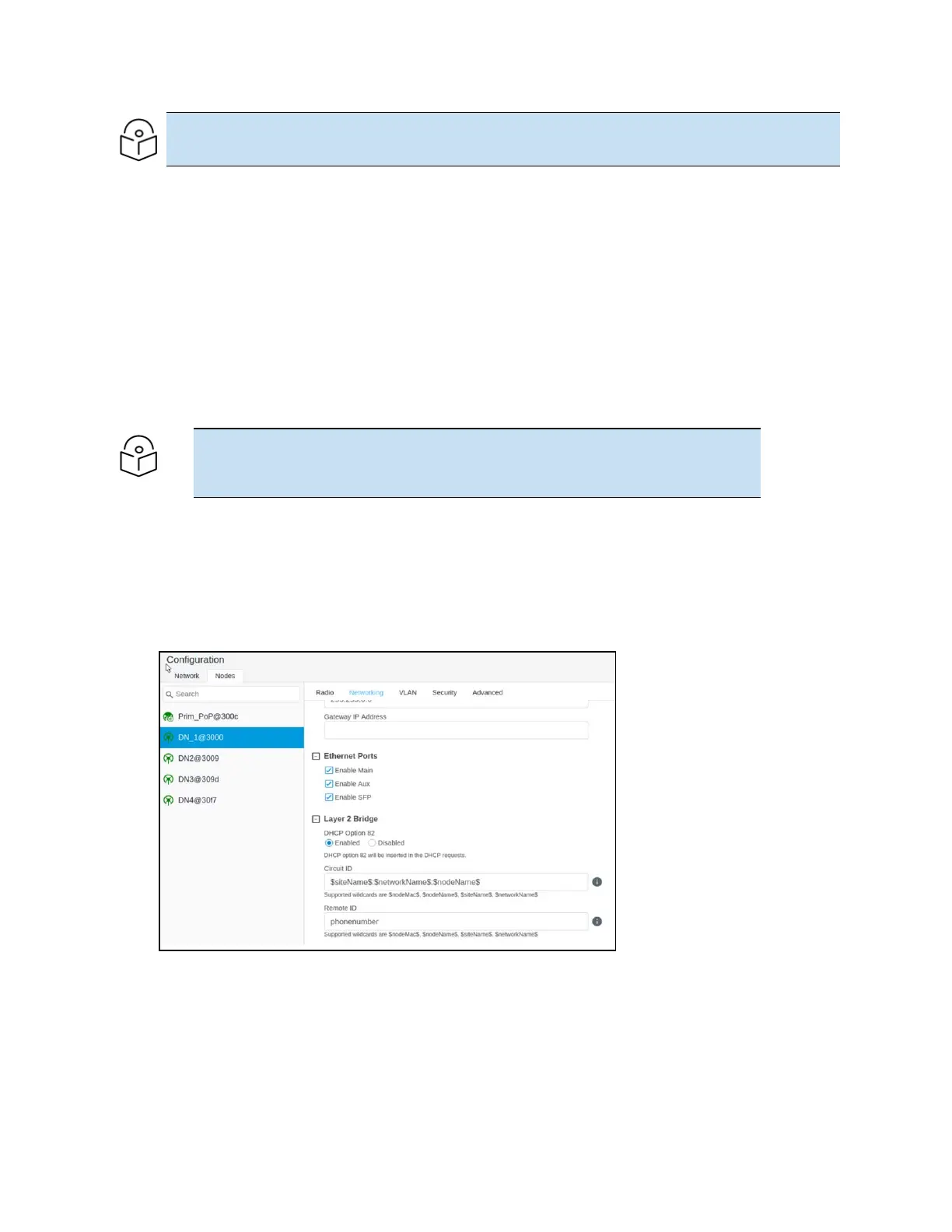
To enable the DHCP Option 82 feature, perform the following steps:
1. Navigate to Nodes > Networking from the home page.
The Networking page appears. The DHCP Option 82 feature is available in the Layer 2 Bridge
section, as shown in Figure 186.
Figure 186:
The DHCP Option 82 feature
The enabled status of DHCP Option 82 implies that the feature is activated.
2. Type appropriate values in Circuit ID and Remote ID text boxes.
3. To save the configuration, click Submit.


 To Next Page
 Loading...





