Operation 218
Show SFP power details
Show SFP Power Details is a remote command that is available on the Tools page. When you execute this
remote command from the Onboard Controller UI or the node CLI, the command provides the SFP power
details (as an output) for the required SFP ports and interfaces.
Note
Currently, the Show SFP Power Details remote command is not available in cnMaestro.
To execute the Show SFP Power Details remote command, perform the following steps:
1. Navigate to Tools > Remote Command from the home page of Onboard Controller UI.
The Remote Command page appears.
2. Select the required node from the Select Node drop-down list.
3. Select Show SFP Power Details from the Select Command drop-down list.
4. Click Execute.
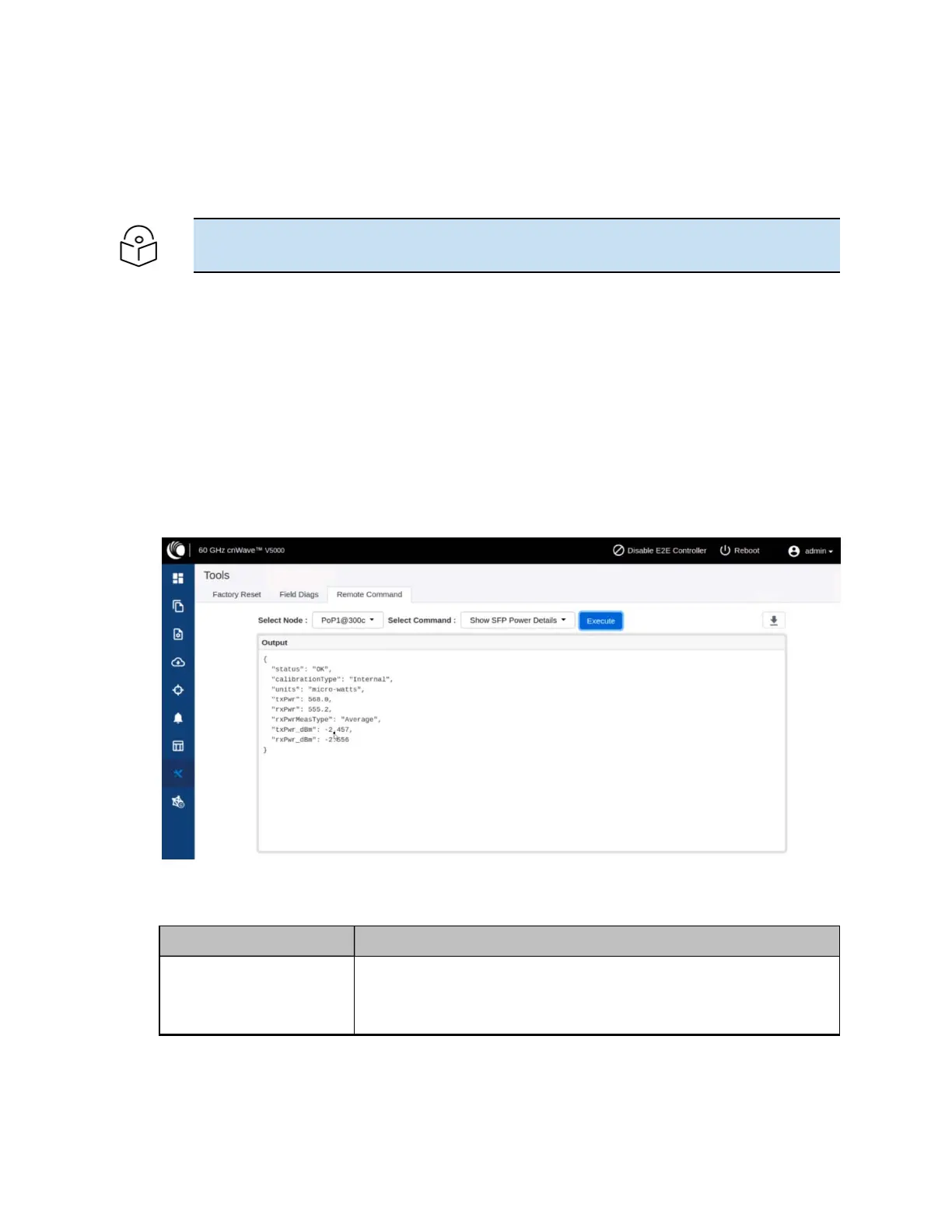
The Output section displays the SFP power details for the selected node, as shown in Figure 240.
Figure 240:
The UI supported output - SFP Power details
Table 52 lists and describes each parameter in the output.
Table 52: Output details
Output Parameter Description
Status Determines whether the output is valid.
If the Status field contains OK, it implies that the rest of the output is
valid.




 To Next Page