Communications
RS-485 Communications
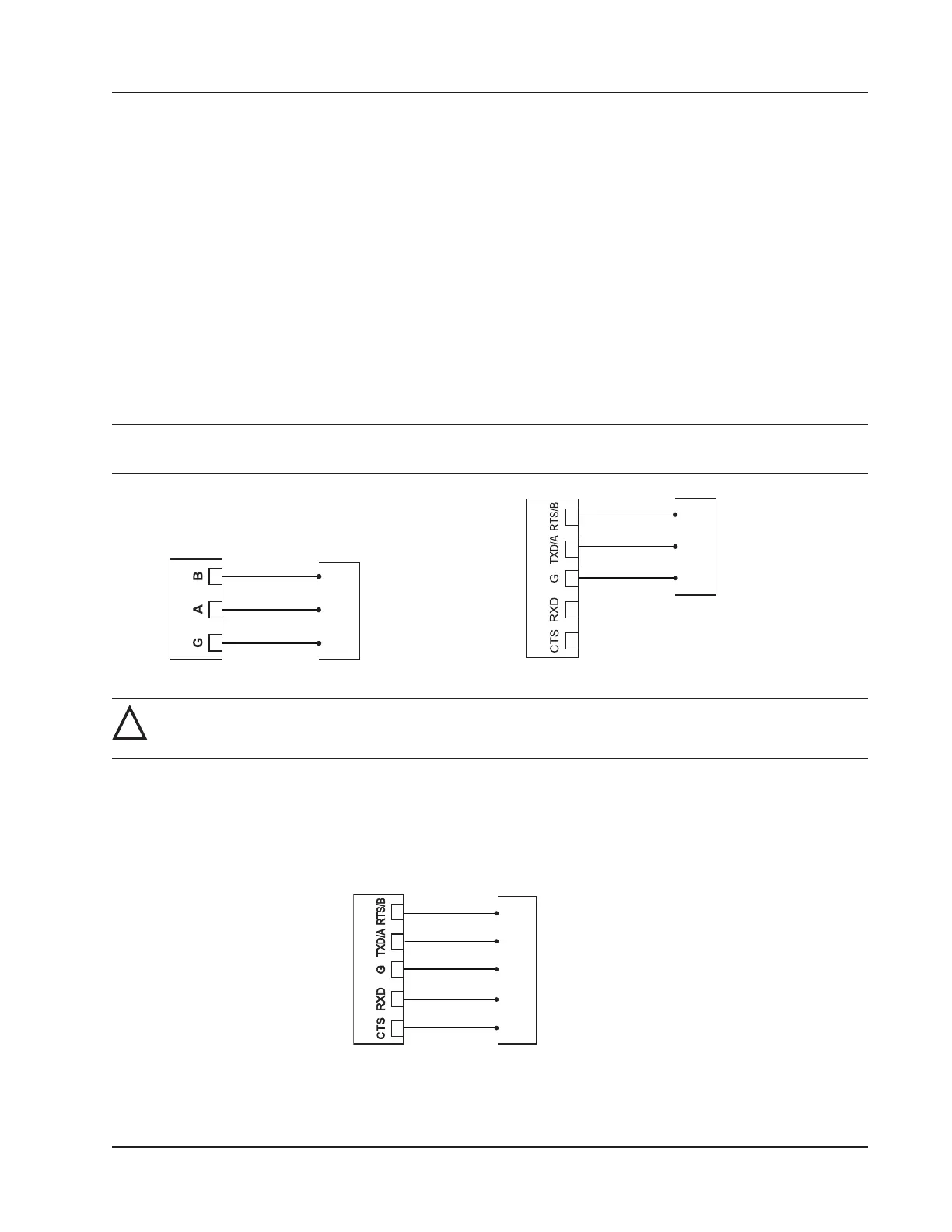
The Scanner 3100 supports digital serial communications using EIA-RS-485 hardware with Modicon Modbus protocol.
RS-485 communications are supported by three ports with a baud range of 300 to 115.2K. Ports 1, 2, and 3 can be used
simultaneously, if desired, and all three ports are protected from high-voltage transients. The circuit can be terminated by
enabling an internal termination resistor in the web interface. See the Scanner 3100 Web Interface User Manual for de-
tails. Wire as shown in Figure 3.14, page 65.
Ports 1 and 2 (shown at left) are designed for use with low-power peripherals such as radios, gas chromatographs, other
wired Modbus devices, and wired Scanner slave devices, and are always enabled. If a large number of slave devices are
to be connected to a Scanner 3100 network via a serial port, more than one communication port may be required, de-
pending on archive periods and baud rates desired.
Port 3 (shown at right) supports both RS-485 and RS-232 communications and may be preferred for continuous, high-
speed communications. Port 3 is disabled by default, and must be enabled before use. The mode (RS-485 or RS-232) is
automatically detected by the hardware.
Note Not all RS-485 devices, including converters, identify A and B terms consistently. If communications are not
established, switch the wires.
RS-485 1, 2
COM
A
B
RS-485 Device
COM
RS-232/485 3
RS-485 Device
A
B
Figure 3.14—RS-485 communications
!
WARNING: To prevent ignition of hazardous atmospheres, do not remove the Scanner 3100 cover while
circuits are alive. The Scanner 3100 poses no hazard when opened in a safe area.
RS-232 Communications
RS-232 communications are supported by Port 3, a high-power port that also supports RS-485 communications. RS-232
communications are useful for short-range communications (typically 50 ft or less) with radios and some Modbus pe-
ripheral devices. Wire as shown in Figure 3.15. Port 3 must be enabled and congured for RS-485 or RS-232 communi-
cations via the web interface.
COM
CTS
RXD
TXD
RTS
RS-232/485 3
RS-232 Device
Figure 3.15—RS-232 communications
65
Scanner 3100 EFM Section 3













 To Next Page