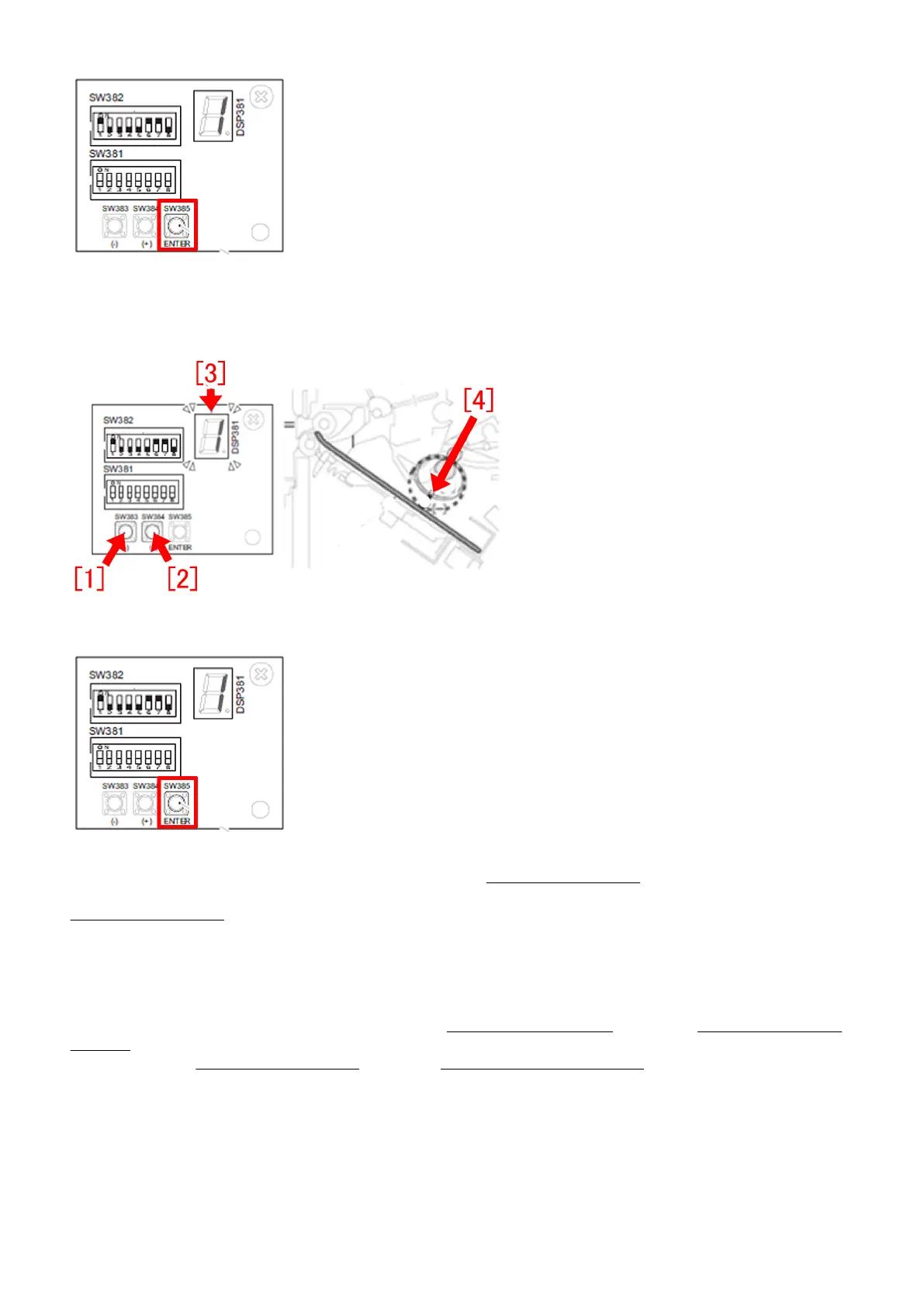
C-3) Press SW383[1] or SW384[2] a few times to have the LED [3] to indicate "-2".
[Reference] The default value is "0". When setting it "-2", the distance between the belt [4] and the paper becomes smaller and
feeding force increases.
C-4) Press switch SW385 again to complete the feed belt adjustment.
C-5) Return all the bit switches in SW382 to OFF. Next, proceed to Checking the adjustment.
Checking the adjustment
1) To check the state, print multiple stapled sets.
2) Check staple quality of the printed document. The specification of staple misalignment for finisher is within 2mm depending
on installation environment of the machine and papers used. After having the alignment plate and the paddle height adjusted to
"-1" and the feed belt position to "-2", staple misalignment should improve to be within 2mm. If staple misalignment on all sets of
the printed document is within 2mm, the work completes here.
3) If staple misalignment is more than 2mm, refer to the step B. Adjusting Paddle Height and the step C. Adjusting Position of
Feed Belt and change the paddle height adjustment value to "-2" and the feed belt position adjustment value to "-4"
[Caution] In the step B. Adjusting Paddle Height and the step C. Adjusting Position of Feed Belt, be sure to first change the paddle
height adjustment value to "-1" and the feed belt position adjustment value to "-2". If no improvement is seen, then change the
paddle height adjustment value to "-2" and the feed belt position adjustment value to "-4". When changing the paddle height
adjustment value to "-2" and the feed belt position adjustment value to "-4" from the beginning, the feeding force may become
too strong causing the paper to hit the trailing edge push-on plate and bounces back. This may result in misalignment. It is difficult
to distinct misalignment caused by the paper not reaching the trailing edge push-on plate from the one caused by the paper
bouncing back because both types of misalignment looks the same in stapled sets. For this reason, the feeding force is set and
adjusted in steps.
4) Print multiple stapled sets again.
96











 To Next Page