- When starting to use the machine, apply a pressure to the primary transfer roller first. If not, an image failure (poor transfer)
would occur.
- There is no effect on the four locations other than the primary transfer roller.
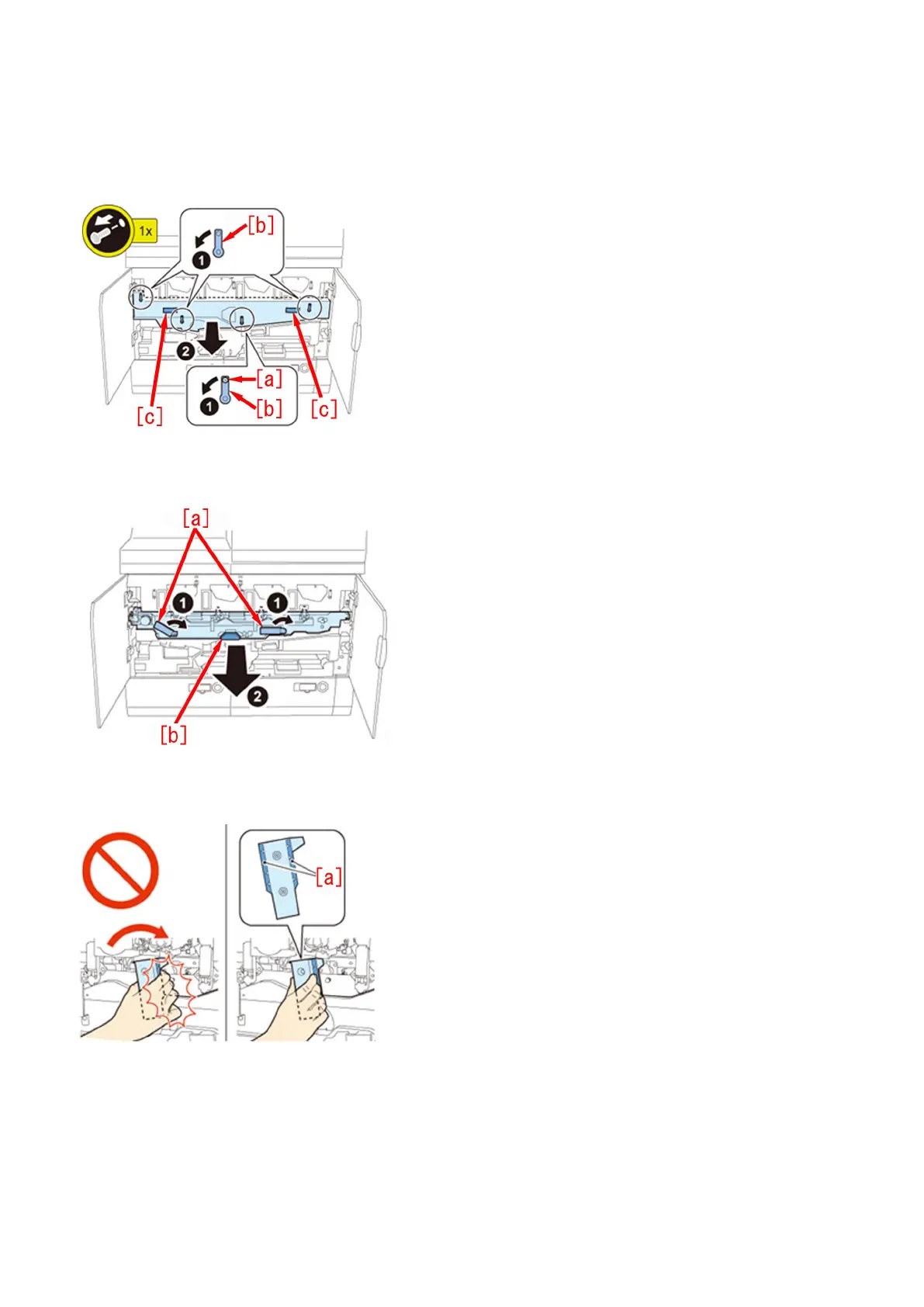
b-1) Open the Main Station Front Right Cover and the Main Station Front Left Cover.
b-2) Remove the stepped screw (yellow)[a] and turn the 4 Release Levers [b] in the direction of the arrow, Holding the 2 grips[c],
remove the Intermediate Transfer Unit Cover
b-3) Turn the 2 Release Levers [a] of the Intermediate Transfer Unit in the direction of the arrow at the same time, and pull the
Intermediate Transfer Unit out until it stops by holding the grips[b].
[Caution] Be sure to hold only the [a] part of the ITB Release Levers when turning the ITB Release Levers, or your hand may be
pinched.
b-4) Holding the 2 grips [a] with both hands, lift the Intermediate Transfer Unit approx. 40 degrees and then lower it to the lock
position (approx. 30 degrees).
18











 To Next Page