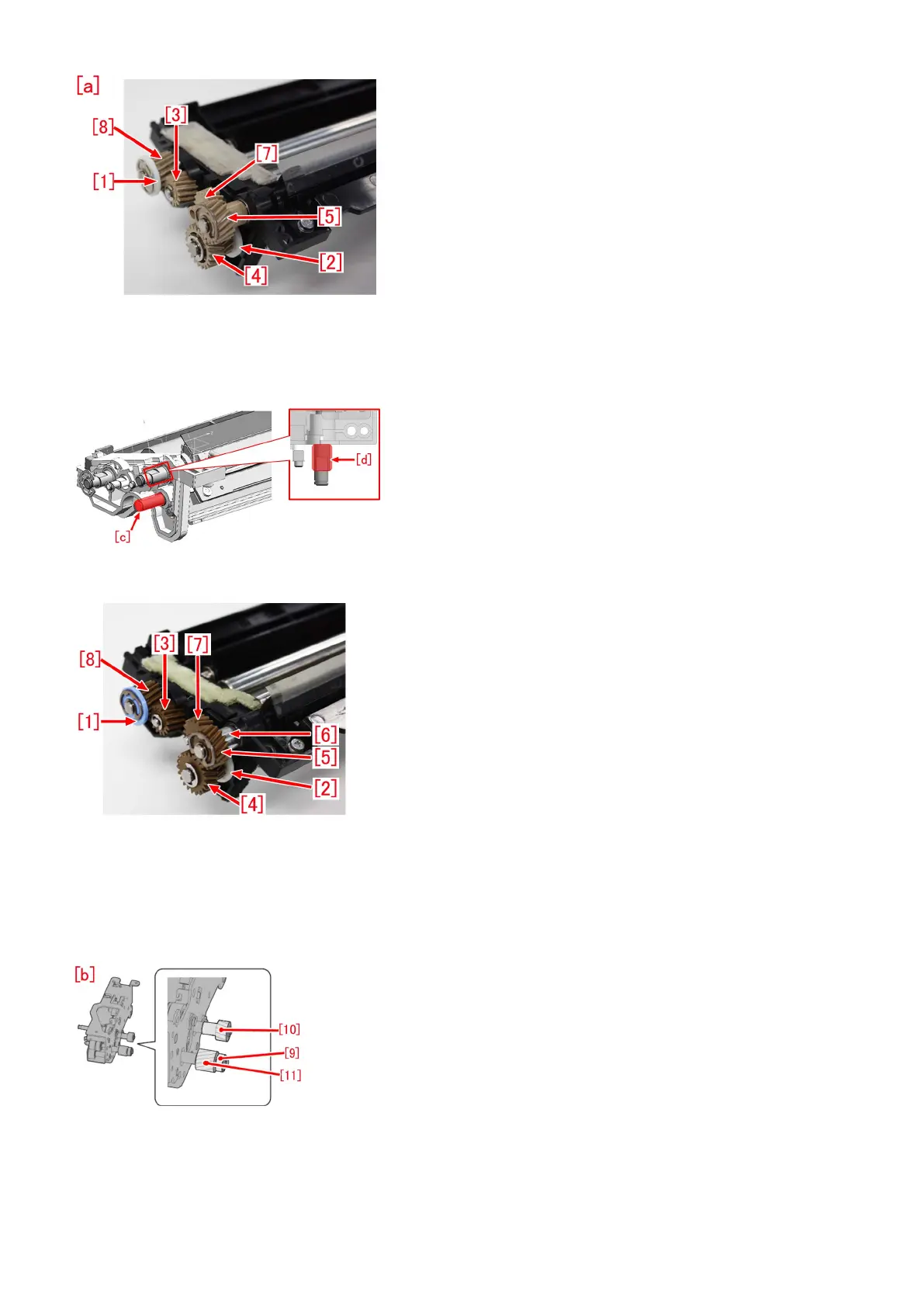
2) Apply the super lube grease in an amount of a grain of rice (approximately 20mg) to [c] and [d] of the belt cleaner assembly,
evenly.
In addition, attach a spacer (FE2-B033) [6] to [d], and rotate the shaft so that the super lube grease may spread around the shaft
evenly.
3) Replace [1] to [5] and [7][8] on the belt cleaner assembly with the parts bundled in the 2ND TRNSFR. CLEANER GEAR SET.
4) Apply the super lube grease in an amount of a grain of rice (approximately 20mg) on the tooth of the following gears, evenly.
-[3] --- FU2-2543 (15T GEAR)
-[4] --- FU2-2544 (21T/15T GEAR)
-[5] --- FU2-2545 (18T GEAR)
-[8] --- FU2-2547 (18T GEAR)
5) Remove [9] to [11] from the transfer cleaner drive unit [b], and replace with the parts of 2ND TRNSFR. CLEANER GEAR SET.
6) After installing the transfer cleaner drive unit on the belt cleaner assembly, apply the super lube grease in an amount of two
grains of rice (approximately 40mg) at four locations, on the teeth of gears [10][11] and [9], and [e] part of [10], evenly.
72











 To Next Page