1
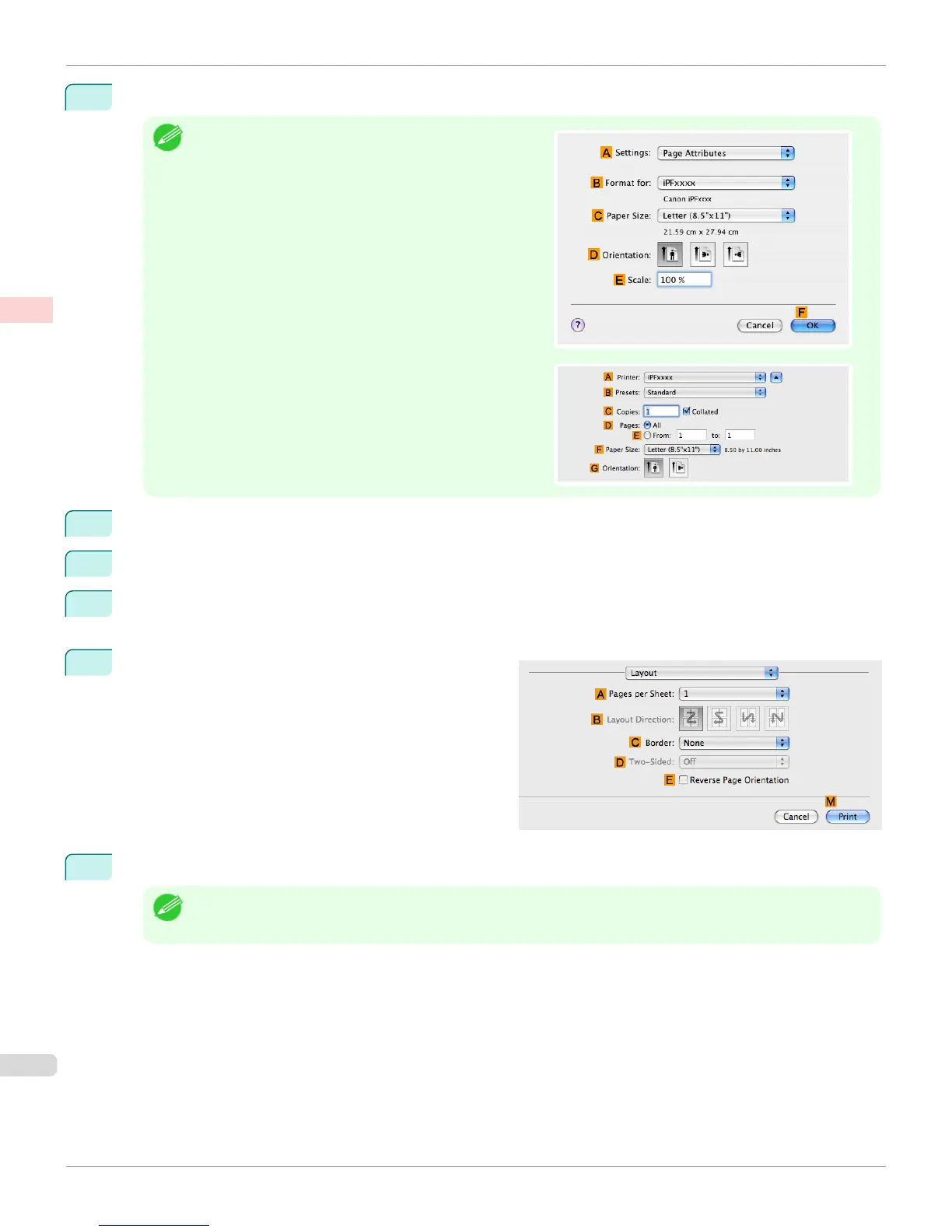
This sets the B Format for and C Paper Size.
Note
•
The configuration method varies depending on the OS and
application software you are using.
If Page Setup is displayed in the application menu, the set-
tings are configured by opening the Page Attributes dialog
box from Page Setup.
If it is not displayed, the settings are configured in the upper
part of the printer driver displayed when you select Print
from the application software menu.
2
Select the printer in the A Printer list.
3
In the F Paper Size list, click the size of the original. In this case, click ISO A3.
4
If you configured the settings using the Page Attributes dialog box, click F OK to close the dialog box, and
then select Print from the application software menu.
5
Access the Layout pane.
6
Click 4 in the A Pages per Sheet list.
Note
• You can choose the layout order and specify a boundary line for the four pages in B Layout Direction and
C Border.
Printing Multiple Pages Per Sheet (Mac OS X)
iPF765
User's Guide
Enhanced Printing Options Tiling and multiple pages per sheet
136


 To Next Page
 Loading...













