Left Side Right Side
e
Ink Tank
Cartridges of ink in various colors.
Stand
Stand
•
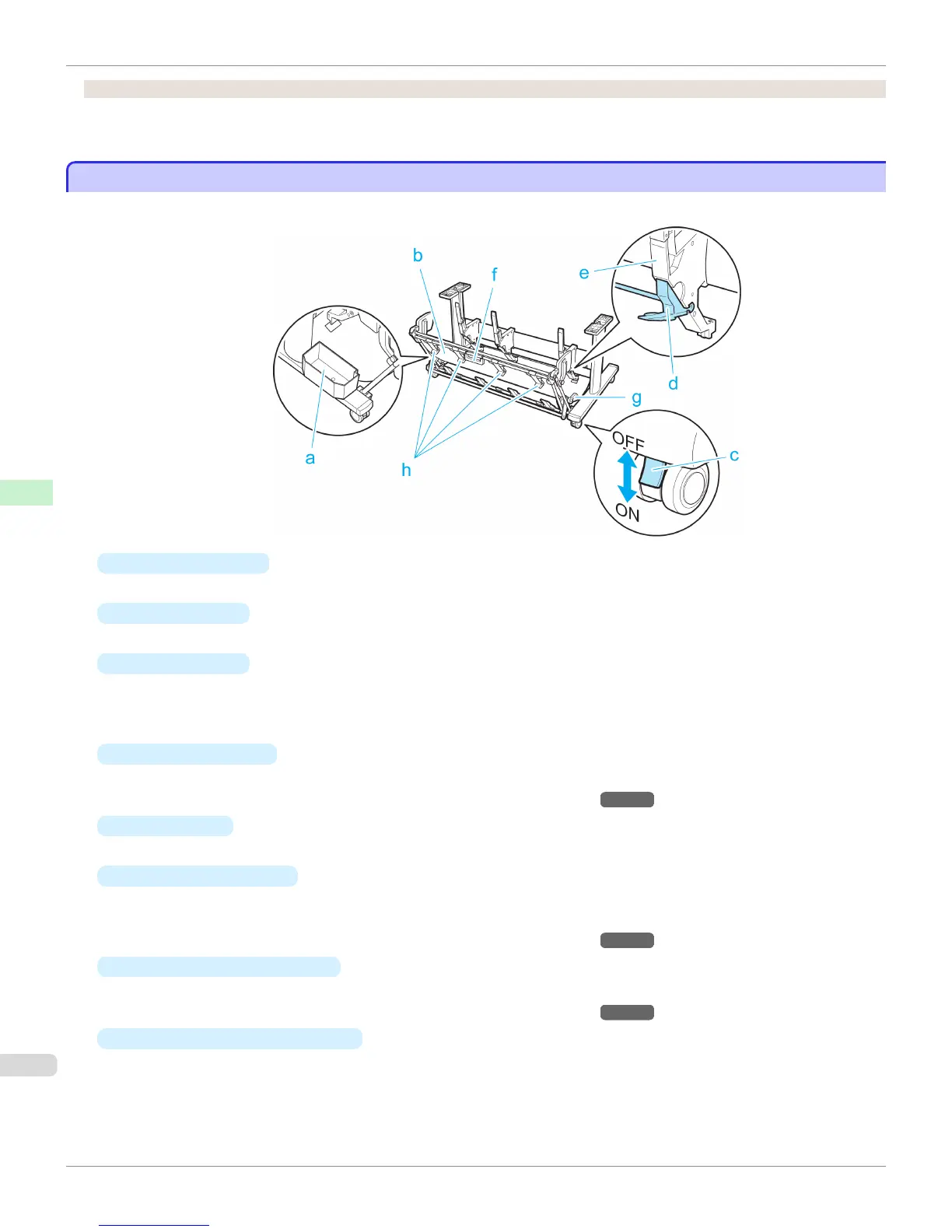
Printer Stand ST-34
a
Accessory Pocket
Stores printer accessories.
b
Output Stacker
Printed documents are ejected into the output tray.
c
Locking Caster
Lock to immobilize the caster.
Before moving the printer, always unlock all four casters. Moving the printer while casters are locked may
scratch the casters or the floor.
d
Adjustable Stopper
Pull out depending on the paper size when using the output stacker in the Extended position A.
For details on the extended position, see "Using the Output Stacker." →P.472
e
Paper Guide
Guides printed documents into the output stacker.
f
Output stacker handle
This handle is grasped and supports the sliding output stacker when putting the output stacker into Extended
position B and returning it to the regular position.
For details on the extended position, see "Using the Output Stacker." →P.472
g
Output stacker release lever
Pull this lever towards you to release Extended position B.
For details on the extended position, see "Using the Output Stacker." →P.472
h
Output Stacker Ejection Guides
This guide supports the paper that is output when using the output stacker in Extended position B.
Stand
iPF765
User's Guide
Printer Parts Printer parts
524


 To Next Page
 Loading...












