• A Maintenance
Click to start the imagePROGRAF Status Monitor, which offers the following maintenance for the printer.
•
Nozzle (ink ejecting outlet) check
•
Nozzle (ink ejecting outlet) cleaning
•
Head alignment adjustment
•
Feed amount adjustment
• B Color imageRUNNER Enlargement Copy
Click to launch Color imageRUNNER Enlargement Copy (iR enlargement copy), which enables you to create hot
folders used for Color imageRUNNER Enlargement Copy and assign print settings to hot folders.
•
Printing Enlargements of Scanned Originals from a Color imageRUNNER →P.251
For details, see Color imageRUNNER Enlargement Copy →P.242 .
Note
• This function is not available on 64-bit version of Windows.
Support Sheet
Support Sheet
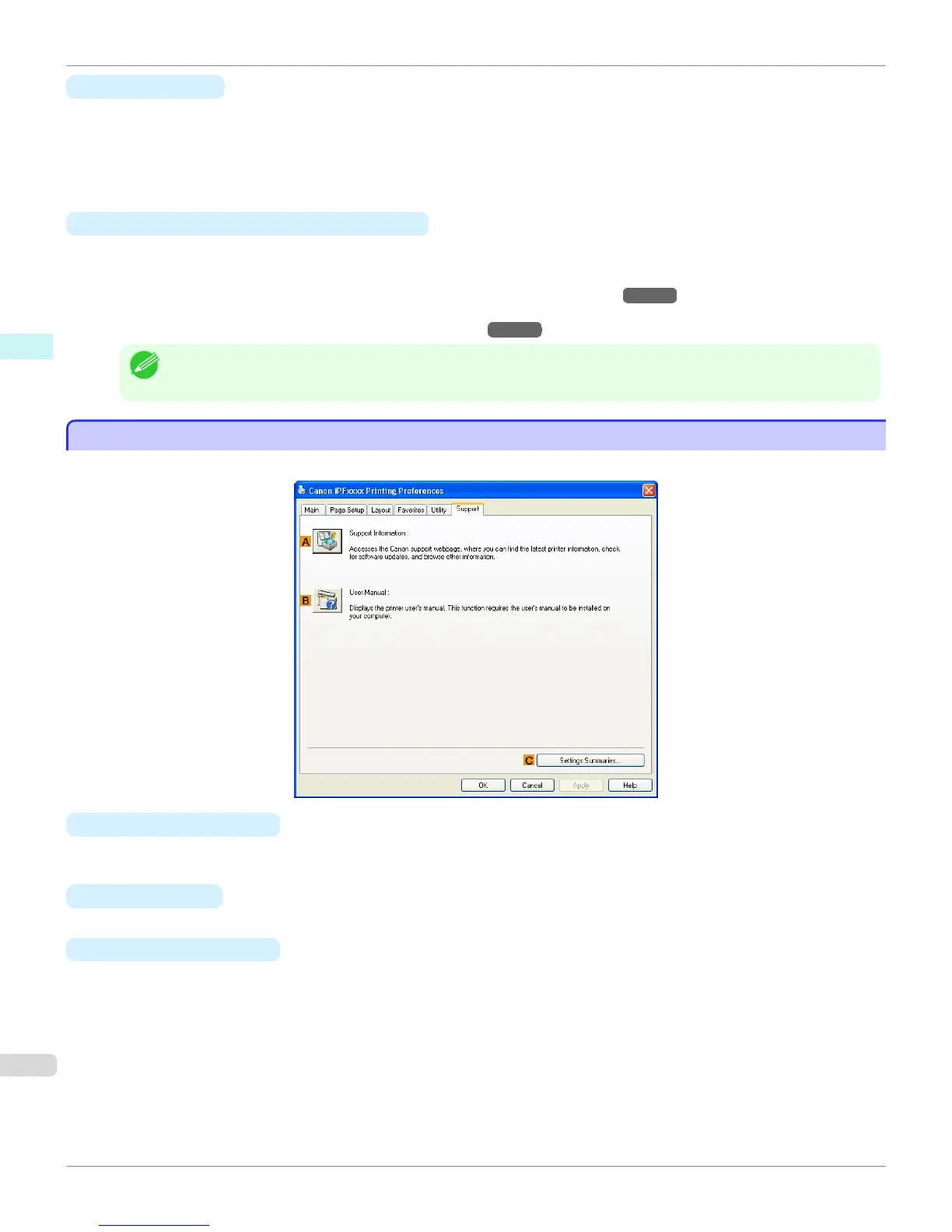
On the Support sheet, you can view support information and the user's manual.
• A Support Information
Click to access the Canon support webpage, where you can find the latest information on the printer and consum-
ables, check for printer driver updates, and browse other information.
• B
User Manual
Click to view the printer user's manual. This function requires the user's manual to be installed on your computer.
• C
Settings Summaries
Click to display the View Settings dialog box, which enables you to confirm the settings for the Main, Page Set-
up, Layout, and Favorites sheets.
Support Sheet
iPF765
User's Guide
Windows Software Printer Driver
206


 To Next Page
 Loading...













