3
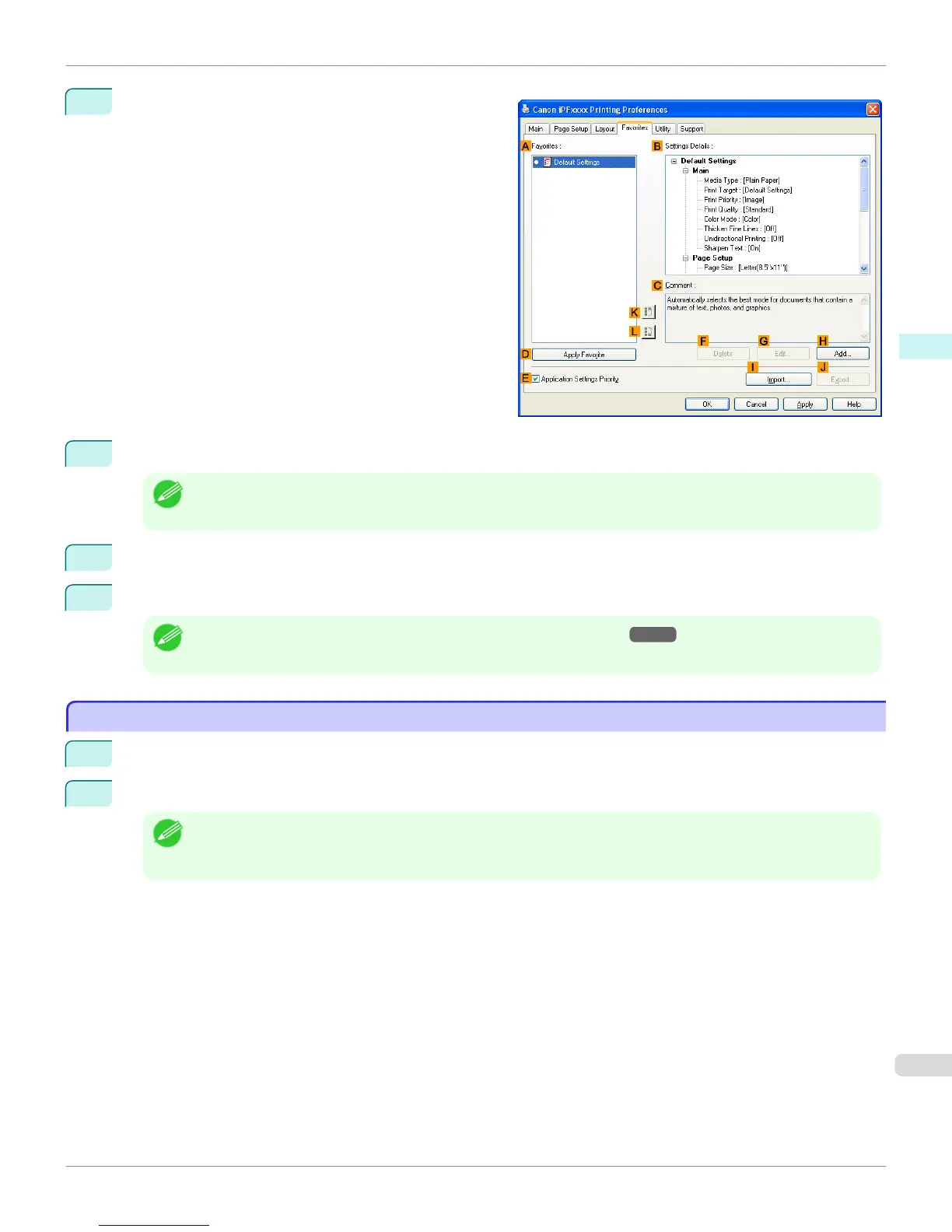
Click the Favorites tab to display the Favorites sheet.
4
In the A Favorites, choose the favorite you registered.
Note
• To import a favorite, click I Import and specify the favorite file.
5
Click
D Apply Favorite to replace the favorite settings with the current print settings.
6
Confirm the print settings and print as desired.
Note
• For instructions on confirming print settings, see "Confirming Print Settings →P.179 "
Accessing the Printer Driver Dialog Box from Applications
Accessing the Printer Driver Dialog Box from Applications
1
Choose Print from the File menu to display the dialog box for printing conditions.
2
Select the printer, and then display the printer driver dialog box.
Note
• The dialog box for specifying printing conditions varies depending on the source application. In some cases, when
you select the printer, a sheet for configuring the printer driver is added to the dialog box.
In the following case, click Preferences.
•
Example:
Print dialog box displayed by the application software
iPF765
Accessing the Printer Driver Dialog Box from Applications
User's Guide
Windows Software Printer Driver
183



 To Next Page
 Loading...












