12
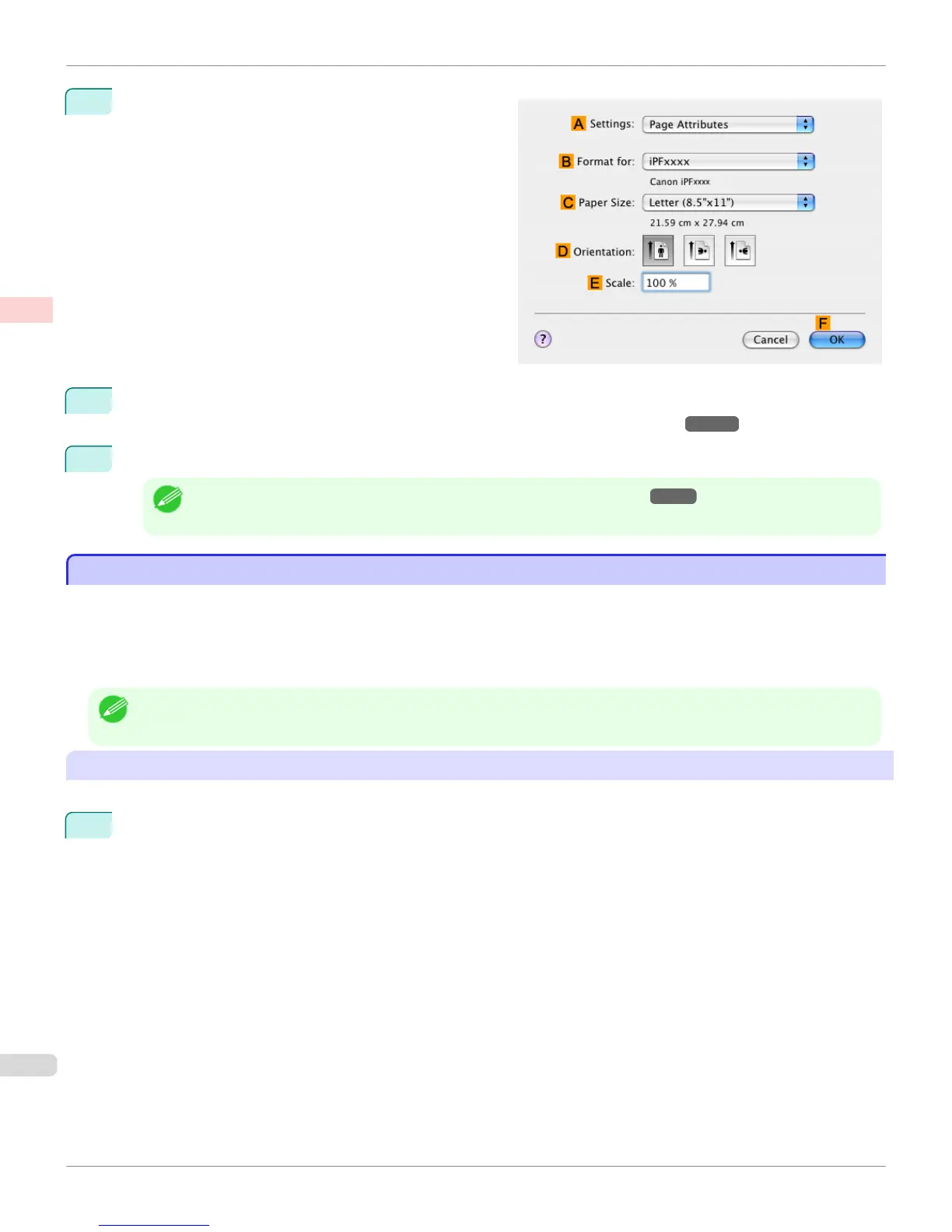
Make sure C Page Size on the Page Setup pane
shows the original size as specified in C Paper Size in
the Page Attributes dialog box—in this case, ISO A3.
13
Specify additional printing conditions.
For details on available printing conditions, see "Printer Driver Settings(Mac OS X) →P.326 "
14
Confirm the print settings, and then click M Print to start printing.
Note
• For tips on confirming print settings, see "Confirming Print Settings(Mac OS X) →P.329 "
Printing from AutoCAD
Printing from AutoCAD
Printer Driver Optimization Module for AutoCAD is software for printing optimally from AutoCAD with the printer driver.
By optimally controlling the processing resolution of raster data and the memory to be used in image processing of
AutoCAD, printing superior in reliability and productivity is realized.
If you install Printer Driver Optimization Module for AutoCAD on a computer on which supported AutoCAD is installed,
it will be installed automatically.
Note
• Printer Driver Optimization Module for AutoCAD is applied automatically when you print from AutoCAD, and optimal printing is
performed.
Confirming the Installation of Printer Driver Optimization Module for AutoCAD
You can confirm whether Printer Driver Optimization Module for AutoCAD is installed by the following method.
1
From the File menu of AutoCAD, select Print.
Printing from AutoCAD
iPF765
User's Guide
Enhanced Printing Options Printing CAD Drawings
52


 To Next Page
 Loading...













