Important
• If you have selected Color (CAD) 3, Color (CAD) 4, or Color (CAD) 5, it is not possible to match the colors and image
quality produced by the specified printer exactly.
For instructions on configuring Color Compatibility, refer to the following topics.
•
Specifying Colors and Printing CAD Drawings (Windows) →P.54
Specifying Colors and Printing CAD Drawings (Windows)
Specifying Colors and Printing CAD Drawings (Windows)
You can complete color settings when Color (CAD) is selected in Color Mode.
Note
• Color (CAD) is displayed when you select Advanced Settings on the Main sheet and set Print Priority to Line Drawing/
Text.
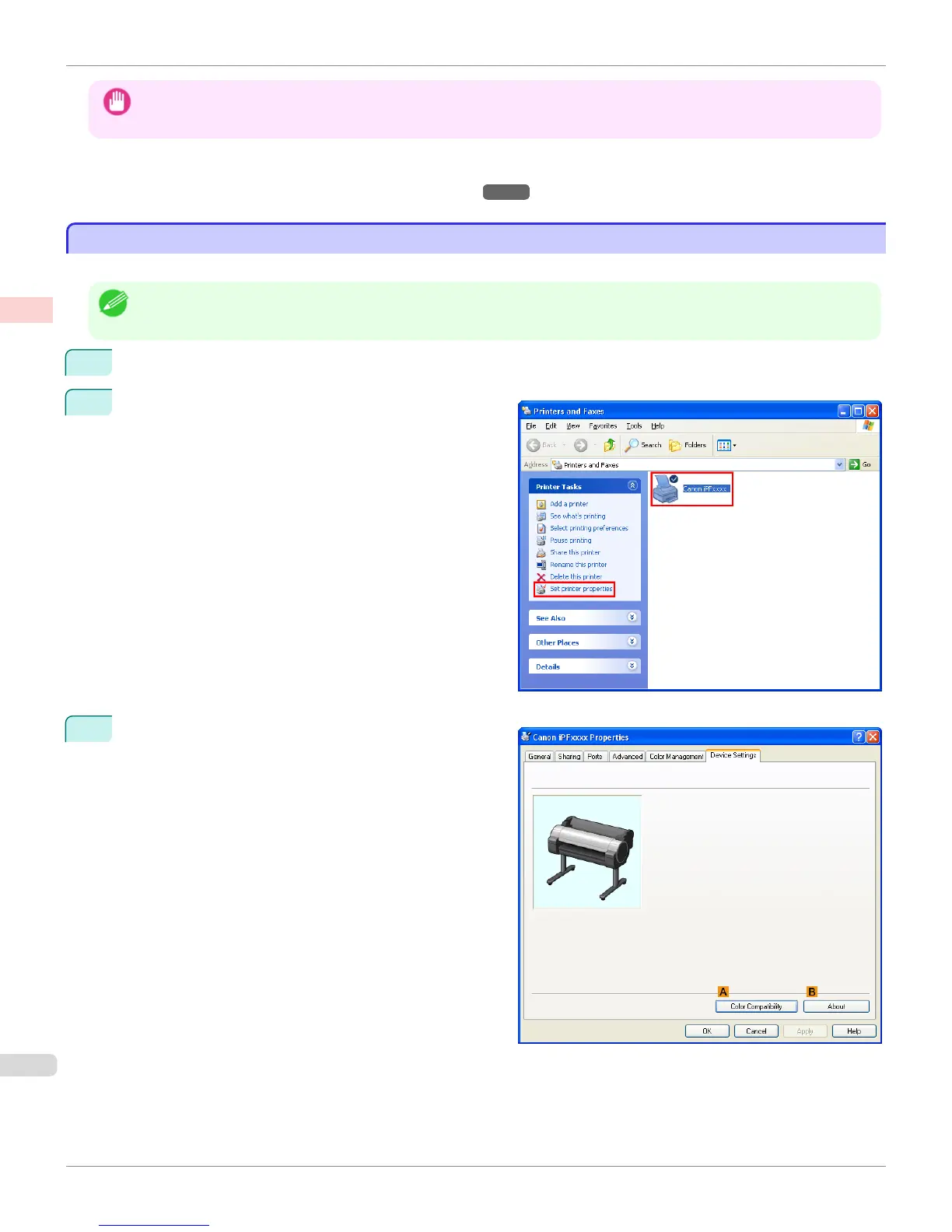
1
Click
start > Printers and Faxes (or Printers).
2
Select the printer, and then display the printer proper-
ties dialog box.
3
Click the Device Settings tab to display the Device
Settings sheet.
Specifying Colors and Printing CAD Drawings (Windows)
iPF765
User's Guide
Enhanced Printing Options Printing CAD Drawings
54



 To Next Page
 Loading...












