Chapter 8
8-33
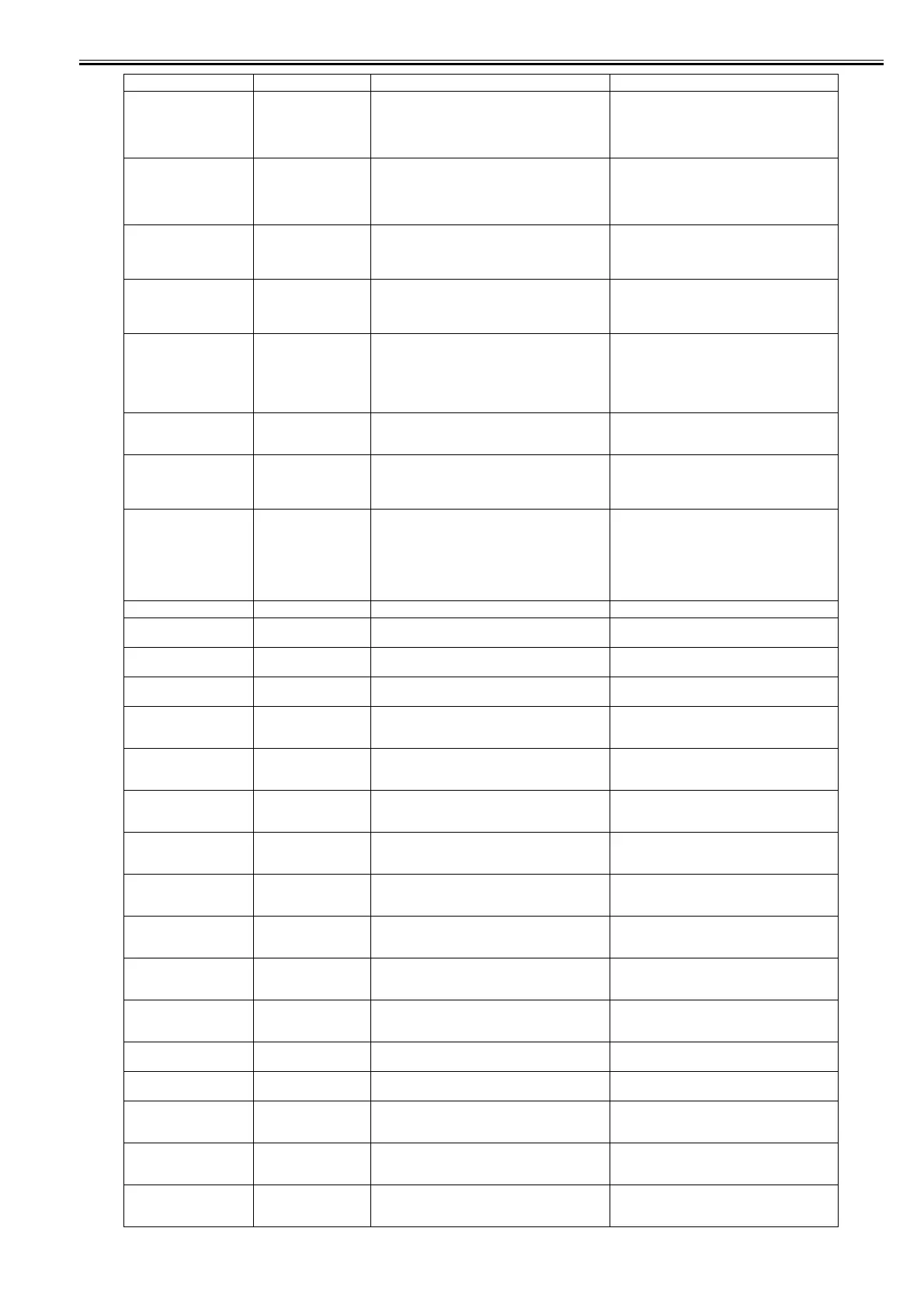
Hardware error.
03130031-2F50
Turn off printer, wait, then
turn on again.
03130031-2F50 Right printhead short-circuit error detection (VH
leakage)
Check that the right printhead is attached correctly.
Check the contact of right printhead and
surrounding parts.
Replace the right printhead.
Replace the carriage unit.
Hardware error.
03130031-2F51
Turn off printer, wait, then
turn on again.
03130031-2F51 Printhead short-circuit error detection (VH leakage) Check that the printhead is attached correctly.
Check the contact of printhead and surrounding
parts.
Replace the printhead.
Replace the carriage unit.
Hardware error.
03130031-2F52
Turn off printer, wait, then
turn on again.
03130031-2F52 Incorrect carriage PCB attachment error Check the carriage PCB.
Replace the correct carriage PCB.
Hardware error.
03130031-4027
Turn off printer, wait, then
turn on again.
03130031-4027 Lift travel timeout error Check the carriage unit and surrounding parts.
Mail box full.
Delete unwanted data on
your computer to resume
printing.
Press Stop to cancel
printing.
031A1001-2905 The job store executed when the free hard disk space
left for Personal Boxes in the printer's hard disk is full.
Delete unneeded jobs stored in Personal Boxes.
Hard disk error.
Press OK to reformat
031A1002-2908 Hard disk format error Press the [OK] button to start reformatting the hard
disk. When formatting is finished, the printer
automatically restarts.
File read error.
Turn off printer, wait a
while, and turn it on again.
Invalid files will be deleted.
031A1002-2909 Hard disk file error Restart the printer. Only the corrupted files will be
deleted, and the printer will restart.
Mail box full.
Cannot save.
Delete unwanted data on
your computer to resume
printing.
Press Stop to cancel
printing.
031A1006-2906 The store executed when 32 jobs are stored in the
Personal Box.
Delete unneeded jobs stored in Personal Boxes.
The paper is too small. 033200D2-2E30 Size clip error Confirm the print data.
No printhead.
Install printhead.
03800100-2800 Printhead not installed Install the printhead.
No right printhead
Install right printhead.
03800101-2800 Right printhead not installed Install the right printhead.
No left printhead
Install left printhead.
03800102-2808 Left printhead not installed Install the left printhead.
Printhead error.
Open top cover and replace
the printhead.
03800200-2802 Invalid printhead installed Replace printhead.
Wrong printhead.
Open top cover and replace
the printhead.
03800200-2811 Printhead version error Replace the printhead.
Right printhead error.
Open top cover and replace
the right printhead.
03800201-2802 Right printhead ID error Replace the right printhead.
PHeads: wrong pos.
Open top cover and check
the printhead positions.
03800201-2804 The left printhead was installed to the installation
position of right printhead.
Check the installation position of printhead.
Right printhead error.
Open top cover and replace
the right printhead.
03800201-2812 Right printhead version error Replace the right printhead.
PHeads: wrong pos.
Open top cover and check
the printhead positions.
03800202-2807 The right printhead was installed to the installation
position of left printhead.
Check the installation position of printhead.
Left printhead error.
Open top cover and replace
the left printhead.
03800202-280A Left printhead ID error Replace the left printhead.
Left printhead error.
Open top cover and replace
the left printhead.
03800202-2813 Left printhead version error Replace the left printhead.
Left printhead error. 03800202-282D Left printhead abnormal temperature detection error
(during maintenance jet)
Replace the left printhead.
Left printhead error. 03800202-2830 Left printhead abnormal temperature detection error
during maintenance jet (when restarting printer)
Replace the left printhead.
Printhead error.
Open top cover and replace
the right printhead.
03800300-2801 Printhead DI compensation failure Replace printhead.
Right printhead error.
Open top cover and replace
the right printhead.
03800301-2801 Right printhead DI compensation failure Replace the right printhead.
Left printhead error.
Open top cover and replace
the left printhead.
03800302-2809 Left printhead DI compensation failure Replace the left printhead.
Display massage Code* Condition detected Action














 To Next Page