COPYRIGHT © 1998 CANON INC. CANON PC400/420/430,FC200/220 REV.0 JAN.1998 PRINTED IN JAPAN (IMPRIME AU JAPON)
CHAPTER 10 TROUBLESHOOTING
10-33
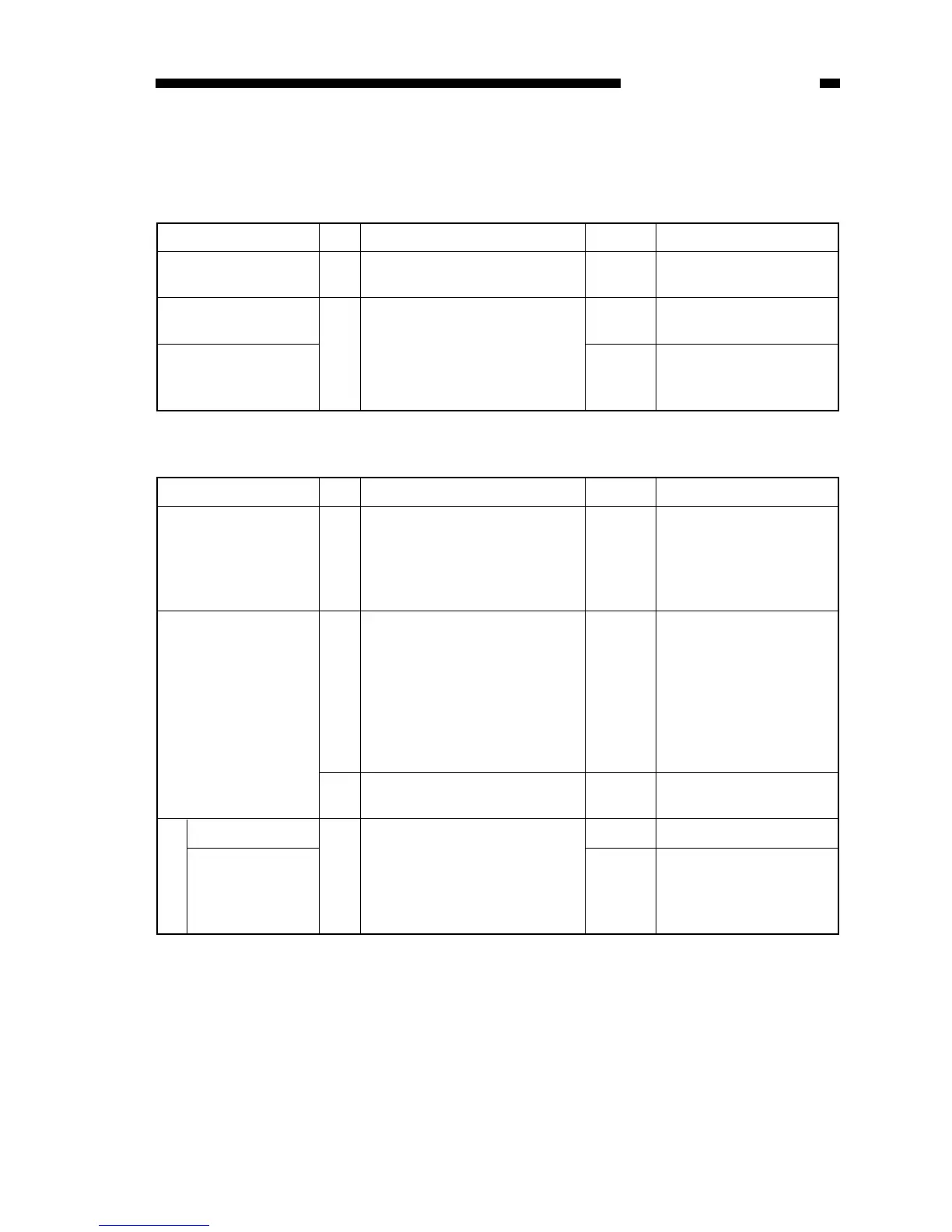
B. Feeding Faults
1. Double Feeding
Cause Step Checks YES/NO Remedies
Copy paper 1 Try copy paper of a type
recommended by Canon.
YES Advise the user to use
recommended paper.
Separation pad Check the movement of the pick-
up guide plate.
Is the movement smooth?
Check the condition of the
separation pad.
Spring (pick-up guide
plate;
PC420/430/FC220)
Check the position of
spring.
NO
2 YES
Cause Step Checks YES/NO Remedies
Pick-up assembly,
Registration roller
1 Switch the copier OFF while the
copy paper is moving through
the feeding assembly.
Is the paper wrinkled at the
time? Or, is it moving askew?
YES Check the pick-up assem-
bly. Check the registration
roller.
Copy paper 2 Try paper fresh out of package.
Is the problem corrected?
YES The paper may be moist;
advise the user on the
correct method of storage.
Also, advise the user to
remove curling before
feeding paper for a second
time when making two-
sided/overlay copies.
3 Try copy paper of a type
recommended by Canon.
YES Advise the user to use
recommended paper.
4 Is the inlet guide soiled with
foreign matter or toner?
YES Clean it using solvent.
Fixing assembly
Inlet guide
NO Check the fixing assembly.
Fixing assembly



 To Next Page