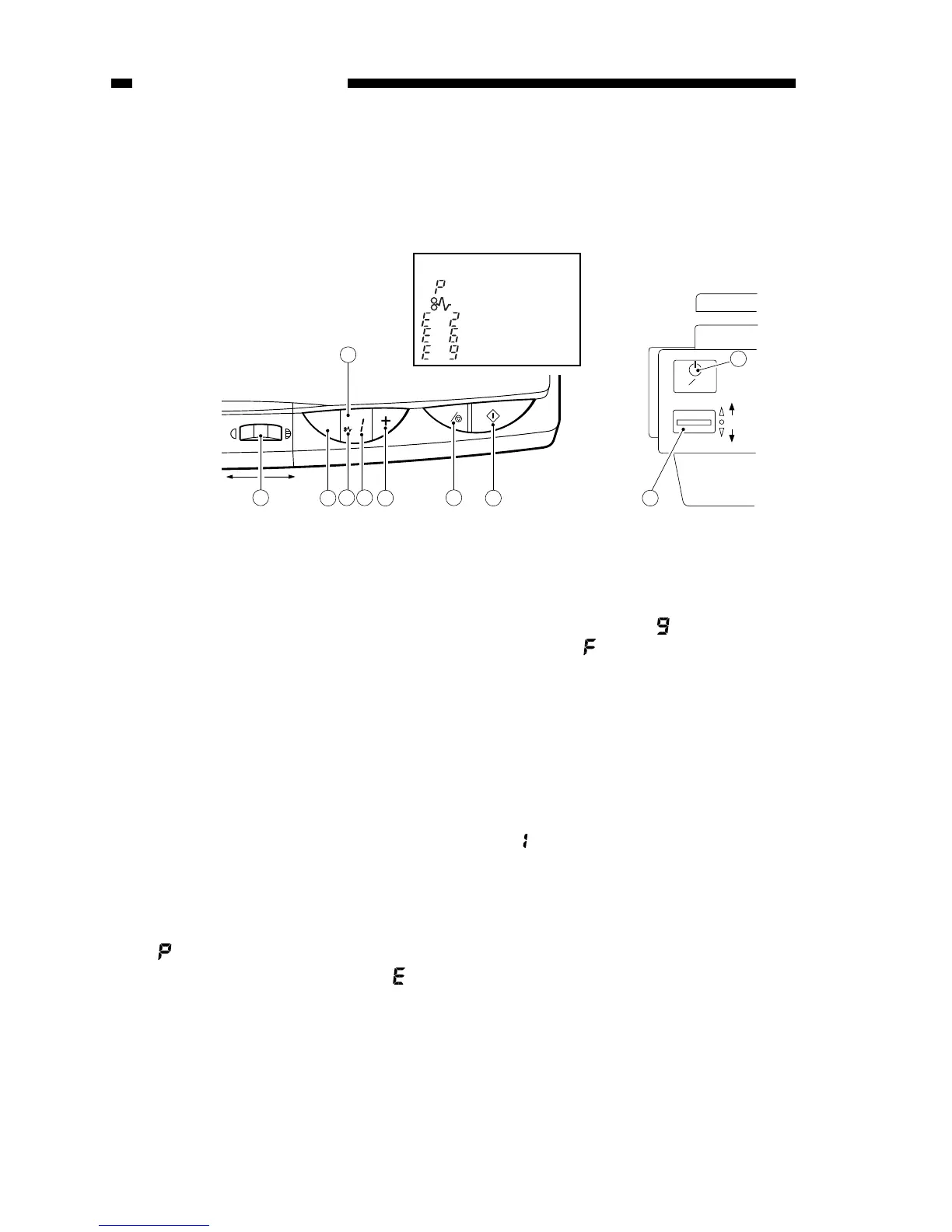
q Density Control Dial
w AE key
• Press it to select/deselect AE
(automatic exposure) mode.
e AE Indicator
• ‘A’ goes ON when AE mode is
selected.
• ‘A’ goes OFF when AE mode is
deselected.
r Jam Indicator
• Flashes when paper jams inside
the copier.
t Copy Count Indicator
• Displays the number of copies
entered by pressing the Copy
Count Set key.
• The count decreases for each copy
made; the initial number is
displayed after the last copy has
been made.
• ‘ ’ is displayed to indicate pick-up
failure or absence of paper; ‘ ’ is
displayed in response to an error
found by self diagnosis.
y Copy Count Set Key
• Each press on the key increases
the copy count (up to 9).
• A press while ‘ ’ is displayed
causes ‘ ’ to appear, indicating all
sheets on the pick-up tray will be
used for continuous copying.
u Clear/Stop Key
• During continuous copying, the key
serves as a Copy Stop key; the
operation stops after finishing the
ongoing copy.
• During standby, the key serves as a
Clear key, setting the copy count to
‘’.
i Copy Start Key
o Power Switch
!0 Density Correction Switch
• Switches copy density among three
settings (top for darker, bottom for
lighter).
• The density is switched by varying
the developing bias.
Figure 1-401A



 To Next Page