COPYRIGHT © 1998 CANON INC. CANON PC400/420/430,FC200/220 REV.0 JAN.1998 PRINTED IN JAPAN (IMPRIME AU JAPON)
5-4
CHAPTER 5 PICK-UP/FEEDING SYSTEM
III. CONTROLLING THE REGISTRATION ROLLER
A. Outline
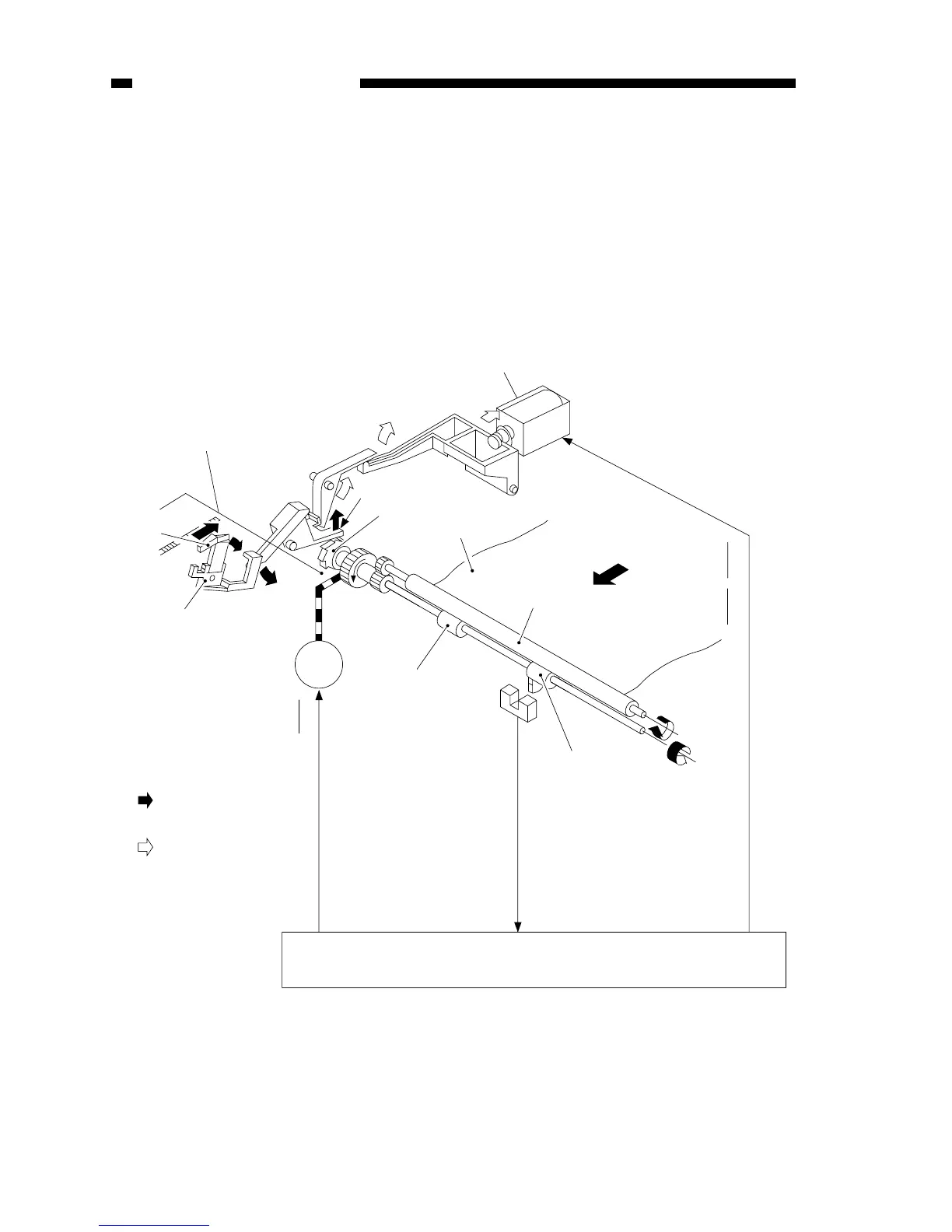
The registration roller rotates when the registration cam found under the copyboard
glass pushes the lever* while the copyboard is moving forward; see Table 3-2 and
Figure 3-28.
* Frees the claw that holds the control ring.
The registration roller stops when the pick-up solenoid (PC420/430/FC220) or the
registration solenoid (PC400/FC200) goes ON to set the claw to the control ring.
Copyboard glass
Registration
cam
Lever
Main motor M1
Claw
Control ring
Copy paper
Upper registration roller
Pick-up direction
Pick-up solenoid (SL1; PC420/430/FC220)
Registration solenoid (SL1; PC400/FC200)
Lower registration rollers
Lower registration
rollers
DC controller/DC power supply PCB
when registration
roller is ON
when registration
roller is OFF
Main motor drive commnand (MMD)
Pick-up/registration solenoid drive commnand (PUSD/RGSD)
:
:
Pick-up sensor
(Q131; PC420/
430/FC220)
Pick-up sensor signal



 To Next Page