COPYRIGHT © 1998 CANON INC. CANON PC400/420/430,FC200/220 REV.0 JAN.1998 PRINTED IN JAPAN (IMPRIME AU JAPON)
4-20
CHPTER 4 IMAGE FORMATION SYSTEM
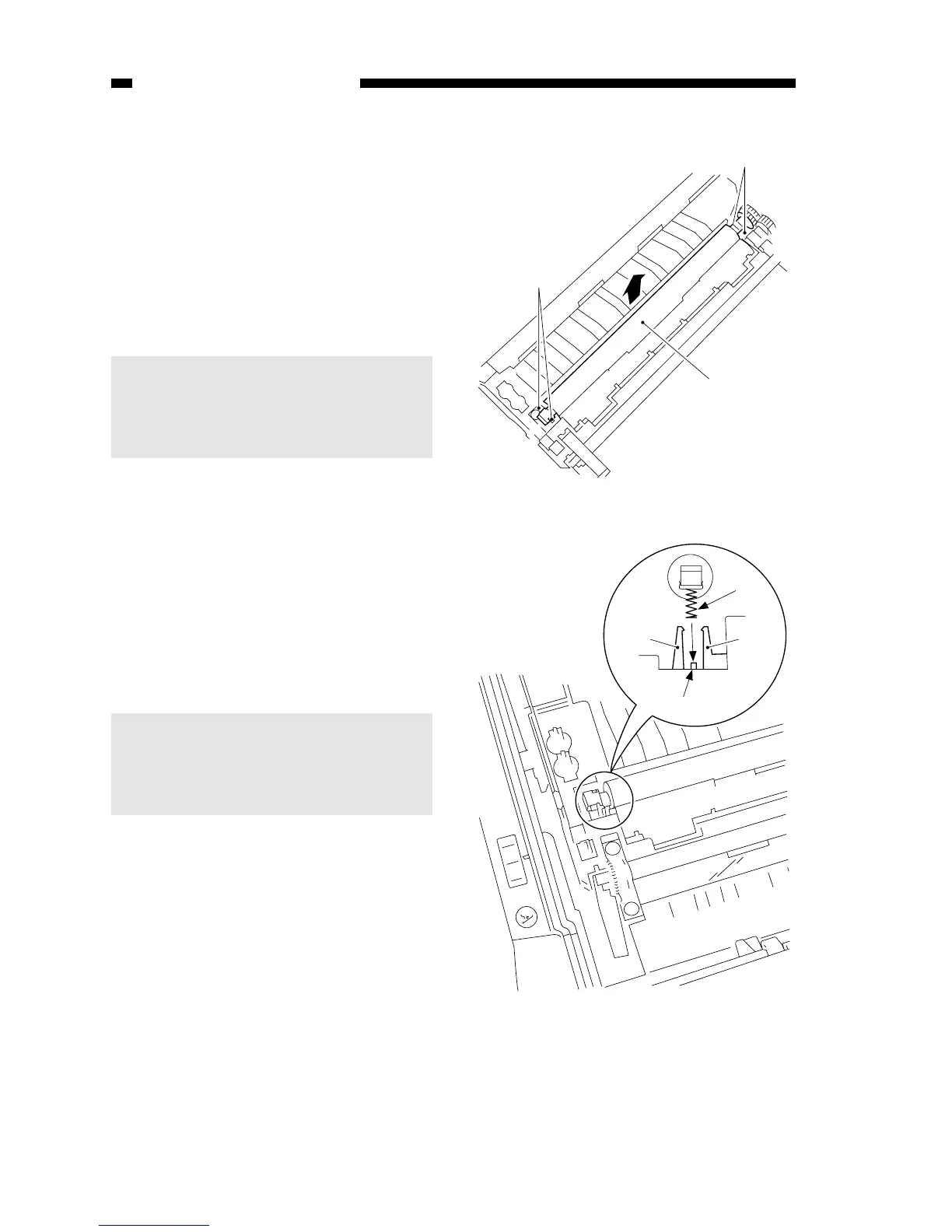
Figure 4-301B
Figure 4-302B
Spring
Boss
Hook Hook
B. Transfer Charging Roller
1. Cleaning the Transfer Charging
Roller
1) Open the top cover, and take out the
cartridge.
2) Wipe off the dirt from the transfer
charging roller lightly using lint-free
paper.
Caution:
1. Do not use water or solvent.
2. Do not touch the roller; make
sure the roller is free of solvent
or oil.
2. Detaching the Transfer Charging
Roller
1) Open the top cover, and take out the
cartridge.
2) Free the tabs
q of the base plate,
and take out the transfer charging
roller w by pulling it up together with
its bushings; at this time, remove the
spring as well.
Caution:
Make sure that the spring is fitted
over the boss in the center of the
hook when attaching the transfer
charging roller; see Figure 4-302B.



 To Next Page