CDE360 Vector Control AC Drive Chapter 3 Mechanical and Electrical Installation
3.1.3 Removal and Installation of the Keypad and Cover
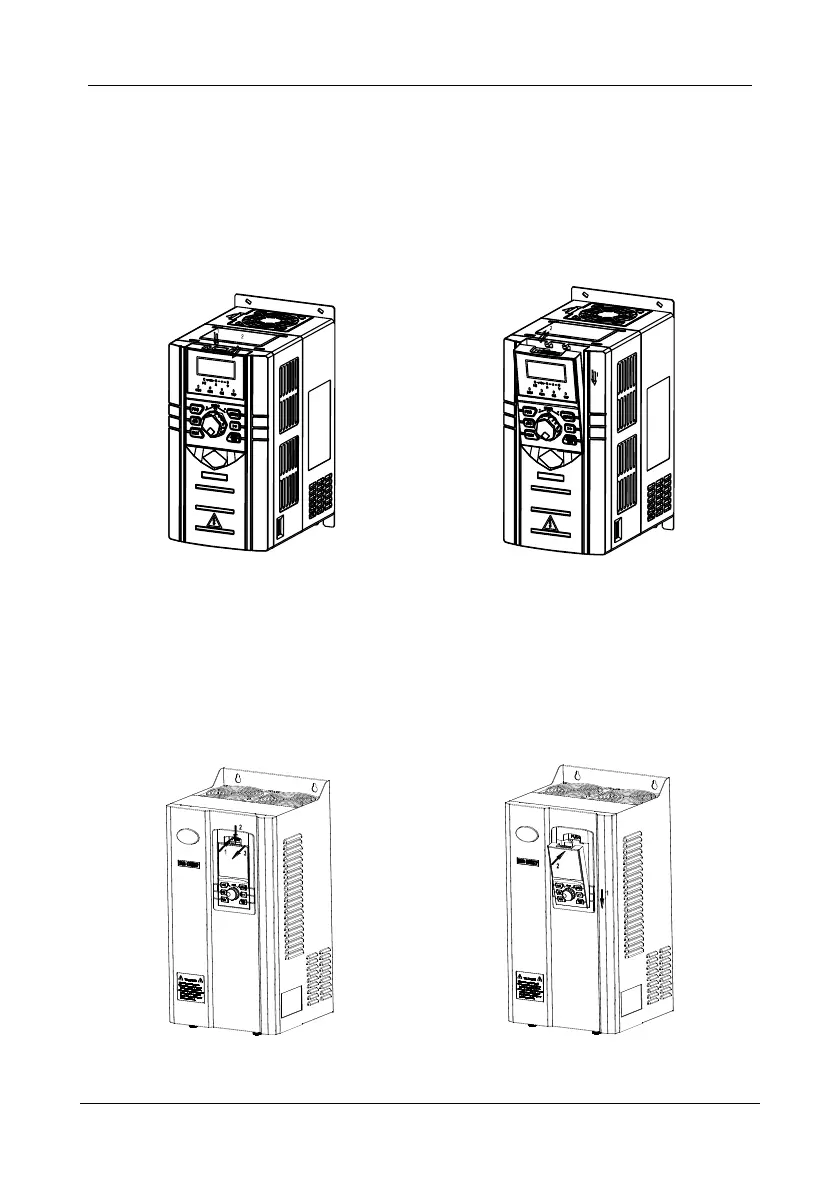
3.1.3.1 Keypad A Removal and Installation
Removal: As shown on the following left figure,please press down the buckle refer to the direction
of Arrow 1.Then uplift the keypad refer to the direction of Arrow 2. And the removal is completed.
Installation: As shown on the following right figure, please incline the keypad slightly towards the
cover or the joint of the bottom side refer to the direction of Arrow 1. Then press down the keypad
refer to the direction of Arrow 2 until hear a snap. And the installation is completed.
Figure 3- 2 Keypad A removal & installation
3.1.3.2 Keypad B Removal and Installation
Removal: As shown on the following left figure,please press down the buckle refer to the direction
of Arrow 1.Then uplift the keypad refer to the direction of Arrow 2. And the removal is completed.
Installation: As shown on the following right figure, please incline the keypad slightly towards the
cover or the joint of the bottom side refer to the direction of Arrow 1. Then press down the keypad
refer to the direction of Arrow 2 until hear a snap. And the installation is completed.
Figure 3- 3 Keypad B removal & installation



 To Next Page