3-CONTROLSANDINSTRUMENTS
Userinformationmode
Theuserinformationmodeincludesthefollowingtabs:
•
Fuelconsumptionhistory
•
Machinestatus
•
Maintenanceinformation
•
Displayconguration
•
Auxiliaryhydraulicsconguration(SeeChapter9)
•
SCRconguration
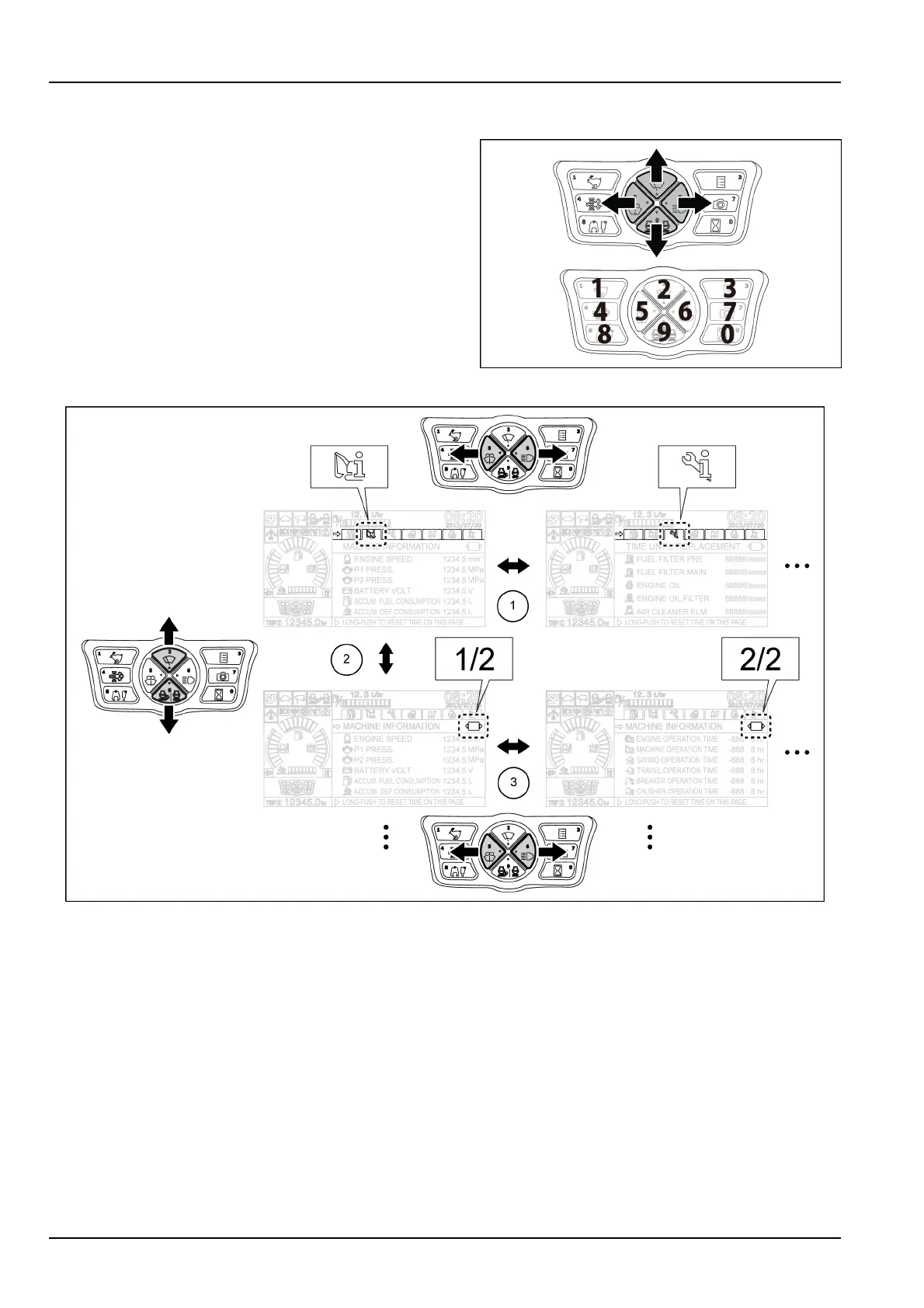
Usetheup,down,left,rightcontrolbuttonstomove
throughthetabsandthepages.Usethecontrolbuttons
asanumerickeypadtoenterthevaluesinthecongura-
tiontabs.
SMIL15CEXY966AA30
SMIL14CEX1794FB31
1.Movingthroughthetabs.
2.Gettingtothepagesinsideeachtab.
3.Movingthroughthepages.
NOTICE:Duringmachineoperation,makesuretoselecttheoperatingmodeofthedisplayinordertoensureproper
visibilityaroundthemachine.Ifthedisplayisswitchedtotheuserinformationmodeduringmachineoperation,the
warningmessageSELECTCAMERASCREENDURINGOPERATIONwillappearonthetopofthedisplay.
3-46


 To Next Page