Cellwatch Frontier System Installation & User Manual
Section IV – Integration Guide-116
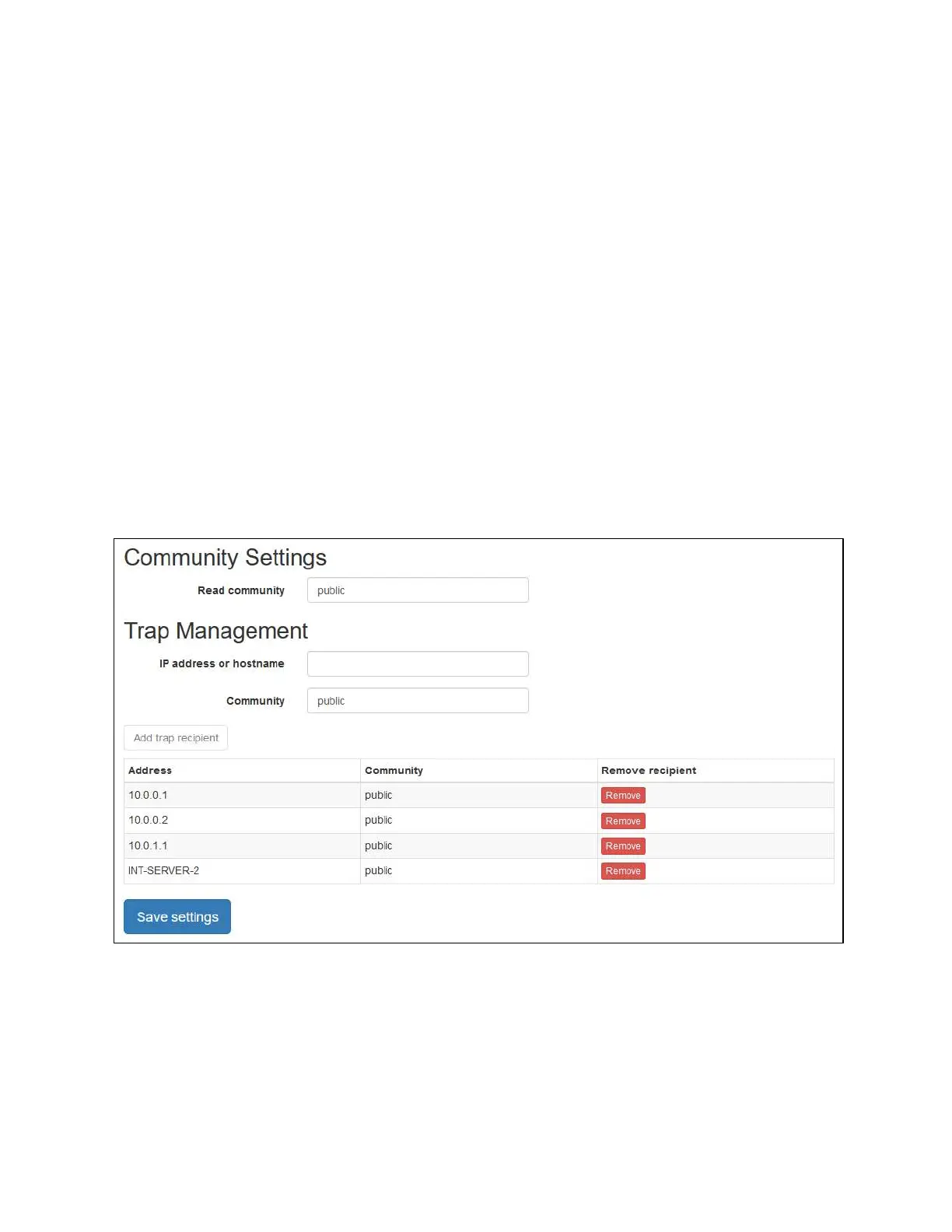
Read community: The string name used to allow read-only access to the device. This name can
be up to 64 characters in length. It is recommended that the default read community string be
changed if Frontier data is sensitive. Write access to the Frontier is not supported.
Adding and removing trap recipients
The Trap Management section of the page allows you to add or a remove a trap recipient. Frontier is
designed to send SNMPv2c unacknowledged traps (TRAP), and any number of recipients can be
specified.
To add a trap recipient, enter the following information:
IP address or hostname: The IP address or hostname of the trap recipient. This must be network
reachable from your Frontier device.
Community: An alphanumeric identifier (0-9, a-z, A-Z) that allows your network management
system (NMS) to identify and receive traps from this device. This name can be up to 64
characters long. For simplicity, we recommend making this the same as the Read community
above.
Click the Add trap recipient button.
SNMPv2c settings tab
To remove a trap recipient, click the Remove button next to the recipient you wish to remove.
To apply any changes to settings on this page, click the Save settings button. Modifying any SNMP
settings on this page will require a restart of the device.



 To Next Page