Cellwatch Frontier System Installation & User Manual
Section I – Installation Guide-36
unused posts; the unused channel must then be nulled in the Frontier web interface. Channel 4 should
always be considered the first channel to be nulled, followed by 3, then 2. This is covered in further
detail in the next few sections.
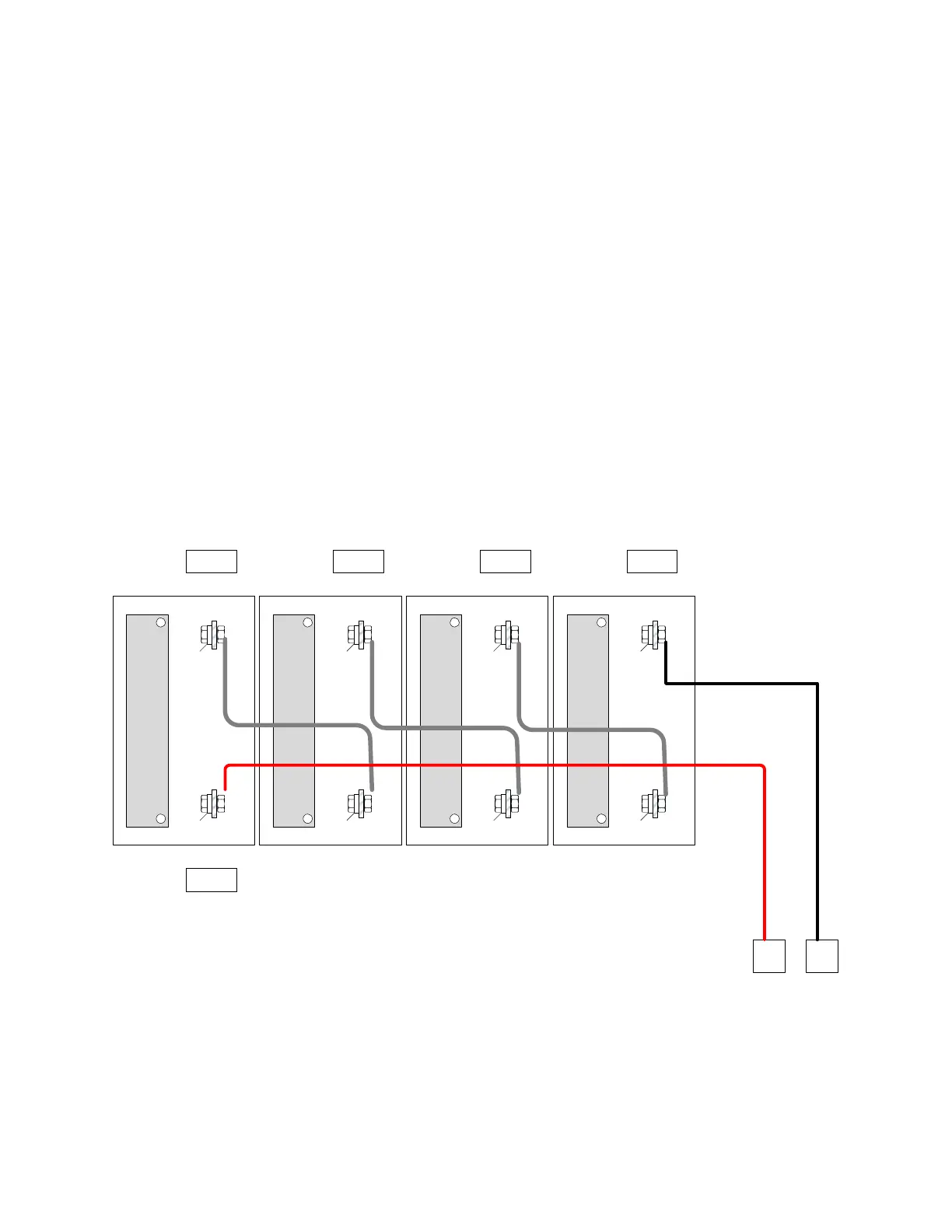
Every Negative Post method (systems divisible by four)
There are a number of ways the battery can be connected to the DCMs depending on the space
available. The ideal method is the “Every Negative Post” method. Using a DCM equipped with
temperature sensors, the Every Negative Post method allows the DCM to monitor for changes in
temperature at the negative post of the cell. The steps for this method can be found below along with
accompanying illustration.
1. Tab the most positive terminal of the first cell or container of the string with two tab washers.
This is the only positive terminal that will be tabbed.
2. Tab the next three negative terminals with a single tab washer.
3. Tab the next negative terminal with four washers. This is the connection for the termination of
the first DCM and the first connection of the second DCM.
4. Repeat steps 2 and 3 until the last negative post of the battery is reached. Place two tab
washers on this post.
+ -
+ -
+ -
+ -
+
-
2 Tabs
1 Tabs 1 Tabs 1 Tabs 4 Tabs
Tabbing for Every Negative Post method
Battery Configurations
There are several battery installations which require an alternate approach. By understanding these, an
unusual installation can be accommodated.



 To Next Page