User Guide | FreeSpeak II™ Base station version
9.2 Transceiver/antenna splitter (PD2203)
The PD2203 antenna splitter is the device that connects multiple
transceiver/antennas to the FS II Base station. It has an RJ-45 connector that
carries the data between a Base station transceiver port and the splitter, and five
RJ-45 connectors to feed that information to and from up to five antennas. The
splitter must be locally powered via the supplied external in-line universal power
supply.
Note: You must power on the splitter before you power on the Base station, otherwise
the Base station might power the splitter. In this case there might be insufficient
power.
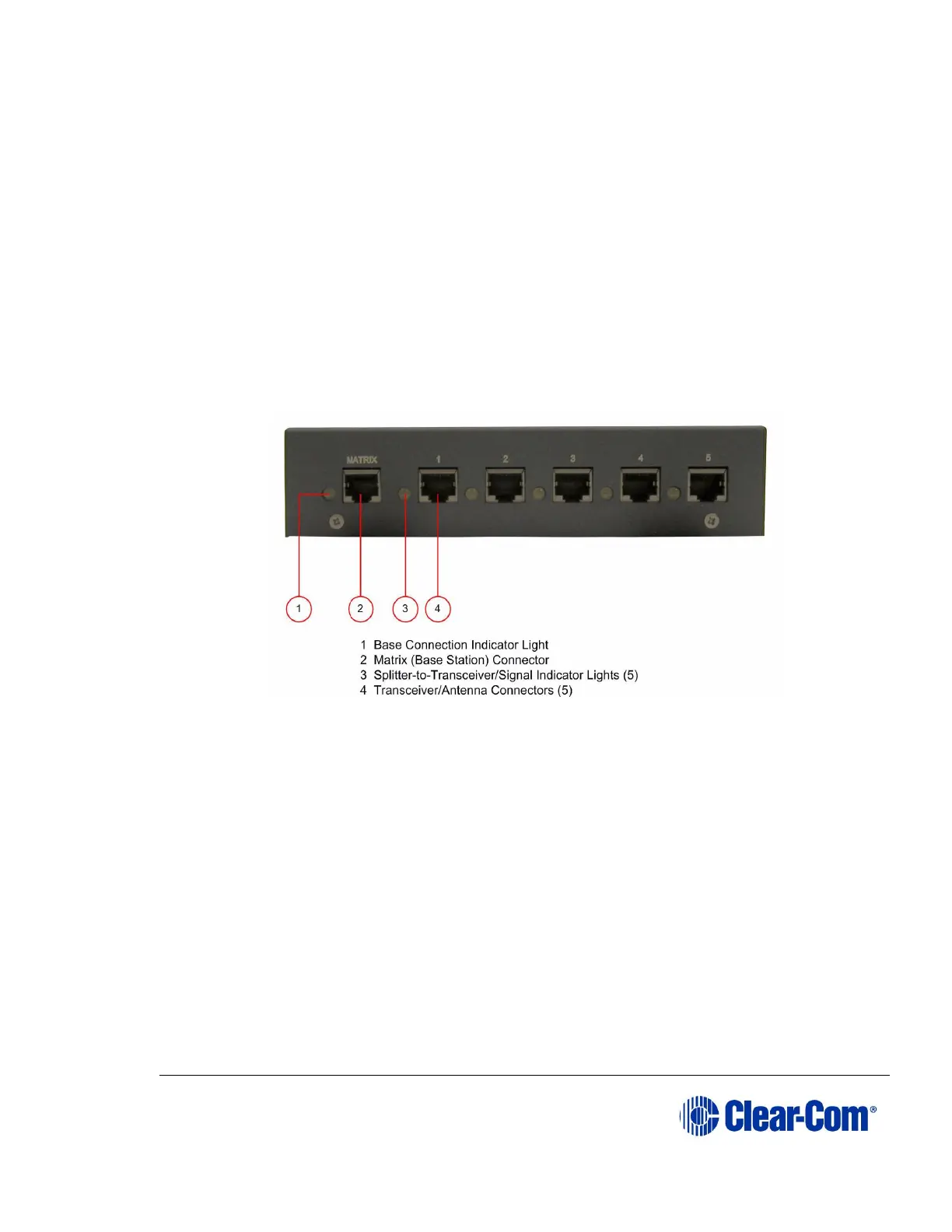
9.2.1 PD2203 Front connector panel
Figure 9-3 FS II Splitter Front Connector Panel
9.2.1.1 Base station connection indicator light
This yellow light indicates that the PD2203 splitter is receiving data from the FS II
Base station.
9.2.1.2 Matrix (FS II Base station) connector
This RJ-45 connector accepts a 4-pair data cable from the FS II Base station
transceiver port. This cable can be up to 1,000 meters (3,200 feet) in length if
24AWG cable is used or up to 500 meters (1,600 feet) if 26AWG cable is used.
Note: It is recommended that shielded Ethernet cable (for instance, CAT-5/5e/6) is
used.



 To Next Page