109
For our setup we’re using Canon’s MP-E 65 lens – which happens to be one of the few lenses on
the market that specifies the depth of field (DOF) for a given aperture at a certain magnification.
If you are unsure of your DOF you can try an online calculator such as DOFMaster
(http://www.dofmaster.com/dofjs.html
) or you can determine it through experimentation.
In this case the published DOF at 3X magnification with an aperture of f/8 is 0.249 mm, or 249
um. We don’t want to run right at the DOF though – the stacking software expects some
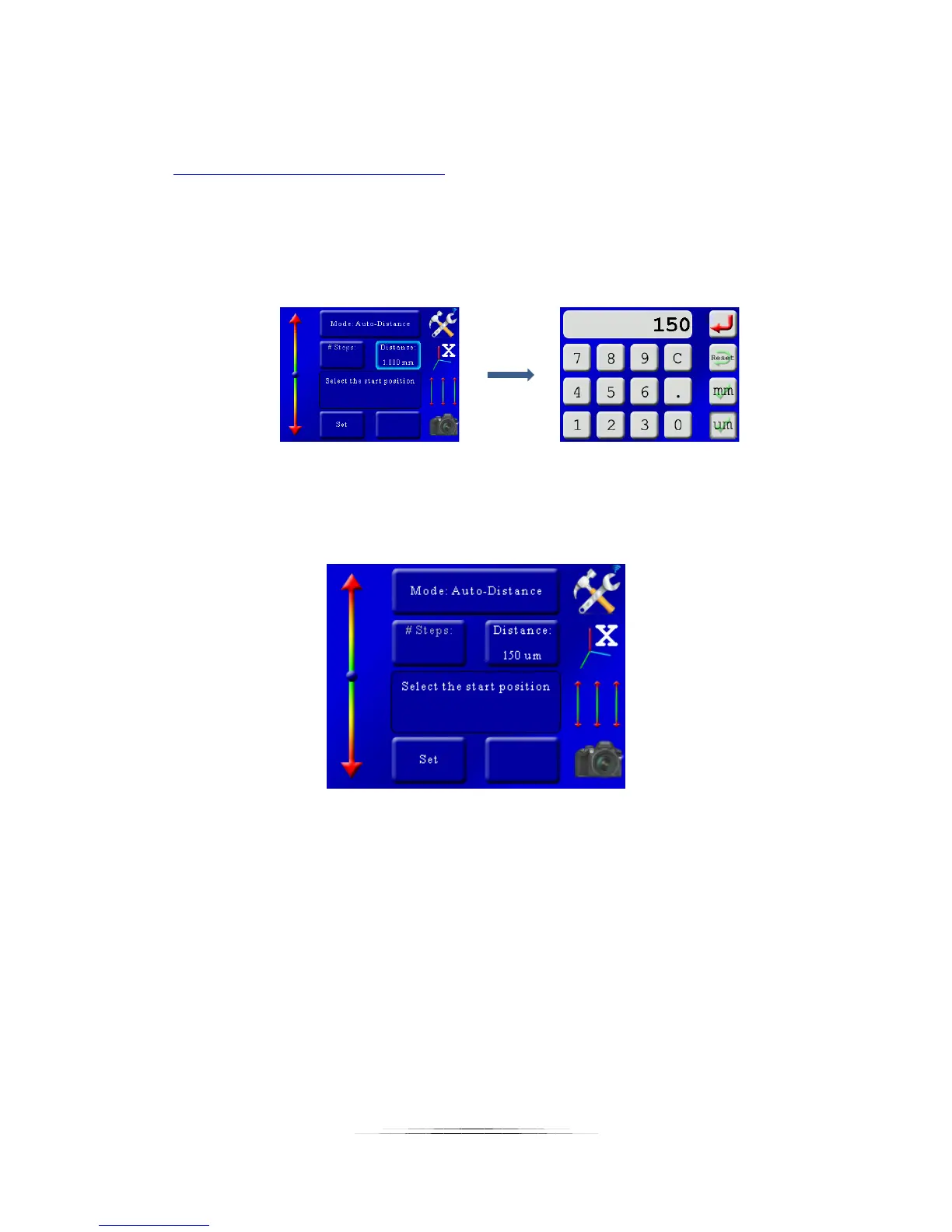
overlap. For this example we’ll set the stack “step” distance to 150 um. To do this press the
“Distance” button and enter 150 um:
Now our step size is selected – We just need to choose our start and stop positions for the stack.
The screen prompts you for this:
To select the start position use the slider on the left side of the screen to position the motor.
You’ll notice the further you move from the center circle the faster the motor will move. You
can use this slider to slow down when you start to approach the start position. With your finger
above the center circle the rail will move forward – and below the circle it will move backward.
Once you’ve found the starting position press the “Set” button at the bottom of the screen.
That will bring up the following screen:



 To Next Page