Secon 5 - Engineer’s Program
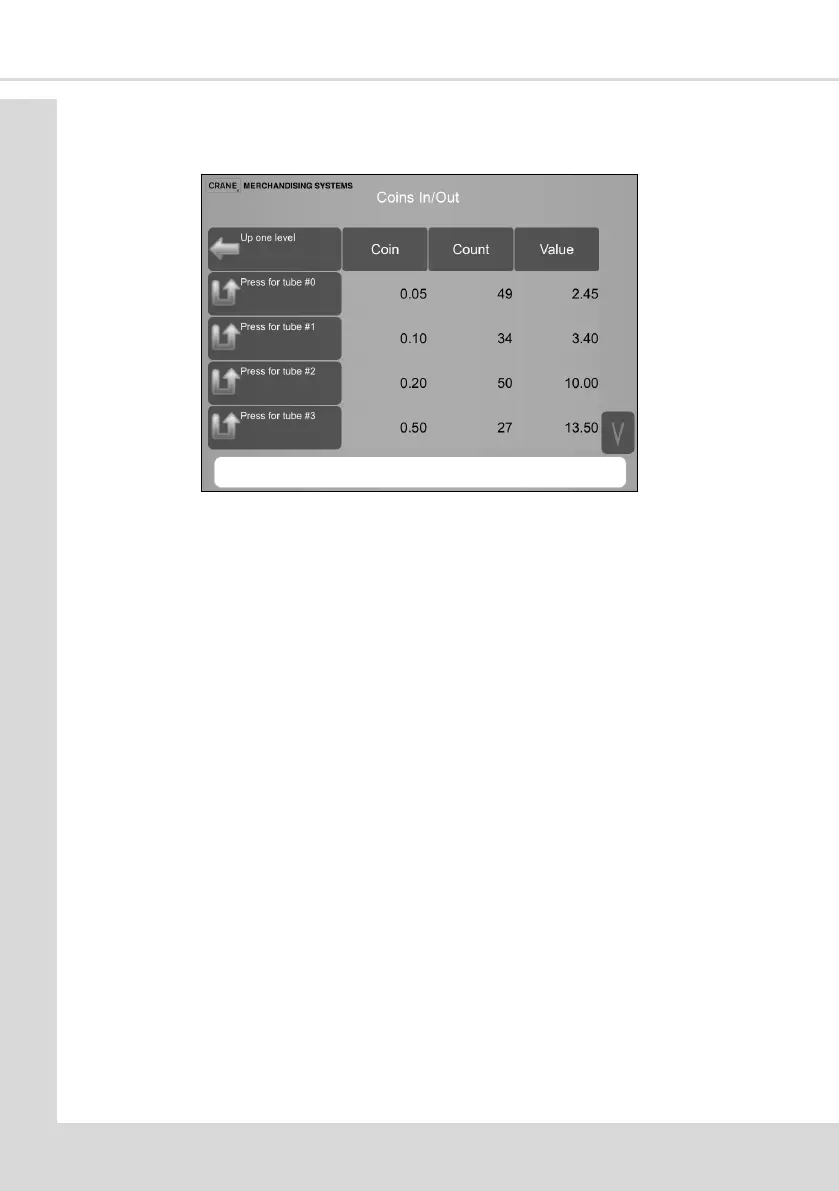
2. Coins In/Out - this menu displays the totals of coins held in the change tubes. The table
displays: the total Coins, Count and Value of the coins and allows coins to be ejected
from the tubes
Selecng the Press for tube #xx will eject coins from the chosen tube
Note: Depending on the make and model of coin mechanism it is also necessary to be in
this mode when loading the coin tubes with change.
3. Force Vend - if enabled the customer must purchase a selecon (it is not possible to
reject coins inserted)
4. Credit For Failed Vend - select either Return Change or Hold Credit, if the machine is
unable to complete a vend with the machine set to Return Change the money will be
returned. If it is set to Hold Credit the machine will hold the credit and the customer
must make an alternave selecon.
5. Low Change Message - a value is entered here via the value entry screen indicang
when the message displayed to the customer advises that they must insert the correct
amount.
6. Accept On Low Change - this is the highest denominaon of coin the machine will
accept if the Low Change messages is being displayed.
7. Mulple Vend Mode - this is either set to Single Vend or Mul Vend. If set to Mul
Vend the customer can keep selecng drinks unl such me as there is insucient
credit to allow any further vends. Once they have purchased all the drinks required
they must press the reject buon to receive their change. If set to Single Vend the
customer will automacally receive their change on compleon of the vend.
8. Show Currency Symbol - this is Enabled or Disabled as required.
Note: In MDB mode the monetary device will dictate to the machine the currency
symbol to be displayed
9. Hide Return Change - this enables you to choose if the reject buon is to be displayed
or not.
10. Save Credit - this is Enabled or Disabled as required. If this is enabled any credit on the



 To Next Page