4.6.2.3.4 ACL Status
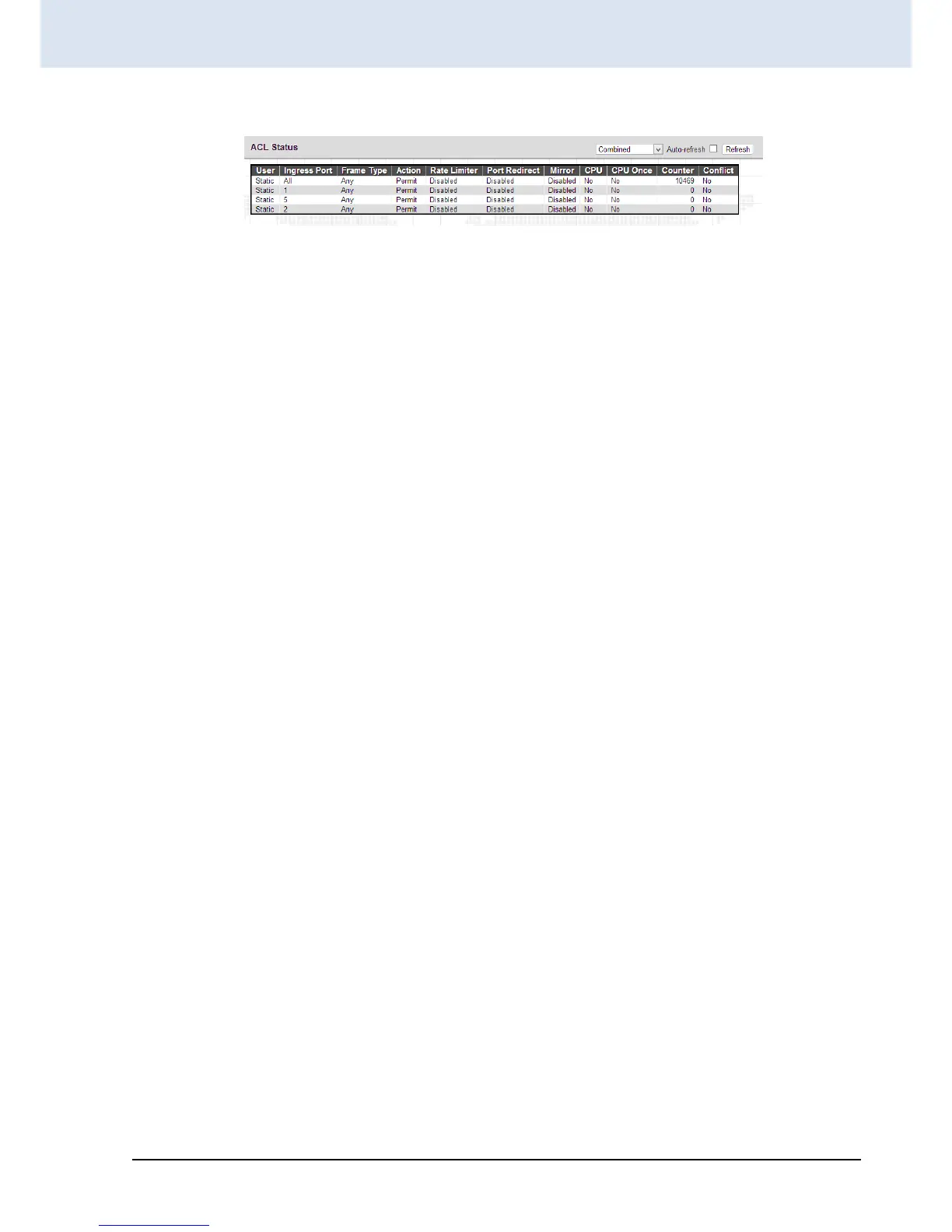
This page shows the ACL status by different ACL users. Each row describes the ACE that is defined. It is a conflict if a
specific ACE is not applied to the hardware due to hardware limitations. The maximum number of ACEs is 256 on each
switch.
User: Display the ACL user.
Ingress Port: Display the ingress port of the ACE. This field could be all ports, a specific port or a range of ports.
Frame Type: Display the frame type of the ACE. Possible values are:
Any: The ACE will match any frame type.
EType: The ACE will match Ethernet Type frames. Note that an Ethernet Type based ACE will not get matched by IP
and ARP frames.
ARP: The ACE will match ARP/RARP frames.
IPv4: The ACE will match all IPv4 frames.
IPv4/ICMP: The ACE will match IPv4 frames with ICMP protocol.
IPv4/UDP: The ACE will match IPv4 frames with UDP protocol.
IPv4/TCP: The ACE will match IPv4 frames with TCP protocol.
IPv4/Other: The ACE will match IPv4 frames, which are not ICMP/UDP/TCP.
Action: Display the forwarding action of the ACE.
Permit: Frames matching the ACE may be forwarded and learned.
Deny: Frames matching the ACE may be forwarded and learned.
Filtered: Frames matching the ACE are filtered.
Rate Limiter: Indicates the rate limiter number of the ACE. The allowed range is 1 to 16. When Disabled is displayed, the
rate limiter operation is disabled.
Port Redirect: Indicates the port redirect operation of the ACE. Frames matching the ACE are redirected to the port
number. The allowed values are Disabled or a specific port number. When Disabled is displayed, the port redirect
operation is disabled.
Mirror: Specify the mirror operation of this port. The allowed values are:
Enabled: Frames received on the port are mirrored.
Disabled: Frames received on the port are not mirrored. The default value is "Disabled".
CPU: Forward packet that matched the specific ACE to CPU.
CPU Once: Forward first packet that matched the specific ACE to CPU.


 To Next Page
 Loading...