Step Action
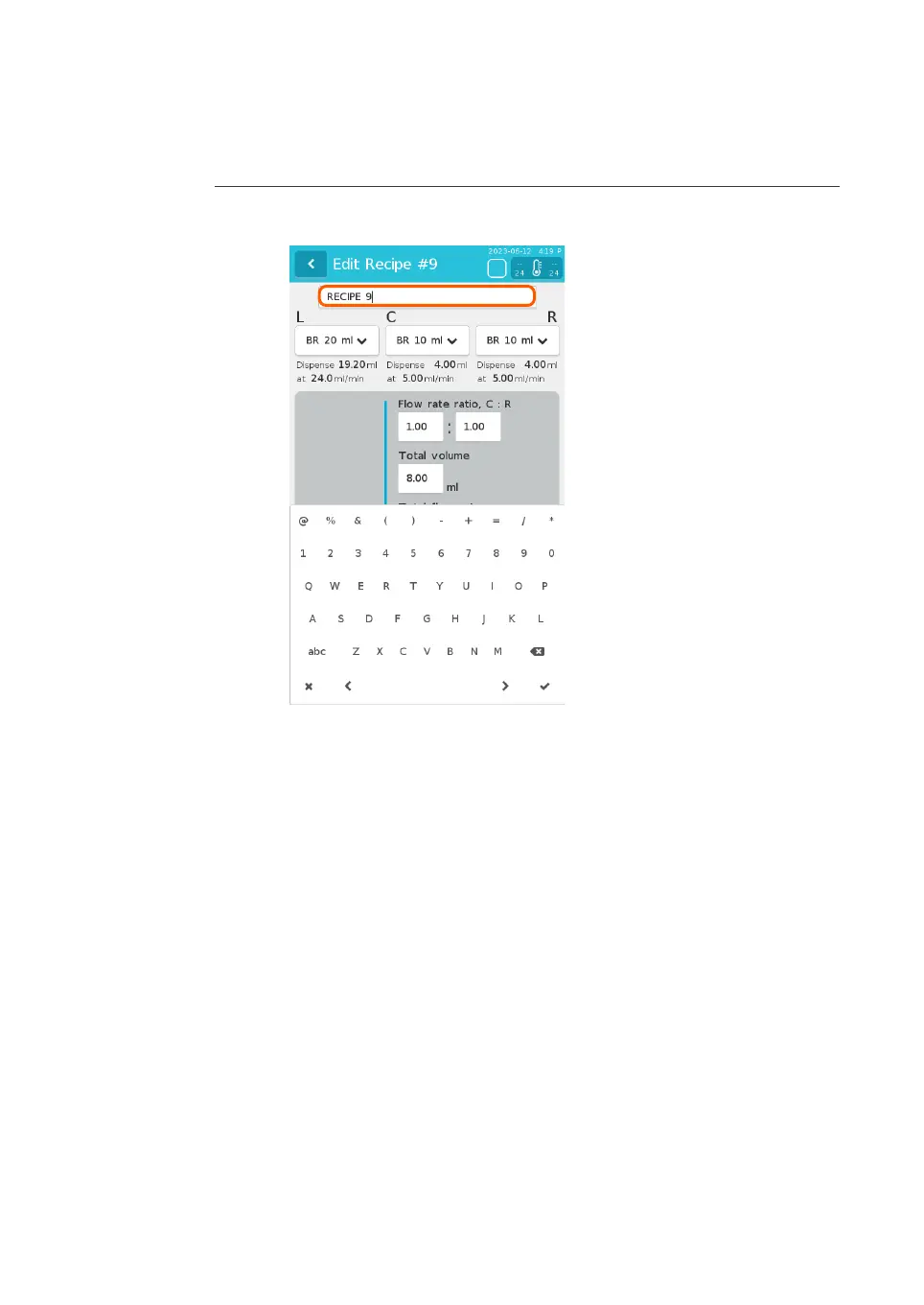
3 Tap the recipe name field to open the on-screen keyboard and enter the
recipe name.
Note:
T
o
close the on-screen keyboard, tap the check mark at the bottom right of
the on-screen keyboard or tap anywhere on the screen.
4 Enter the parameters as follows. See Se
ction 5.1 Parameters, on page 56 for
parameter ranges and recommendations.
a. Tap the arrows under L, C, and R to open a drop down list and select the
syringe sizes.
Note:
The L field is only required for recipes that use a NxGen Dilution or
NxGen500D cartridge. For all other cartridges, leave this field blank.
b. Tap each field to open the on-screen keyboard and enter the parameter
value with up to two decimal places.
Note:
Enter values for Dilution ratio, L : (C+R) only for recipes that use a
NxGen Dilution or NxGen500D cartridge. For all other cartridges, leave
this field blank.
5 Preparation
5.
2 Recipes
NanoAssemblr Ignite and Ignite+ Operating Instructions NIN1134 AA 69











 To Next Page