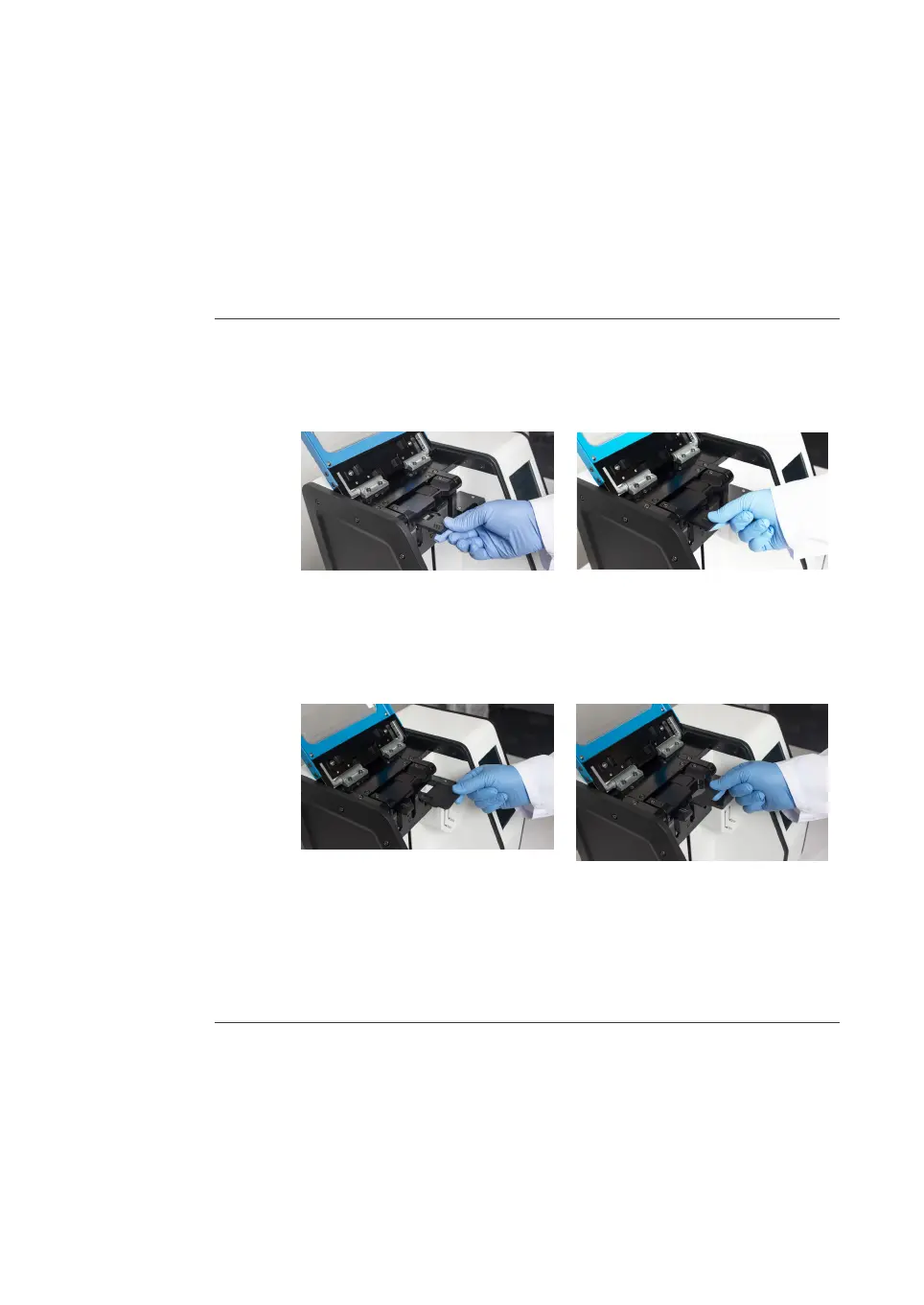
6.3.5 Prepare the cartridge
Lo
ad a cartridge
Follow the steps below to load a two- or three-inlet cartridge.
Step Action
1 Open the lid of the instrument.
2 If using a two-inlet cartridge, insert the cartridge adapter with the arrows
f
a
cing upwards into the rotating block above the L pusher.
Result:
Th
e cartridge adapter snaps into place magnetically.
3 Insert the cartridge into the rotating block with the cartridge label facing up.
Result:
Th
e cartridge snaps into place magnetically.
4 Make sure the cartridge indicator in the information bar of the user interface
is green. See Cartridge indicator states, on page 30 for information about the
status of the cartridge.
Optional: Prime the cartridge
The option for a short priming sequence is available. However, priming is not required
when using the system due to the following design features:
• Single-use cartridges remove the risk of cross-contamination from prior runs.
• Cartridges are manufactured using a highly automated process in a cleanroom
environment, minimizing the potential for leaks, blockages, and debris.
6 Operation
6
.
3 Run a procedure
6.3.5 Prepare the cartridge
NanoAssemblr Ignite and Ignite+ Operating Instructions NIN1134 AA 90











 To Next Page