SEVEN PLUS User’s Guide | 27
You can set one of these (or neither), but not both.
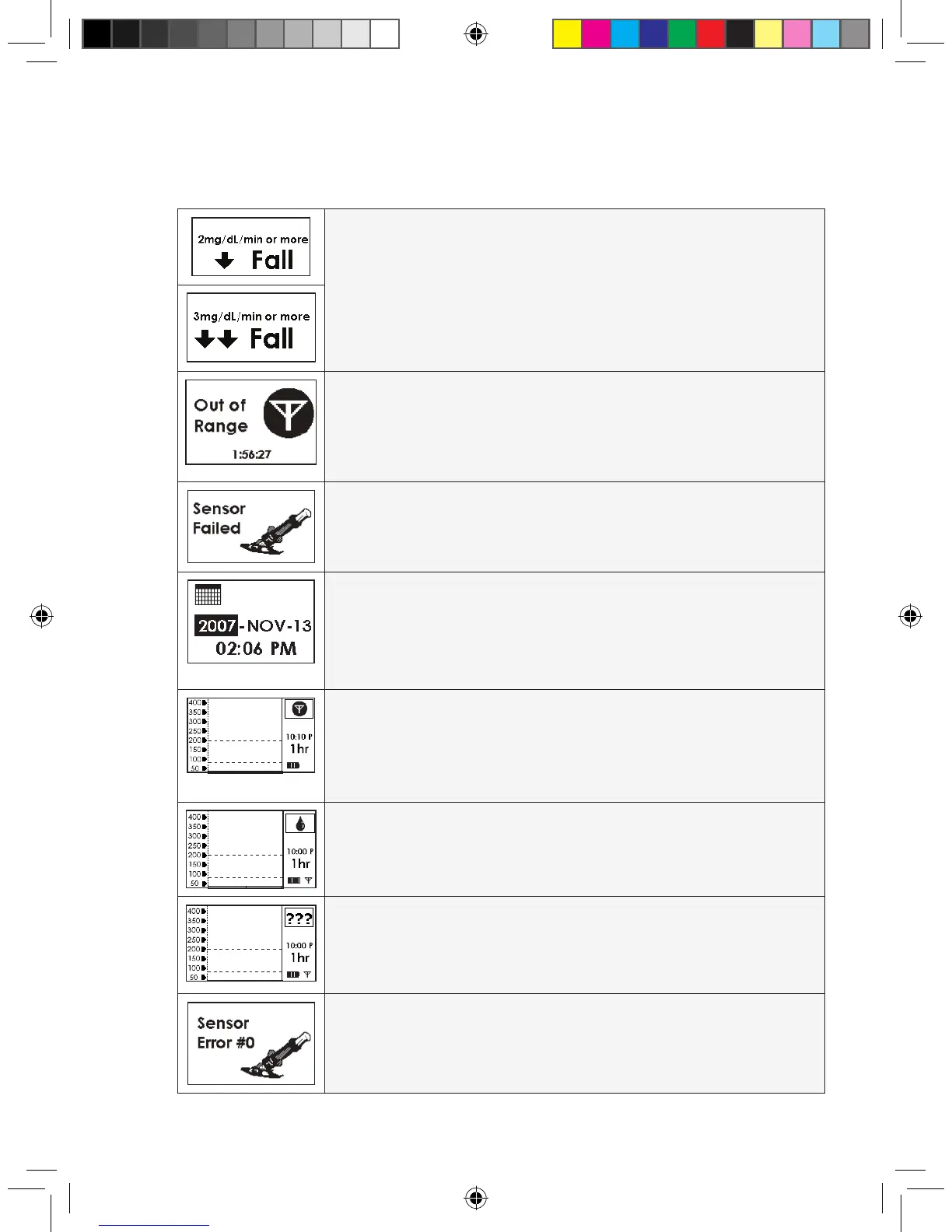
FALL ALERT: Your glucose levels are falling at 2mg/dL per minute or more.
OR
RAPID FALL ALERT: Your glucose levels are falling fast at 3 mg/dL per
minute or more.
OUT OF RANGE ALERT: The Transmitter and Receiver are not talking
and you will not get readings.
FAILED SENSOR SCREEN: The Sensor is not working. You will need to
replace the Sensor at this time.
TIME LOSS ALERT: The Receiver’s back-up battery drained, so you need
to reset the Receiver’s time. The Time Loss Alert will
automatically take you to the Time Setting Screen.
If you were in a Sensor Session, this Alert will end your session. You must set
the correct date and time and then start a new session.
OUT OF RANGE/NO ANTENNA: The Receiver and Transmitter are not
talking and your glucose data has not been sent to the Receiver in the last 5
minutes. If you see this screen you should make sure the Receiver and Trans-
mitter are within 5 feet of each other. See Chapter 8 for Troubleshooting.
OUT OF CALIBRATION: The SEVEN PLUS is not calibrated. If you see
this screen you should take and enter an additional
ngerstick reading.
UNKNOWN SENSOR GLUCOSE READINGS:
The Sensor is sending glucose readings that the Receiver does
not understand.
SENSOR ERROR #0: The Sensor cannot calibrate. If you see this screen,
enter at least 1 more calibration ngerstick reading in the next 10-15 minutes. If
no readings appear on the Receiver, the
Sensor needs to be replaced.



 To Next Page