DA20-C1 Flight Manual
Description
Doc # DA202-C1 April 16, 2009 Page 7 - 6
7.3.5. Flight Control Lock
A flight control lock, P/N 20-1000-01-00, is provided with each aircraft and should be installed
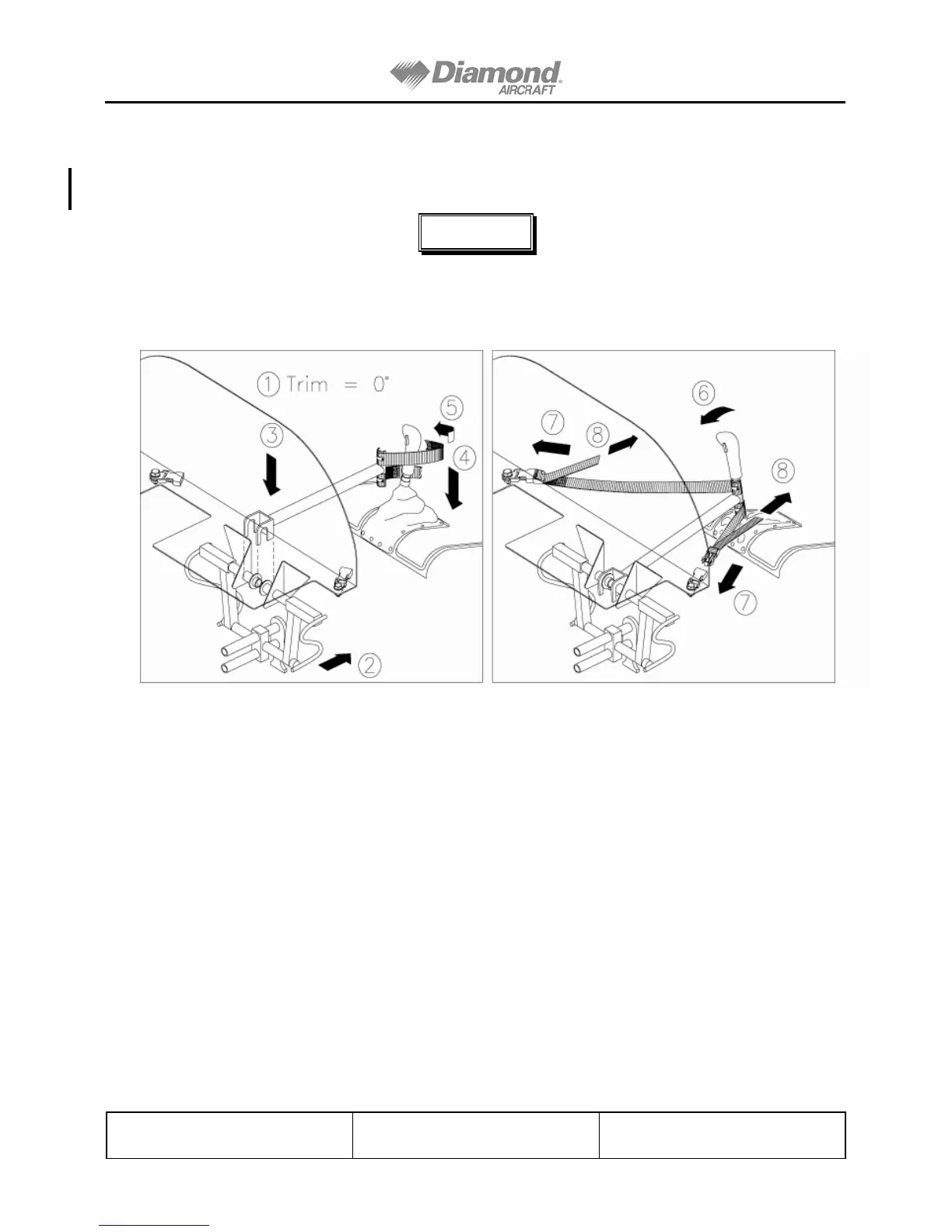
whenever the aircraft is parked. See Figure 7.1, Installation and Removal of the Control Stick.
NOTE
Failure to install the flight control lock whenever the aircraft is
parked may result in control system damage, due to gusts or
turbulence.
Figure 7.1. Installation and Removal of the Control Lock
1. Trim aircraft to neutral.
2. Pull the left rudder pedals fully aft and check they are locked in position.
3. Hook the Control Lock's forks over the rudder pedal tubes as shown above.
4. Push down the Control Stick's leather boot to expose the Control Stick tube, and
push the Control Stick forward against the Control Lock.
5. Loop the straps around the Control Stick as shown, and push forward on the
Control Stick.
6. Clip the straps into the left and right buckle receptacles located under the
instrument panel.
7. Adjust the straps as required. Straps should be tight to secure the controls
properly.
8. TO REMOVE, push the Control Stick forward (to relieve strap tension). Unclip
the straps and remove the Control Lock. Store in the aircraft's baggage
compartment.
Revision 24


 To Next Page