• Select "Projector" from the menu and then click the "Ok" button.
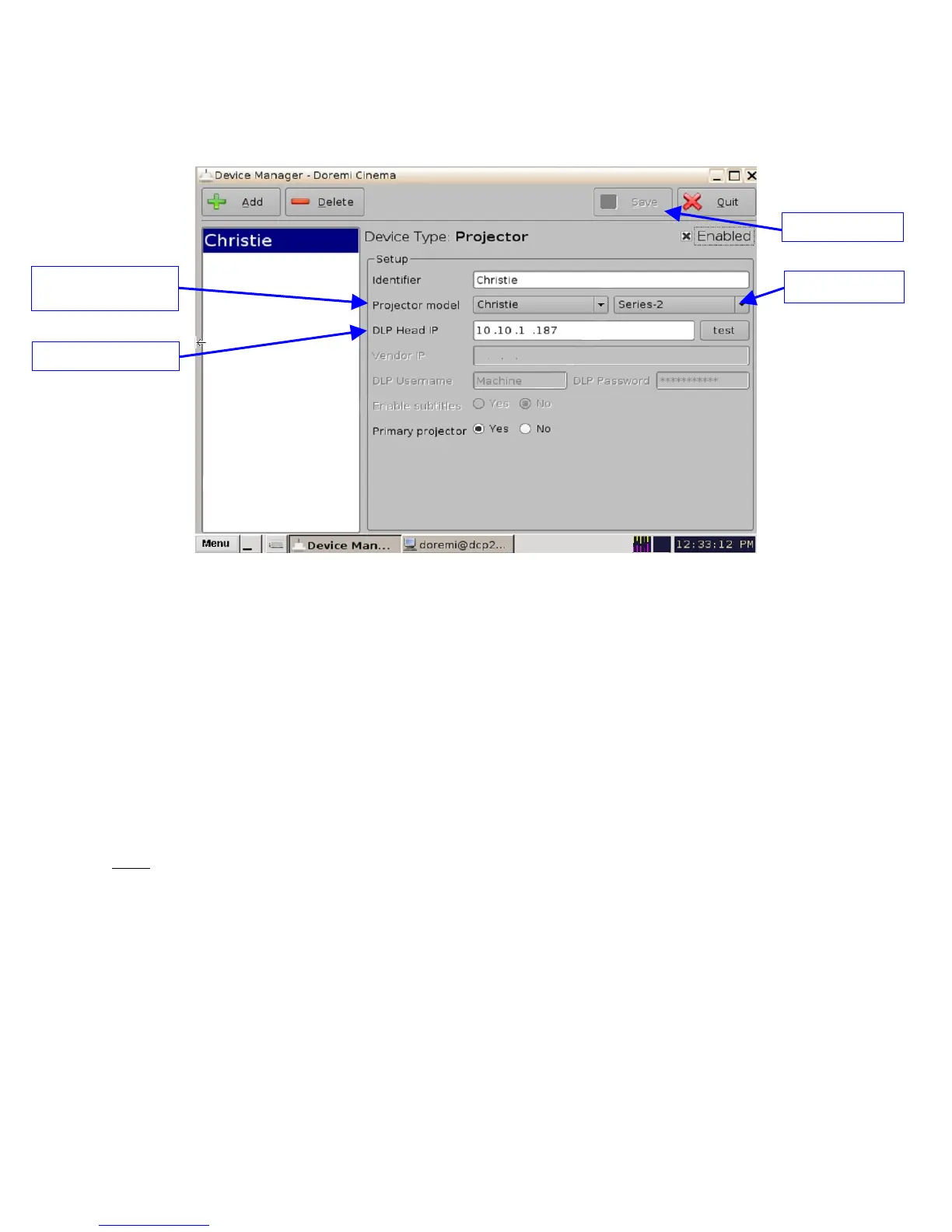
• The following window will appear:
Figure 123: Device Manager Menu with Projector Configuration
• Select the "Projector model" and click on "Christie" and then select "Series-2".
• Select the "DLP Head IP" address for the projector.
• Click the "Save" button and then input the password to record the settings.
• Click the "test" button to verify the connection with the projector.
18.1.3 IMB Marriage Procedure
Note: Currently Christie does not have software that will support the marriage with an IMB. To
continue using the IMB, contact Doremi to receive a black-out dlm for six months. If after six
months there is still no software to support the IMB marriage then contact Doremi to renew the
black-out dlm. If Christie does release software to perform the marriage on a Series 2 projector
then please see document # CRT.OM.001420.DRM to perform the IMB marriage (located on
the ftp site).
_____________________________________________________________________________________
SHV.OM.001293.DRM Page 114 Version 1.3
Doremi Cinema LLC Confidential
"Projector model"
field
"DLP Head IP" field
"Series 2" field
"Save" button



 To Next Page