8 Control Panel
• To access the Control Panel window go to “Menu → Control Panel”
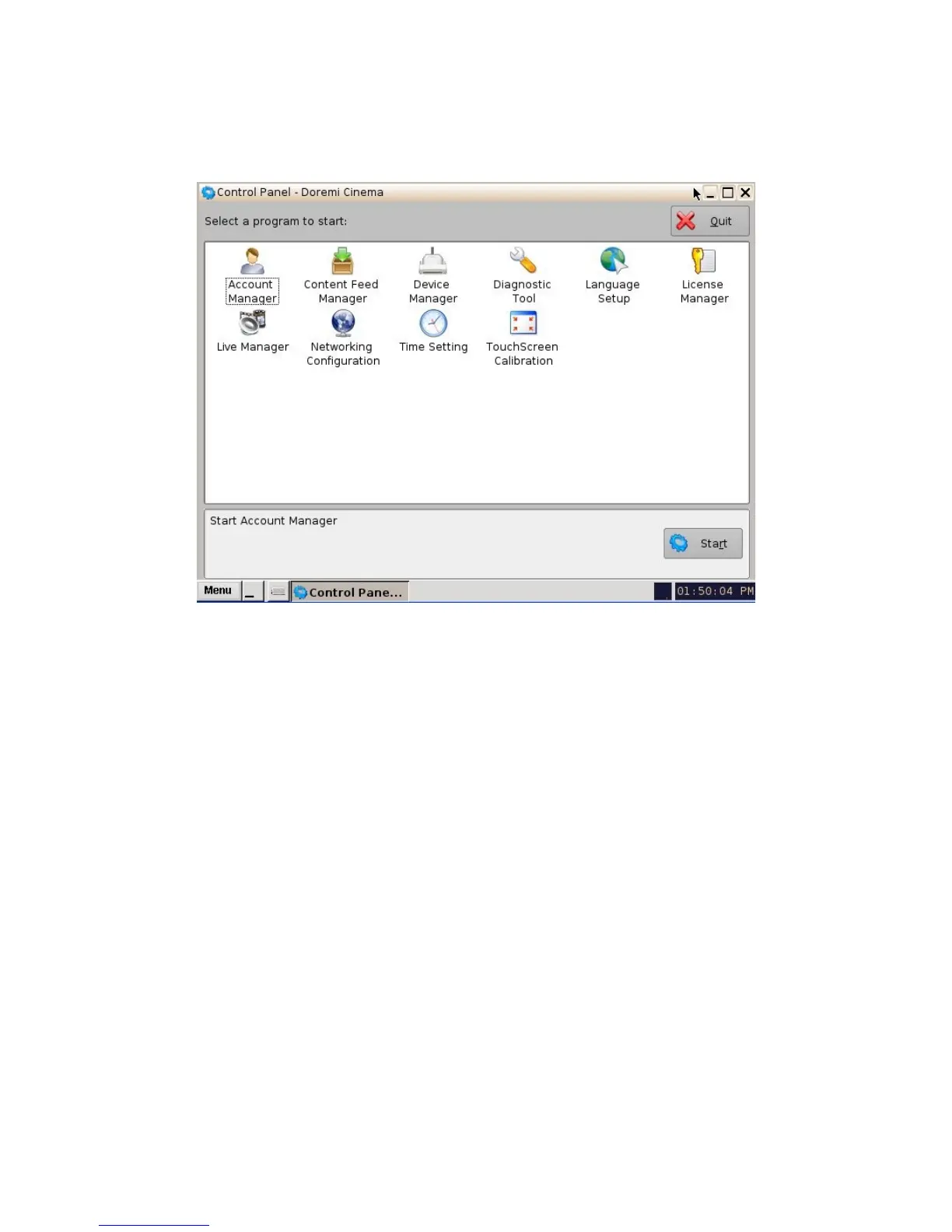
• The following will appear:
Figure 53: Control Panel Window
• The Control Panel window provides access to various software as listed below: See
Figure 53 above for more information.
1) Account Manager GUI: allows the user to add/remove/edit user accounts.
2) Content Feed Manager: allows the user to build a netmap.
3) Device Manager GUI: allows the user to launch the Device Manager GUI.
4) Diagnostic Tool: allows the user access to the Diagnostic Tool GUI – see document
“Diagnostic Tool User Guide”.
5) Language Setup window: allows the user to change the language used on the
ShowVault.
6) License Manager GUI: Shows all of the licenses that were ingested onto the unit.
7) Live Manager GUI: allows the user to create a CPL to handle live events.
8) Network Configuration: opens the Network Configuration set-up windows.
9) Time Setting: allows the user to set the local time.
10) Touch Screen Calibration: initiates the touch screen calibration process (only applicable
to the 3RU).
_____________________________________________________________________________________
SHV.OM.001293.DRM Page 49 Version 1.3
Doremi Cinema LLC Confidential



 To Next Page