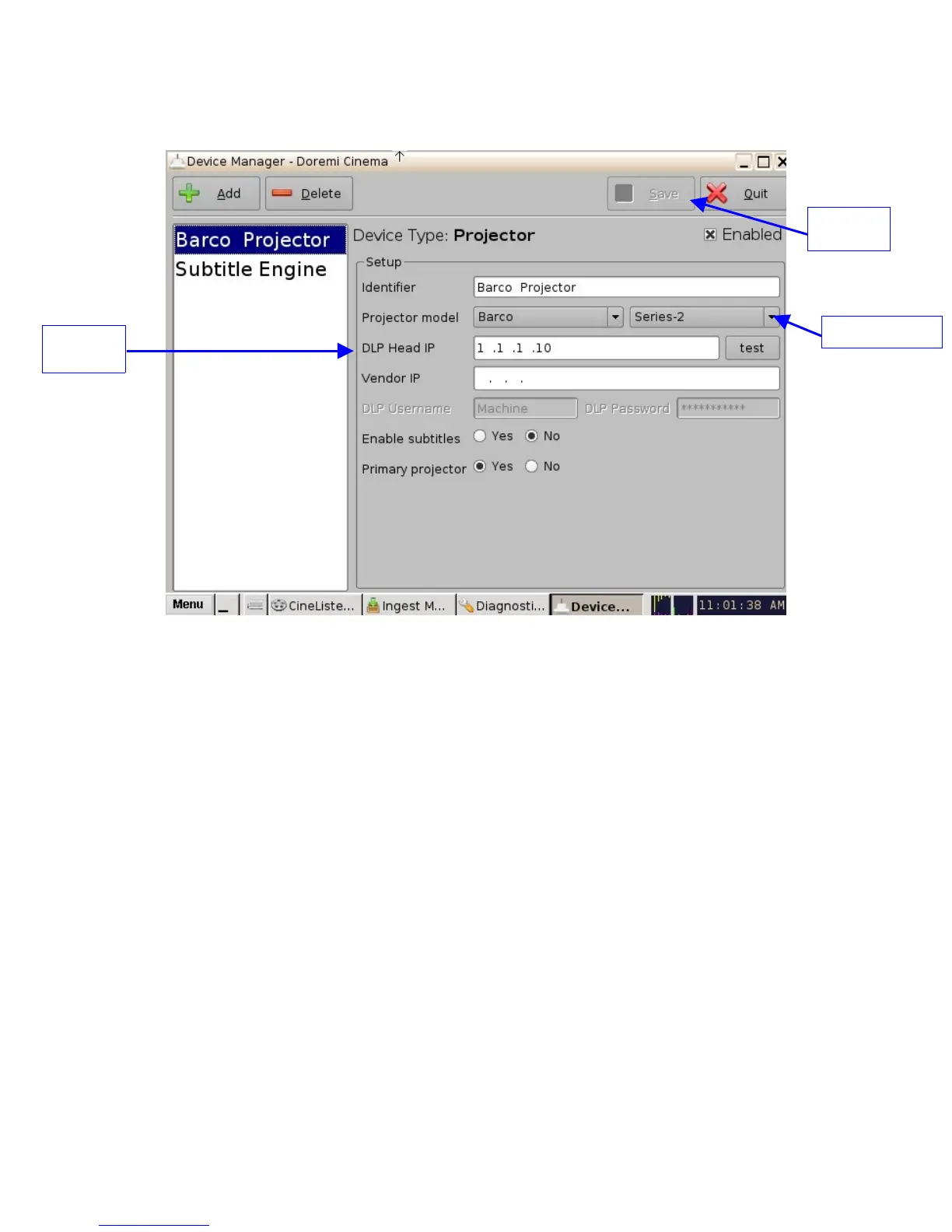
• The following window will appear:
Figure 104: Device Manager Menu With Device Added
• Select the "Projector model" and click on "Barco" and then select "Series-2" (see Figure
104 above).
• Select the "DLP Head IP" address for the projector (see Figure 104 above).
• Click the "Save" button and then input the password to record the settings ((see Figure
104 above).
• Click the "test" button to check if the IP is active and connected (see Figure 104 above).
16.1.6 IMB Marriage Procedure
Barco projectors use a combination of a “Dallas key” (an RFID transponder) and a series of
button presses to arm the marriage. The procedure, shown below, consists of initiating the
process using the Dallas key, then pressing the channel buttons in a sequence. It is not
necessary to keep the Dallas key next to the security socket once the channel button backlight
turns yellow. You only have five seconds to enter the key sequence. The key sequence is as
follows: 1-2-3-4-5-6-1-2.
_____________________________________________________________________________________
SHV.OM.001293.DRM Page 102 Version 1.3
Doremi Cinema LLC Confidential
"Series 2" field
"Save"
button
"DLP Head
IP" field



 To Next Page