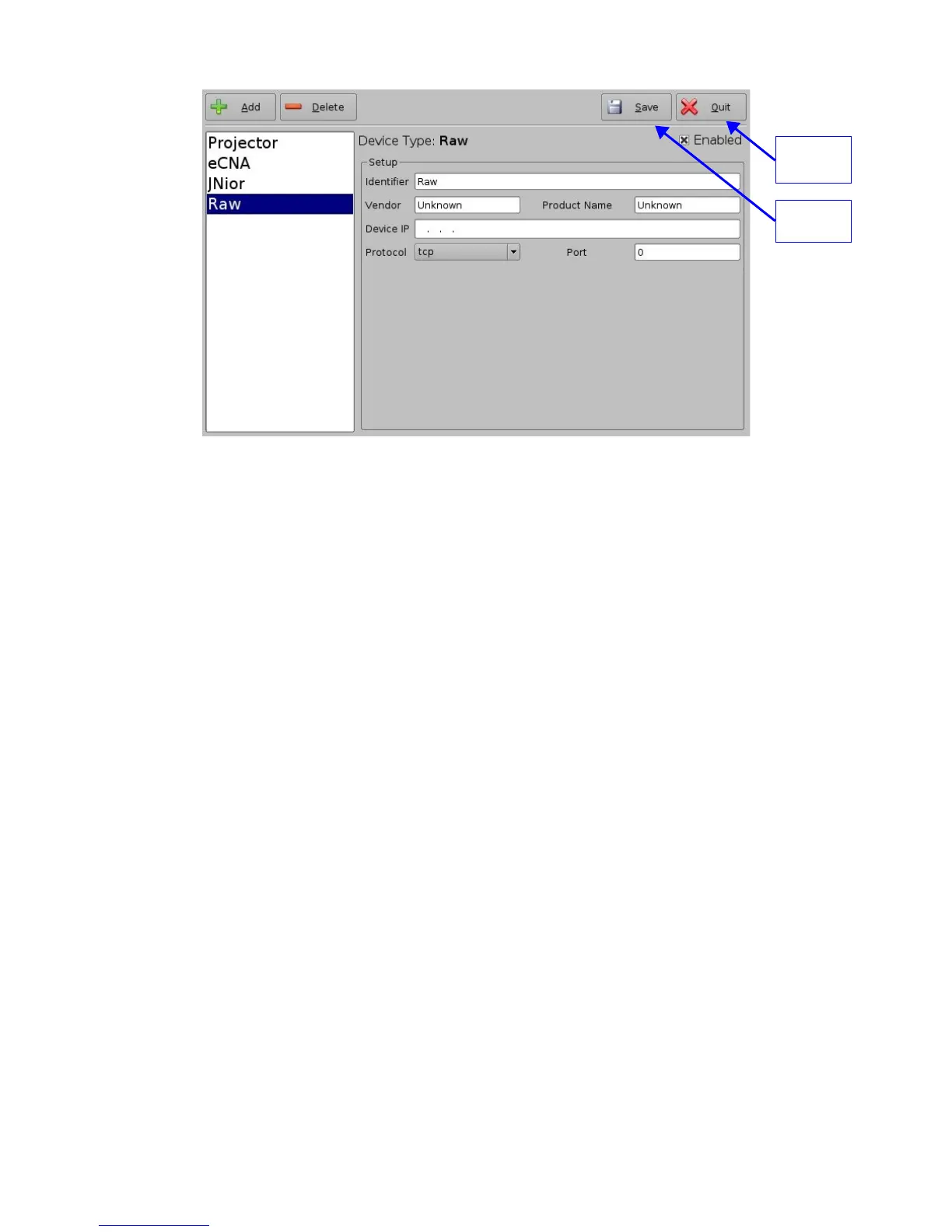
Figure 25: Device Manager GUI – Raw Device Set Up
• Enter the IP address of the "Raw" device in the “Device IP” field (see Figure 25 above)
• Chose the protocol to be used (TCP or UDP) and the proper Port number
• Click the “Save” button to record the settings (see Figure 25 above)
• A window will appear asking for a password, enter the password to proceed
• If finished with the configuration then click the "Quit" button and save the settings
5.3.2 Raw Device Removal
• To remove the "Raw" device click on its name on the left part of the "Device Manager"
GUI and press the “Delete” button (see Figure 25 above)
5.4 ISE1 Device
The ISE1 Device provides for communication with the IMAX Secure Enclosure. If more
information is needed, please contact Doremi Technical Support.
5.5 CSS Device
The CSS Device provides for communication with the Sony Cavity Security System. If more
information is needed, please contact Doremi Technical Support.
5.6 3D Set Up
5.6.1 Projector Configuration for 3D or 48fps
When using a ShowVault/IMB configuration for 3D presentation the projector needs to be set to
the proper color space. Contact the projector vendor to know how to configure the projector
properly.
_____________________________________________________________________________________
SHV.OM.001293.DRM Page 29 Version 1.3
Doremi Cinema LLC Confidential
“Quit”
button
“Save”



 To Next Page