4 ShowVault IP Address
All ShowVault servers are shipped with a default IP address of 192.168.100.50 on the Ethernet
port (Eth1) and a DHCP assigned dynamic IP address on the Ethernet port (Eth0) – see section
3.3 to locate each Ethernet connector.
• To change the IP address of the ShowVault server, go to “Menu → System →
Networking Setup” and follow the steps below:
• From the ShowVault menu, select “Menu → System → Networking Configuration”
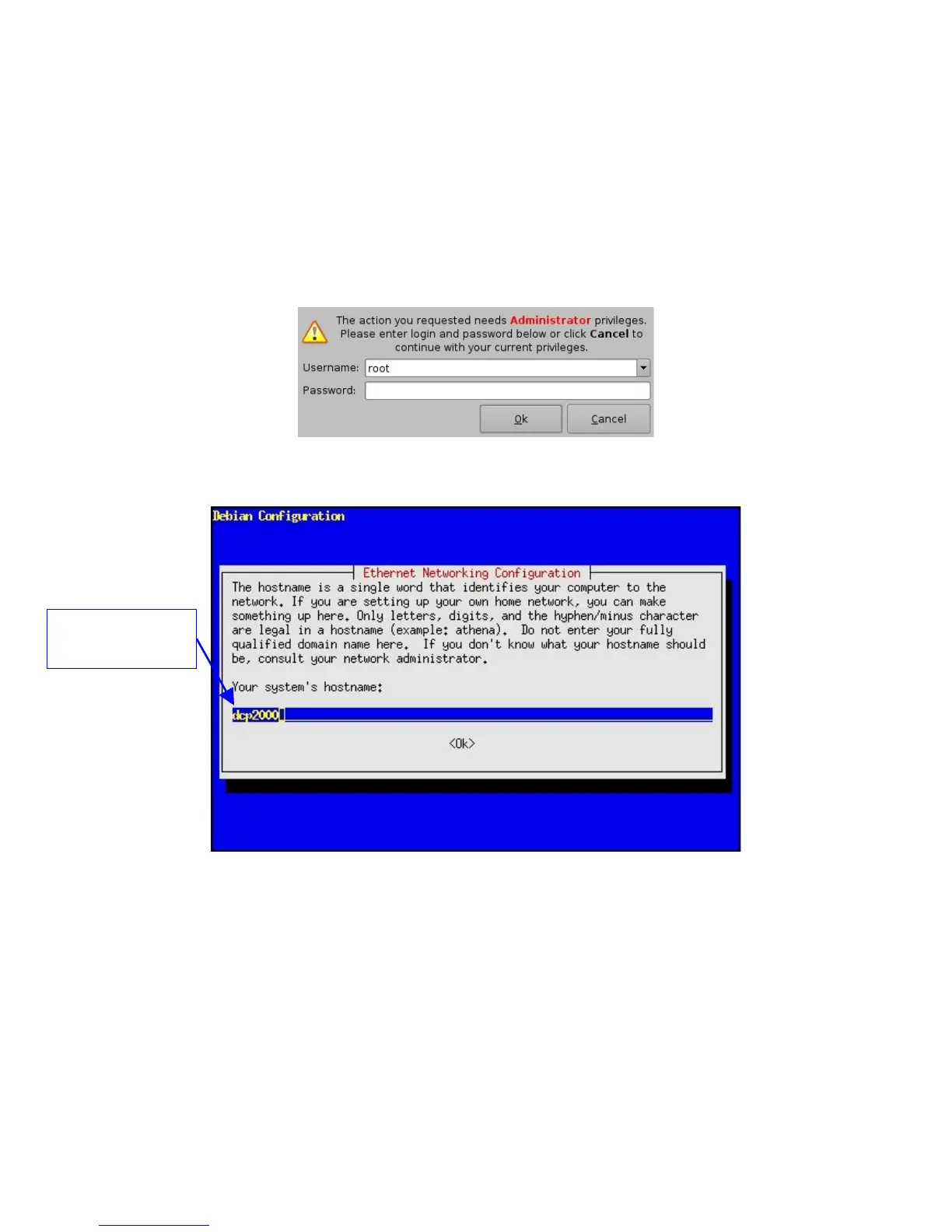
• A window will appear asking for a password as illustrated below:
Figure 17: Authentication Windows
• Follow the steps starting with the following windows:
Figure 18: ShowVault Network Configuration
• In the steps that follow use the arrow down or the "Tab" key to select “OK” and then
press "Enter".
• Enter the desired system’s hostname and select “OK”.
• Select “OK” for the system’s domain name.
• Select “Yes” for eth0.
• Select “No” for "Removable Device".
• Select “No” for automatically configure device with DHCP.
• Enter the desired IP address for eth0 and select “OK”.
_____________________________________________________________________________________
SHV.OM.001293.DRM Page 22 Version 1.3
Doremi Cinema LLC Confidential
System hostname -
"dcp2000" used as an
example



 To Next Page