Vigor3900 Series User’s Guide
125
H
H
o
o
w
w
t
t
o
o
e
e
d
d
i
i
t
t
a
a
L
L
A
A
N
N
p
p
r
r
o
o
f
f
i
i
l
l
e
e
f
f
o
o
r
r
D
D
H
H
C
C
P
P
v
v
6
6
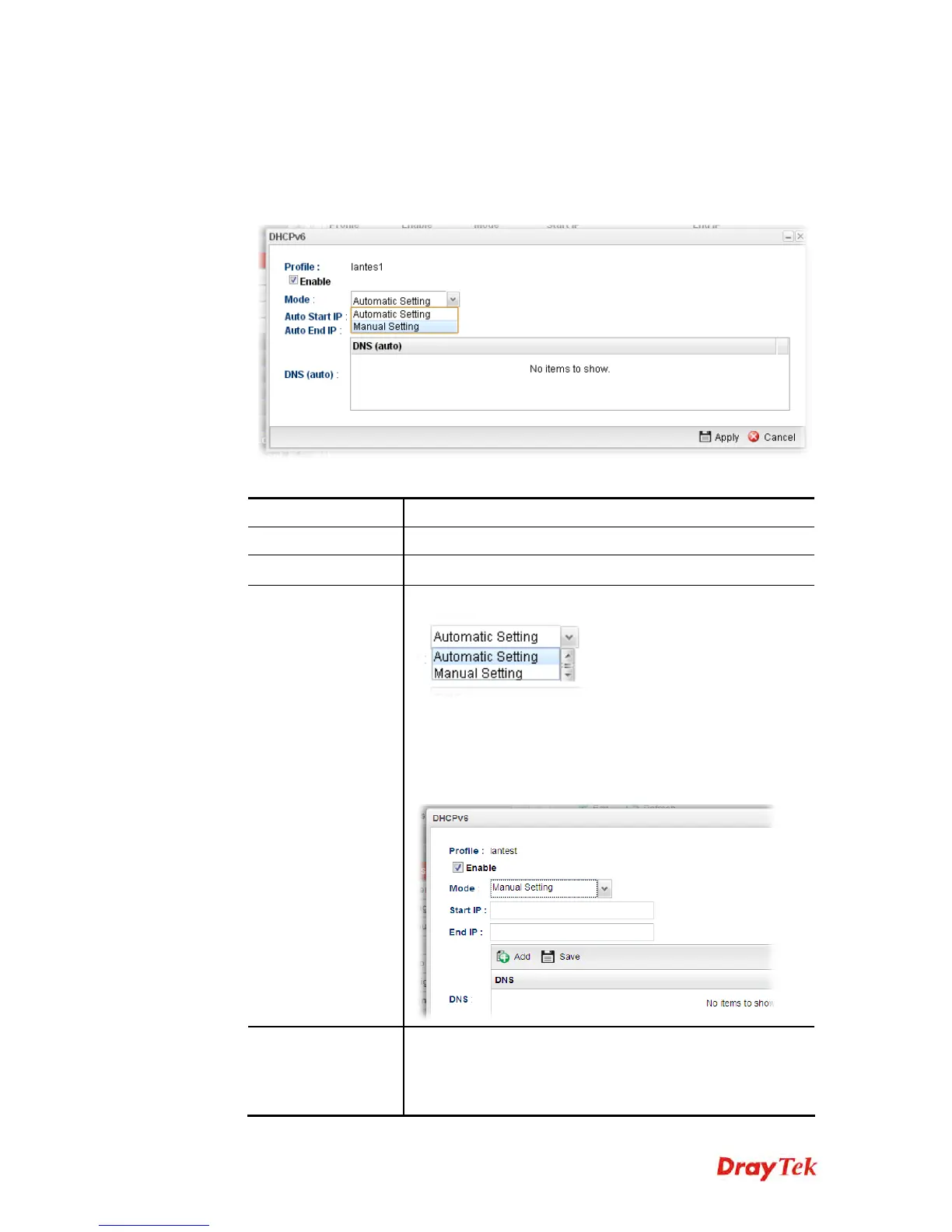
1. Open LAN>>General Setup and click the DHCPv6 tab.
2. Choose one of the LAN profiles by clicking on it and click the Edit button to open the
following dialog.
Available parameters are listed as follows:
Item Description
Profile
Display the name of the LAN profile.
Enable
Check this box to enable this profile.
Mode
Choose Automatic Setting or Manual Setting.
Automatic Setting – It is not necessary to configure Start
IP, End IP and DNS setting. The system will assign suitable
address automatically.
Manual Setting – You should type the Start IP address and
End IP address manually.
Start IP
Set the starting IP address of the IP address pool for DHCP
server. The format the IP address shall be similar to the
following example:
2000:0000:0000:0000:0000:0000:0000:10 or 2000::10.














 To Next Page