Vigor3900 Series User’s Guide
24
3
3
.
.
2
2
H
H
o
o
w
w
t
t
o
o
u
u
s
s
e
e
S
S
e
e
s
s
s
s
i
i
o
o
n
n
L
L
i
i
m
m
i
i
t
t
o
o
n
n
V
V
i
i
g
g
o
o
r
r
3
3
9
9
0
0
0
0
?
?
Session Limit feature enables Network Administrator to limit the number of sessions that a
LAN client can use. This will prevent the router's resources from being taken up by, for
example, P2P applications. We can also create customized Session Limit rule for each LAN
client. This note demonstrates how to set up Session Limit with Vigor3900.
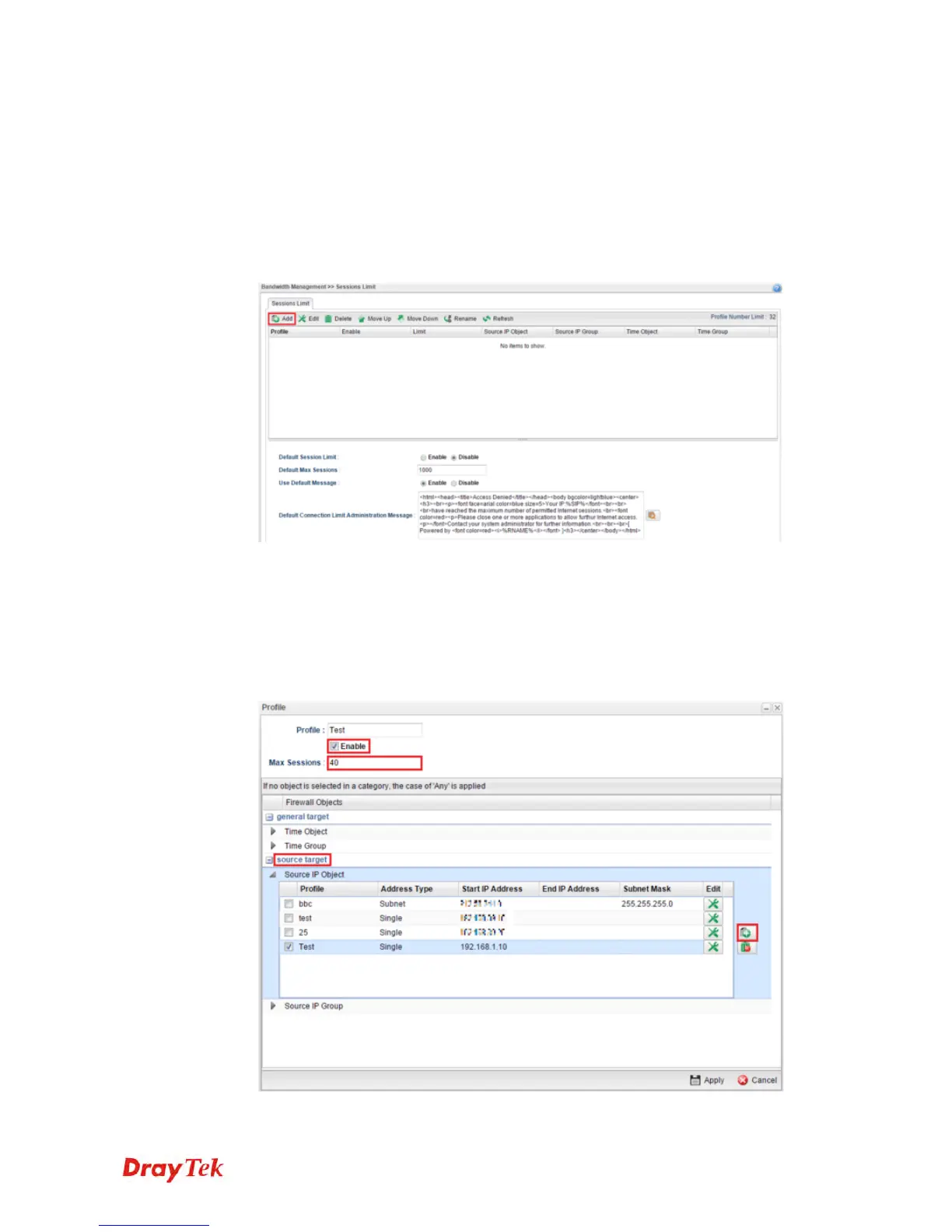
1. Go to Bandwidth Management >> Session Limit and click “Add” to create a new
rule.
2. Then set up the details for the new rule.
Enter the profile name.
Enable the profile.
Set the customized max session.
Go source target and click the “+” icon to set the rule for particular IP address.














 To Next Page