Vigor3900 Series User’s Guide
429
4
4
.
.
1
1
4
4
.
.
7
7
S
S
N
N
M
M
P
P
S
S
e
e
t
t
u
u
p
p
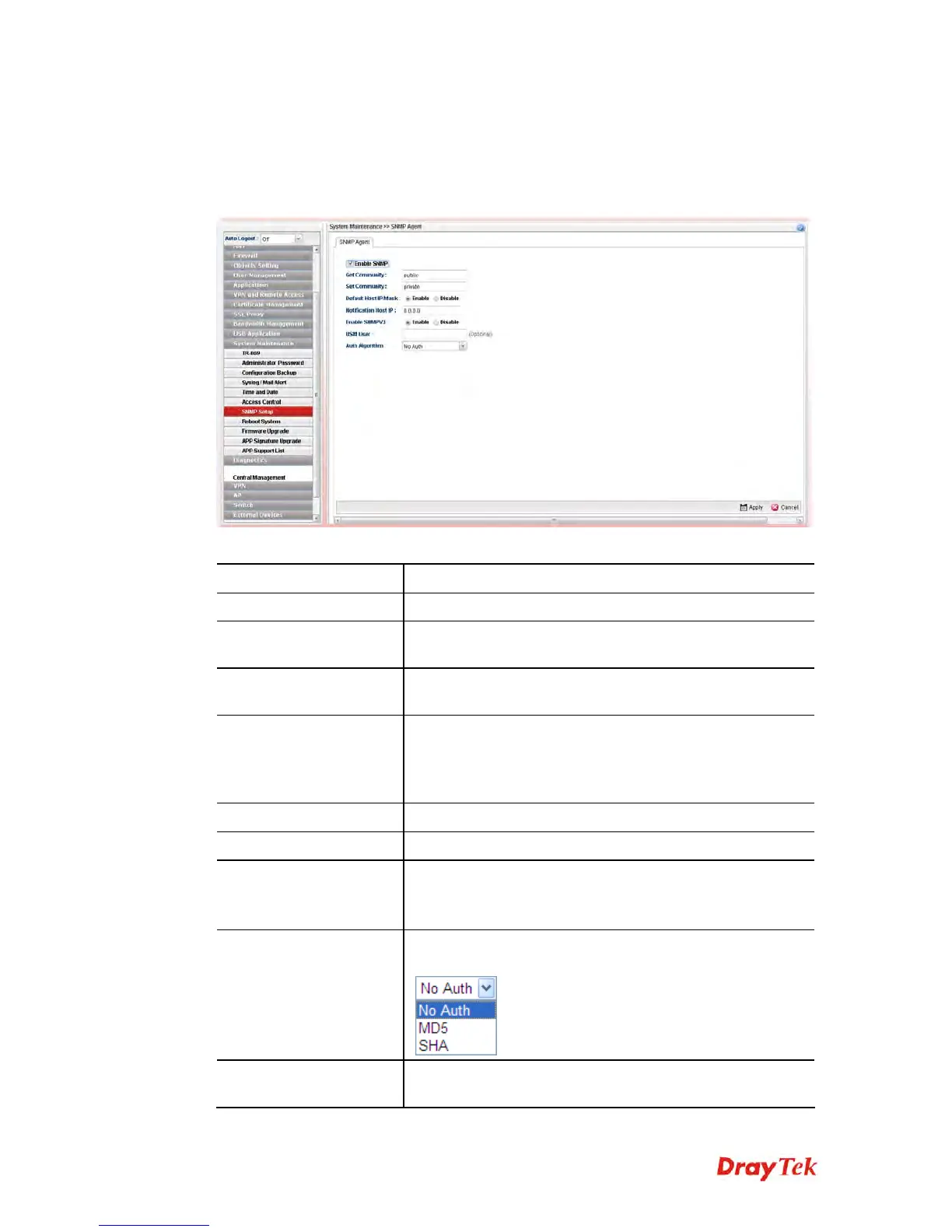
This page allows you to manage the settings for SNMP setup.
The SNMPv3 is more secure than SNMP through the encryption method (support AES and
DES) and authentication method (support MD5 and SHA) for the management needs.
Available parameters are listed as follows:
Item Description
Enable SNMP
Check the box to enable the function.
Get Community
Set the name for getting community by typing a proper
character. The default setting is public.
Set Community
Set community by typing a proper name. The default setting
is private.
Default Host IP/Mask
Click Enable to use the default IP and mask of the host as
the SNMP agent.
If you click Disable, you need to type the IP address and
choose the mask manually in related fields.
Notification Host IP
Type the IP address of the host for notification.
Enable SnmpV3
Click Enable to enable this function.
USM User
USM means user-based security mode.
Type a username which will be used for authentication. The
maximum length of the text is limited to 23 characters.
Auth Algorithm (Min.
Length:8)
Choose one of the encryption methods listed below as the
authentication algorithm.
Auth Password
Type a password for authentication. The maximum length of
the text is limited to 23 characters.














 To Next Page