Vigor3900 Series User’s Guide
21
C
C
h
h
a
a
p
p
t
t
e
e
r
r
3
3
:
:
A
A
p
p
p
p
l
l
i
i
c
c
a
a
t
t
i
i
o
o
n
n
a
a
n
n
d
d
T
T
u
u
t
t
o
o
r
r
i
i
a
a
l
l
3
3
.
.
1
1
H
H
o
o
w
w
t
t
o
o
u
u
s
s
e
e
B
B
a
a
n
n
d
d
w
w
i
i
d
d
t
t
h
h
L
L
i
i
m
m
i
i
t
t
o
o
n
n
V
V
i
i
g
g
o
o
r
r
3
3
9
9
0
0
0
0
?
?
Bandwidth Limit feature enables Network Administrator to limit the amount of data that a
LAN client can transfer over a period of time. This will prevent the router's resources from
being taken up by only a few LAN clients. We can also create customized Bandwidth Limit
rule for each LAN client. This note demonstrates how to set up Bandwidth Limit with
Vigor3900.
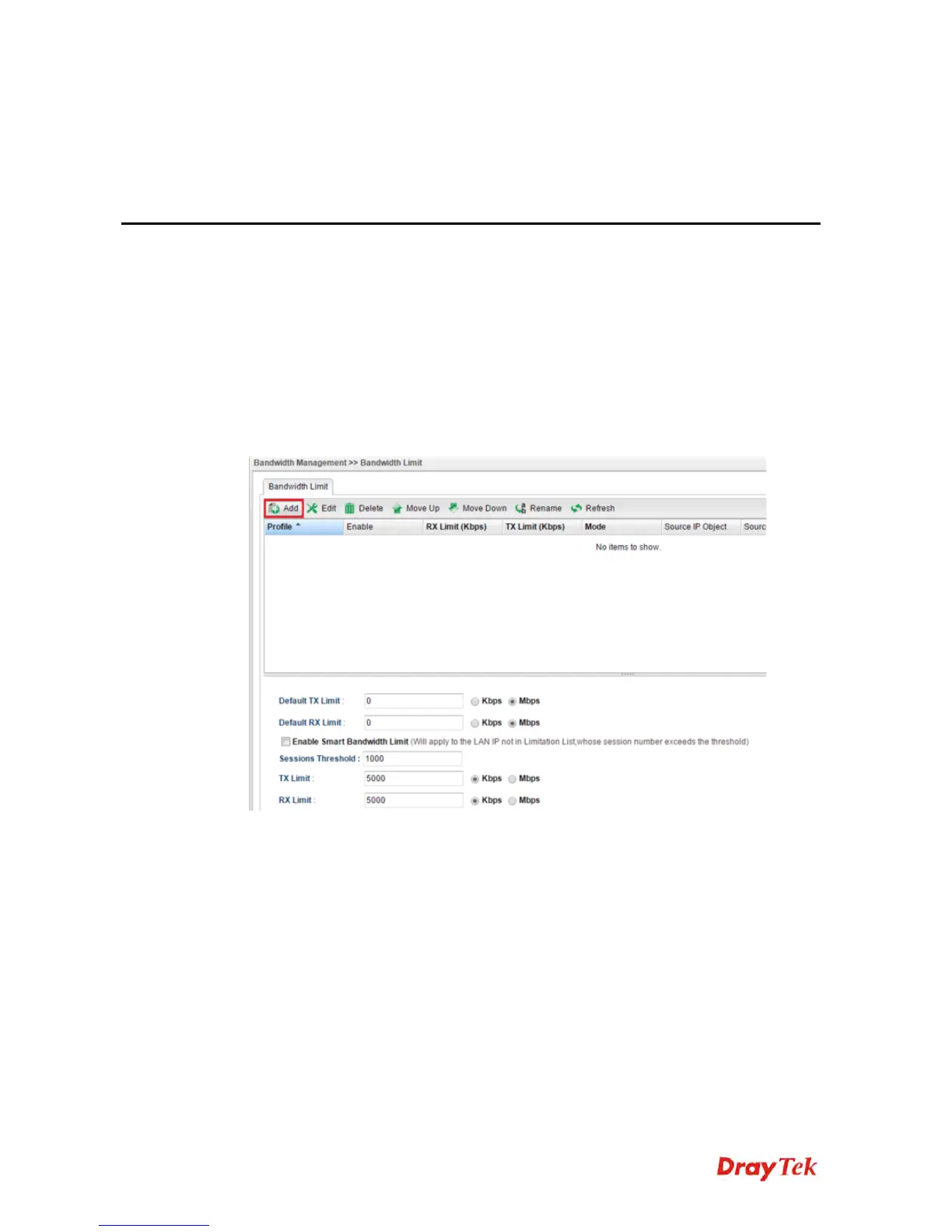
1. Go to Bandwidth Management >> Bandwidth Limit and click “Add” to start the
configuration.
2. Then set up the details for the new rule.














 To Next Page