Vigor3900 Series User’s Guide
53
3
3
.
.
9
9
H
H
o
o
w
w
t
t
o
o
S
S
e
e
t
t
u
u
p
p
5
5
0
0
W
W
A
A
N
N
s
s
o
o
n
n
V
V
i
i
g
g
o
o
r
r
3
3
9
9
0
0
0
0
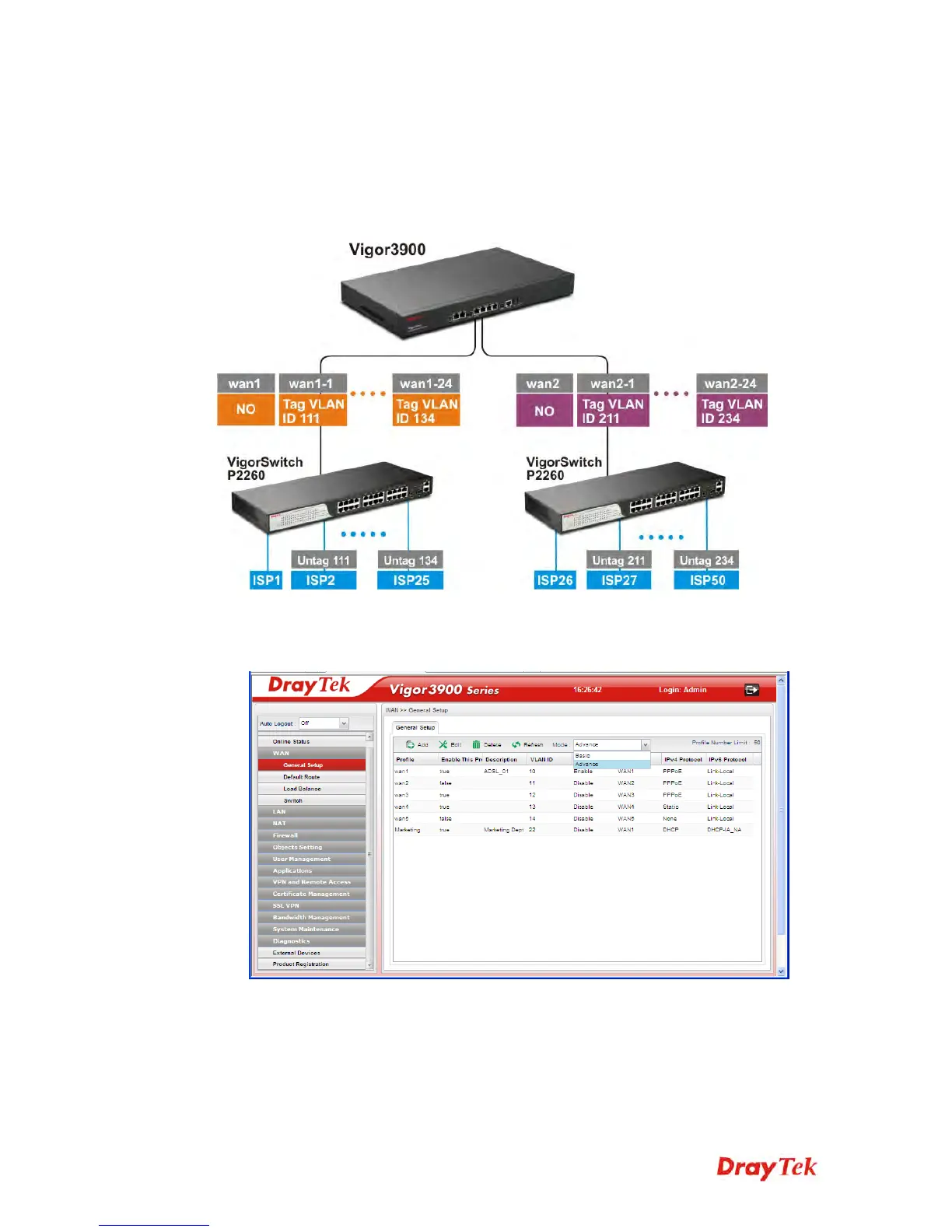
Vigor3900 has 5 physical WANs; however, it can be extended to 50 WANs at most by using
VLAN Tagging technology.
Below will show how to achieve 50 WANs setup by one Vigor3900 and two
VigorSwitch2260s. Refer to the following application illustration:
C
C
o
o
n
n
f
f
i
i
g
g
u
u
r
r
i
i
n
n
g
g
5
5
0
0
W
W
A
A
N
N
p
p
r
r
o
o
f
f
i
i
l
l
e
e
s
s
o
o
n
n
V
V
i
i
g
g
o
o
r
r
3
3
9
9
0
0
0
0
1. Change mode from Basic to Advance via WAN>>General Setup page.














 To Next Page