Vigor3900 Series User’s Guide
63
3
3
.
.
1
1
1
1
C
C
V
V
M
M
A
A
p
p
p
p
l
l
i
i
c
c
a
a
t
t
i
i
o
o
n
n
-
-
H
H
o
o
w
w
t
t
o
o
b
b
u
u
i
i
l
l
d
d
t
t
h
h
e
e
V
V
P
P
N
N
b
b
e
e
t
t
w
w
e
e
e
e
n
n
r
r
e
e
m
m
o
o
t
t
e
e
d
d
e
e
v
v
i
i
c
c
e
e
s
s
a
a
n
n
d
d
V
V
i
i
g
g
o
o
r
r
3
3
9
9
0
0
0
0
?
?
When a remote device is managed by Vigor3900 series, it is easy to build VPN between
these two devices.
1. Access into the web user interface of Vigor3900 series.
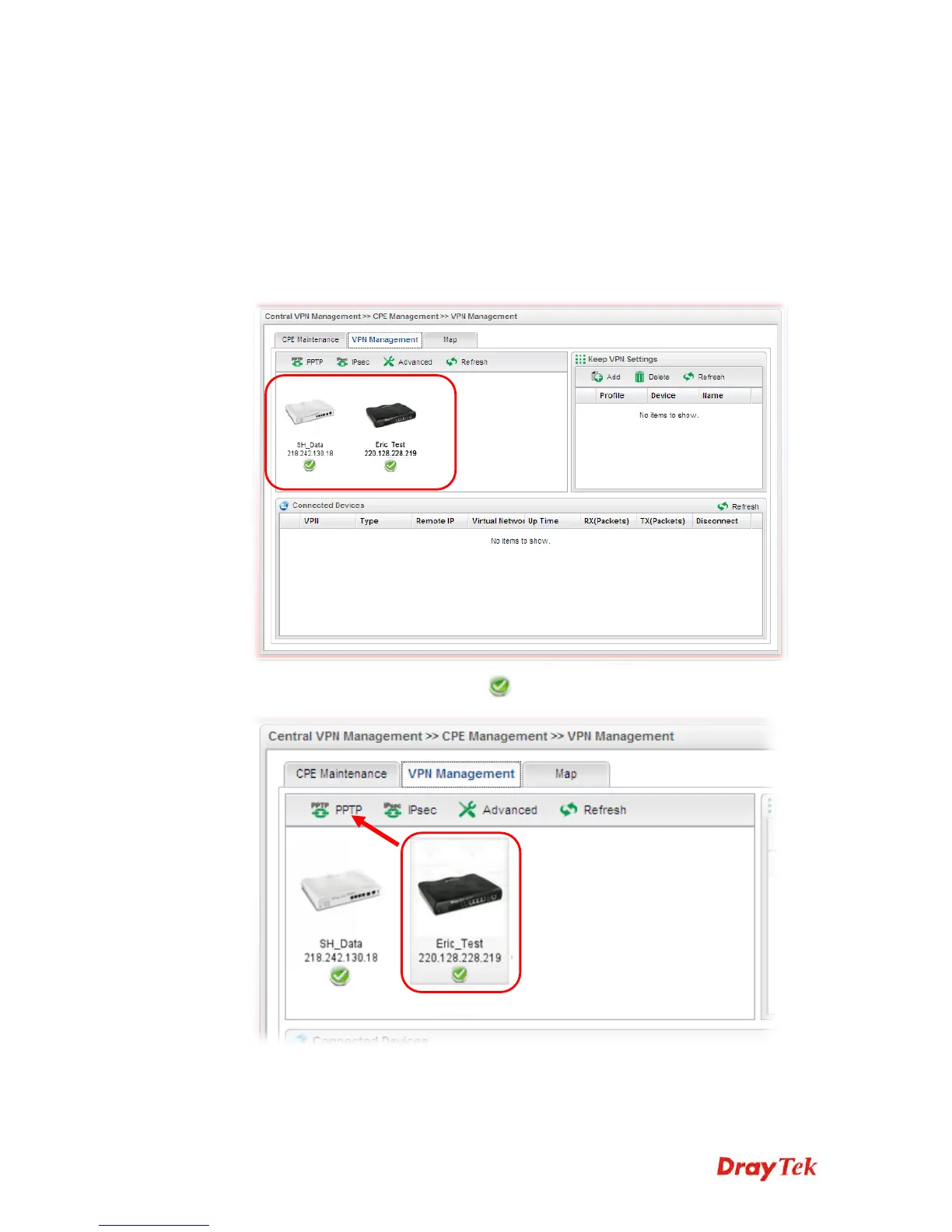
2. Open Central VPN Management>>CPE Management. The icons displayed on the
screen means the remote devices are ready for building VPN with Vigor3900.
3. Click the device icon (marked with
) and click the PPTP or IPsec button.














 To Next Page