Vigor3900 Series User’s Guide
28
3
3
.
.
4
4
H
H
o
o
w
w
t
t
o
o
u
u
s
s
e
e
P
P
o
o
r
r
t
t
R
R
e
e
d
d
i
i
r
r
e
e
c
c
t
t
i
i
o
o
n
n
o
o
n
n
V
V
i
i
g
g
o
o
r
r
3
3
9
9
0
0
0
0
?
?
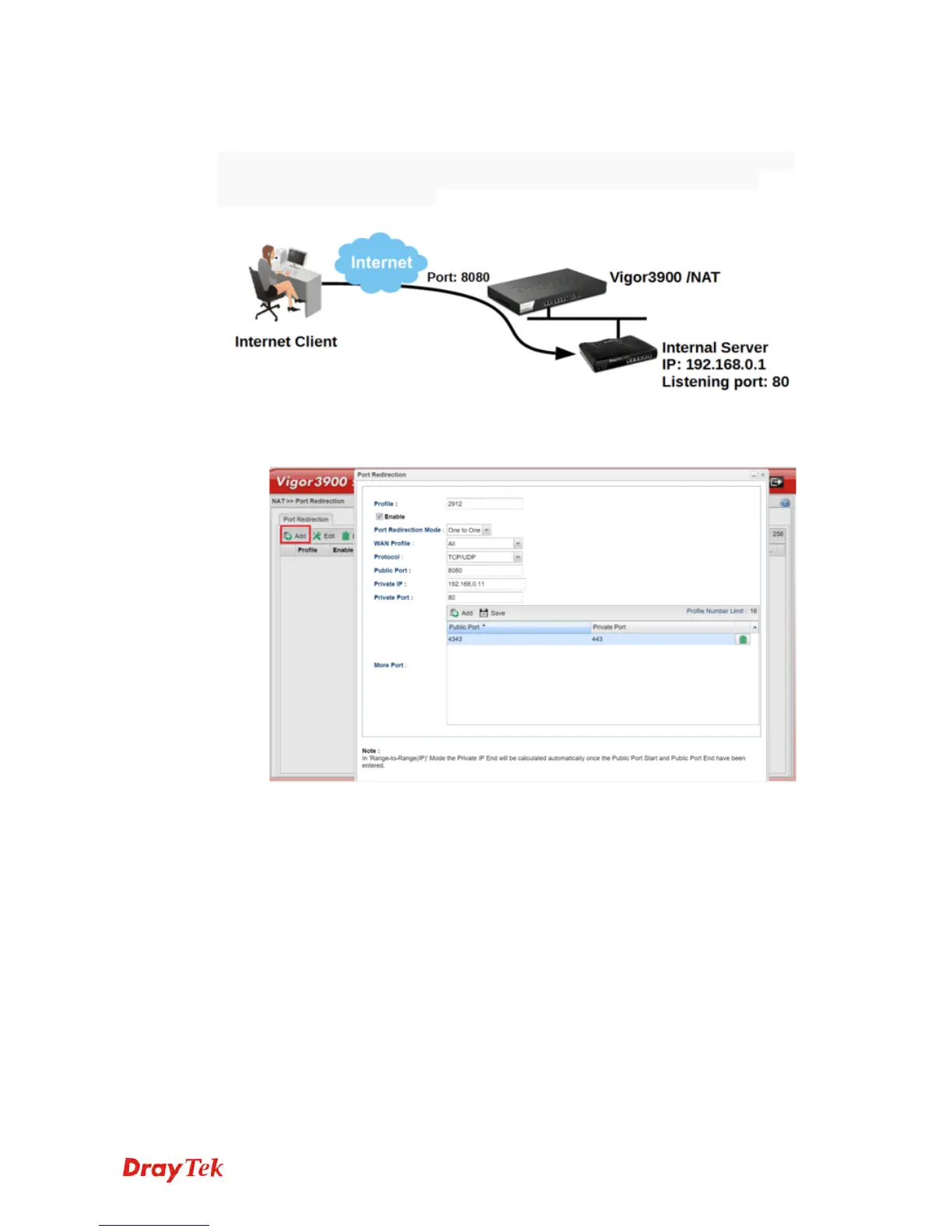
Port Redirection allows Internet clients to access server behind router on a certain port of
router's WAN IP. This note is going to demonstrate how to use this feature with the
following topology in Vigor3900.
1. Go to NAT >> Port Redirection, click Add to create a profile.
2. Edit the profile.
Give profile name and enable it.
Select “One to One” as Port Redirection Mode.
Select Protocol.
Enter Public Port as the port to which Internet client should connect.
Enter Private IP as the IP of the server on LAN.
Enter Private Port as the port to which the server is listening.
Click Add in More Port to allow more public ports to be redirected to other
private ports.














 To Next Page