Vigor3900 Series User’s Guide
496
Apply
Click it to save the configuration.
Cancel
Click it to exit the setting page without saving any change.
4
4
.
.
1
1
8
8
.
.
4
4
M
M
a
a
i
i
n
n
t
t
e
e
n
n
a
a
n
n
c
c
e
e
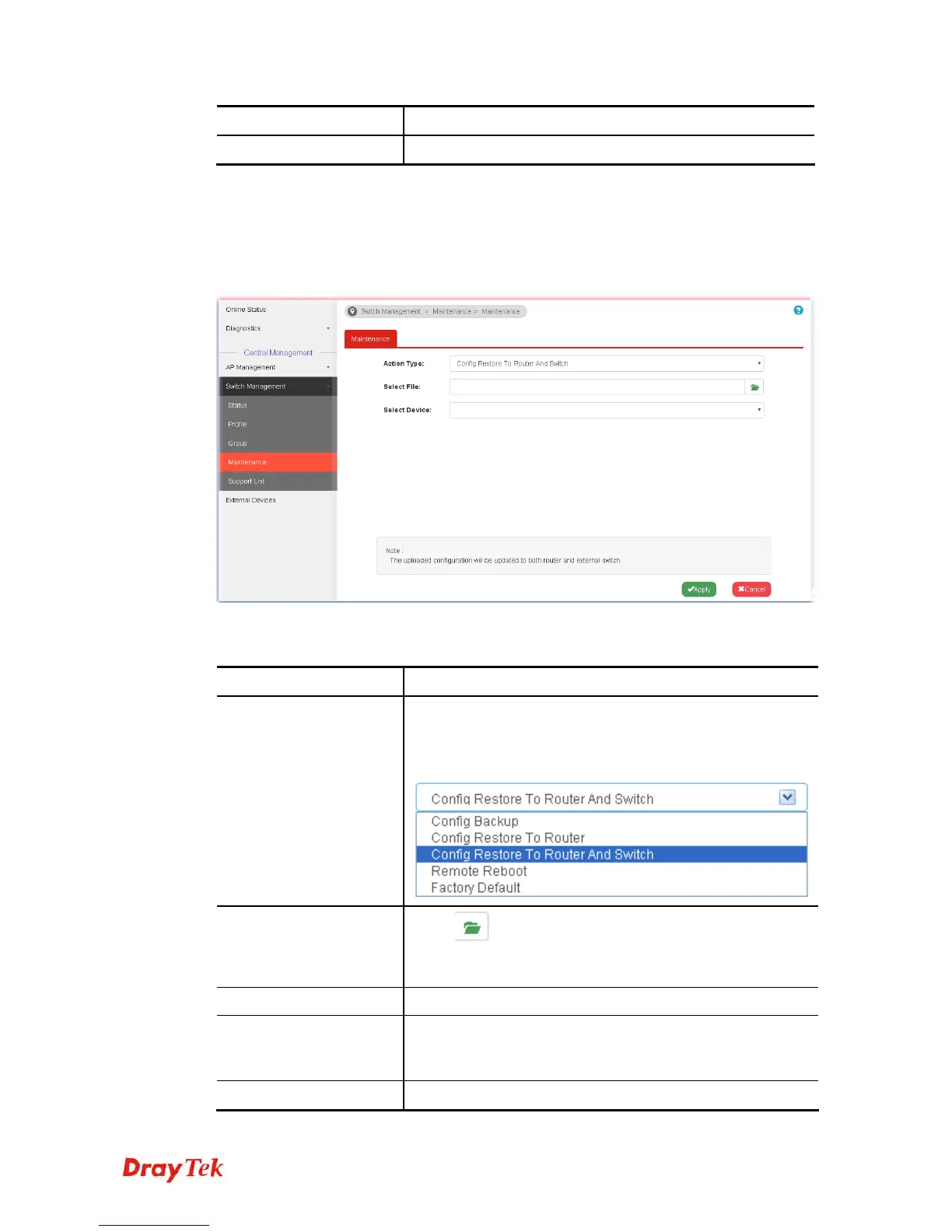
Such feature can execute configuration backup, restore of selected VigorSwitch device(s) or
reboot the VigorSwitch devices remotely or reset the VigorSwitch devices with factory
default settings, without accessing into the web user interface of VigorSwitch respectively. It
is convenient for system administrator to manage VigorSwitch devices.
Available settings are explained as follows:
Item Description
Action Type
Five actions including configuration backup, configuration
restore, configuration restore to router and switch, remote
reboot and factory reset are offered by Vigor3900 to perform
on VigorSwitch.
Select File
Click
to find out the required file. Such option is
available when Config Restore To Router / Config Restore
To Router And Switch is selected as Action Type.
Select Device
Choose the switch to be applied with the action
Apply
Click it to immediately perform the action (configuration
backup, configuration restore, remote reboot and factory
reset) on the device(s) listed in Selected Device.
Cancel
Click it to cancel the setting changes.














 To Next Page