Vigor3900 Series User’s Guide
146
H
H
o
o
w
w
t
t
o
o
a
a
d
d
d
d
a
a
P
P
o
o
o
o
l
l
p
p
r
r
o
o
f
f
i
i
l
l
e
e
f
f
o
o
r
r
B
B
a
a
c
c
k
k
u
u
p
p
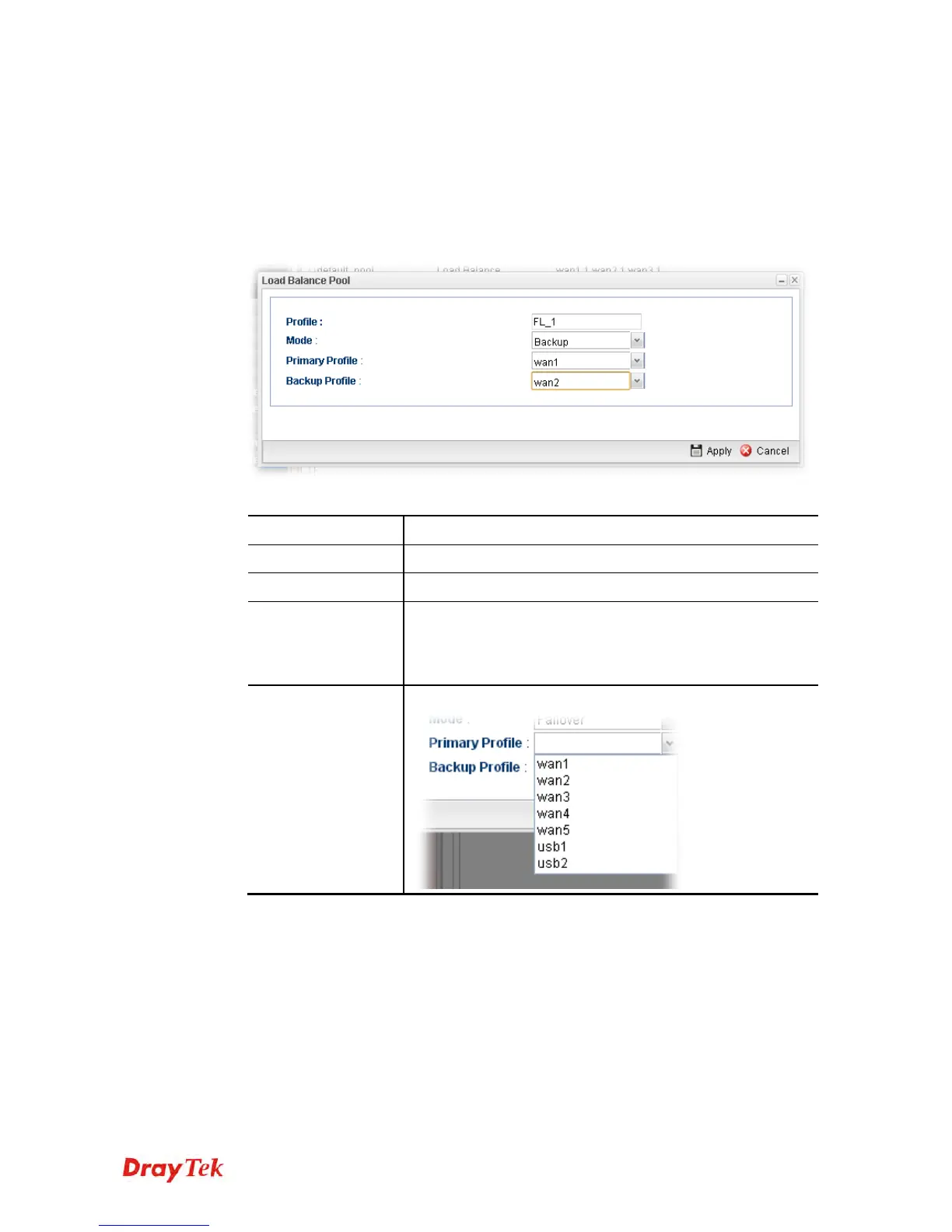
Such page allows you to set a backup profile which will be activated when the primary
profile is invalid by any reason.
1. Open Routing >>Load Balance Pool.
2. Simply click the Add button to open the following dialog. Type a name (e.g., FL_1) for
such profile. Choose Backup as the Mode selection.
Available parameters are listed as follows:
Item Description
Profile
Type the name of the profile.
Mode
Choose Backup as the Mode selection.
Primary Profile
In default, the system will apply Primary Profile. If Primary
Profile cannot be used any more, the Backup Profile will be
used instead. Use the drop down list to choose the one you
need.
Backup Profile
Use the drop down list to choose the one you need.
3. Click Apply. A new profile will be added on the page.














 To Next Page