Vigor3900 Series User’s Guide
152
Mask
Display the mask address used by such ARP profile.
H
H
o
o
w
w
t
t
o
o
a
a
d
d
d
d
a
a
n
n
e
e
w
w
P
P
r
r
o
o
x
x
y
y
A
A
R
R
P
P
p
p
r
r
o
o
f
f
i
i
l
l
e
e
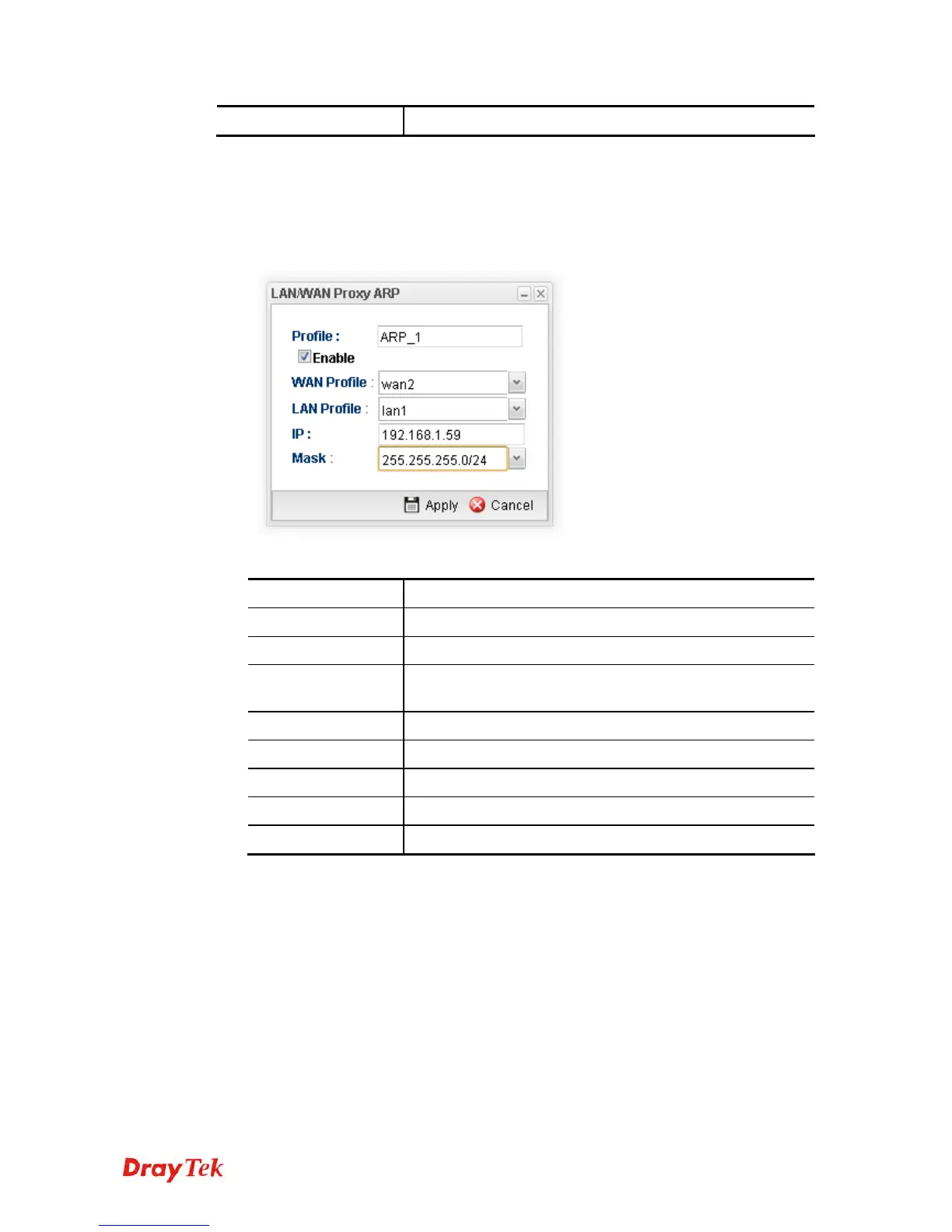
1. Open Routing>>Static Route and click the LAN/WAN Proxy ARP tab.
2. Click the Add button.
3. The following dialog will appear.
Available parameters are listed as follows:
Item Description
Profile
Type the name of the static route profile.
Enable
Check this box to enable such profile.
WAN Profile
Choose one of the WAN/USB profiles of the gateway for
such profile.
LAN Profile
Choose one of the LAN profiles for such profile.
IP
Type an IP address for such profile.
Mask
Use the drop down menu to specify mask address.
Apply
Click it to save and exit the dialog.
Cancel
Click it to exit the dialog without saving anything.
4. Enter all of the settings and click Apply. The new profile will be added on the screen.














 To Next Page