Vigor3900 Series User’s Guide
185
Delete
Remove the selected profile.
To delete a profile, simply select the one you want to delete
and click the Delete button.
Rename
Allow to modify the selected profile name.
Before using such function, there is one profile existed at
least.
Refresh
Renew current web page.
Profile
Display the name of the profile.
Enable
Display the status of the profile. False means disabled; True
means enabled.
Protocol
Display the protocol used for the entry.
WAN Profile
Display the WAN interface of this profile.
IP Alias
Display the selected WAN IP address.
Port
Display the port value used by WAN interface.
H
H
o
o
w
w
t
t
o
o
a
a
d
d
d
d
a
a
n
n
e
e
w
w
s
s
e
e
r
r
v
v
e
e
r
r
l
l
o
o
a
a
d
d
b
b
a
a
l
l
a
a
n
n
c
c
e
e
p
p
r
r
o
o
f
f
i
i
l
l
e
e
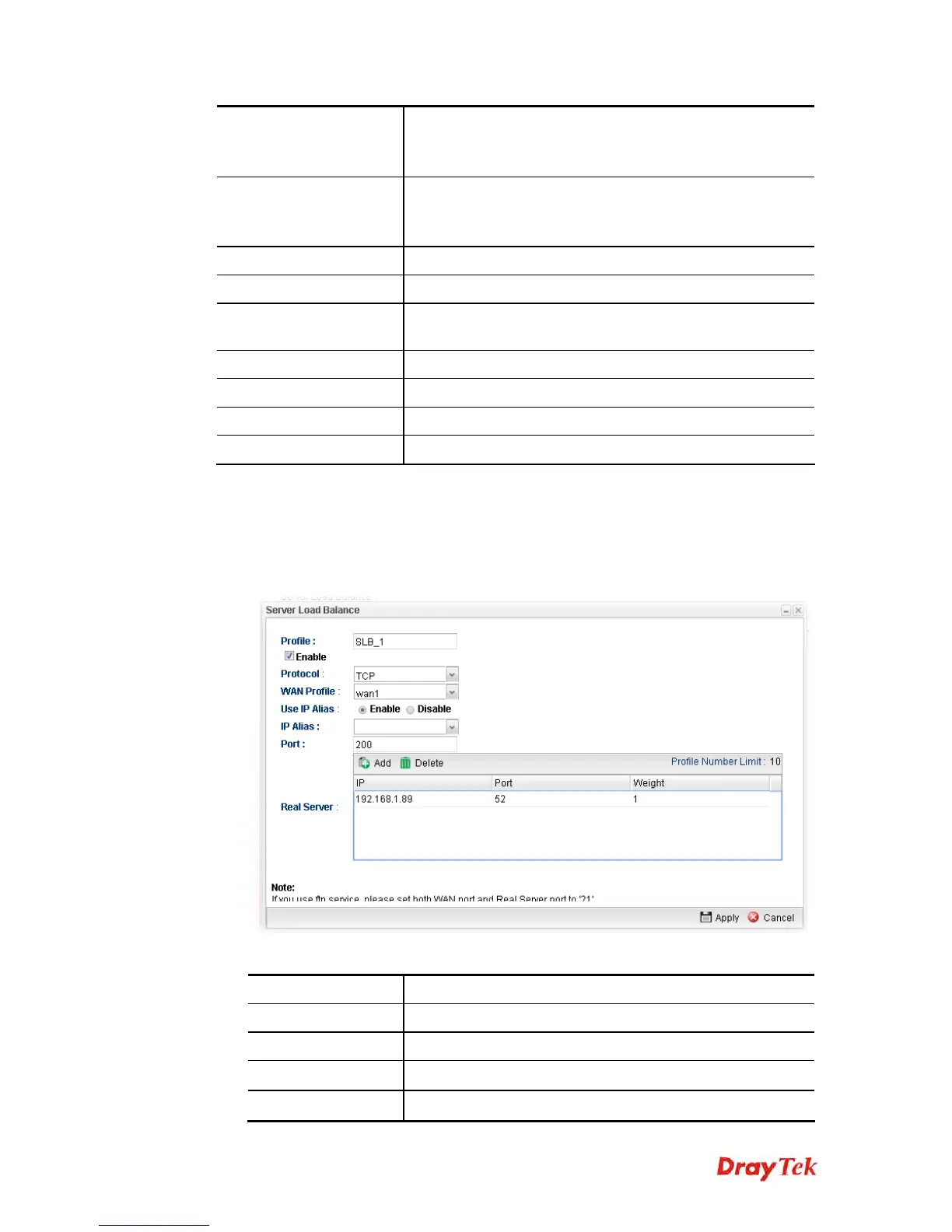
1. Open NAT>> Server Load Balance.
2. Simply click the Add button.
3. The following dialog will appear.
Available parameters are listed as follows:
Item Description
Profile
Type the name of the profile.
Enable
Check the box to enable this profile.
Protocol
Choose the protocol (TCP or UDP) used for the entry.
WAN Profile
Specify the WAN interface for such profile.














 To Next Page